One of the reasons I first bought a Pixel (it was the Pixel 2 XL) was because I wanted to be able to update to the next Android build before owners of other Android devices. Google's outstanding computational photography was also a reason. We are getting closer to the release of the first Android 17 Beta and for my Pixel 6 Pro, Android 17 will be the last system update for the phone. I really can't complain since my Pixel was supposed to lose support for Android updates after the release of Android 15.
Tuesday's Beta update is the last for the Android 16 QPR cycle
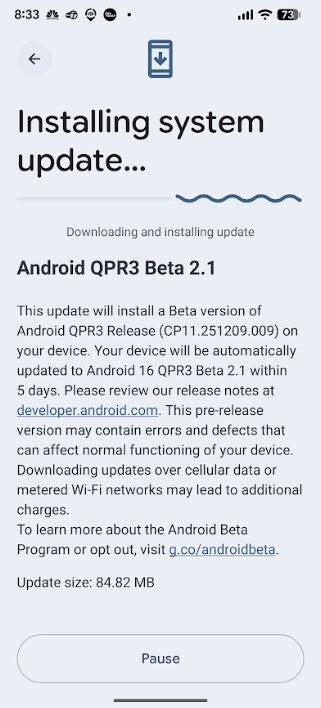
On Tuesday, Google released Android 16 QPR3 Beta 2.1, and Google says that the update is the last one for the cycle. That means if you want to receive the stable Android 16 QPR3 update, you have to opt out of the Beta program. This can be done now without forcing you to wipe your phone:
Opt out of Android 16 QPR3 Beta-tap on this link or go to google.com/android/beta. When you get to the website, press the "View your eligible devices" button. The next page shows you a photo of your device. Underneath it will be a button to press to opt out of the Beta program. You want out? Press it.
Ignore and do not apply the OTA update that says Downgrade on it. Google says that you must wait for the final public stable release of Android 16 QPR3(CP1A) that is coming soon. Once that update arrives, you can install it as long as you did not install Android 17.1 Beta first. The OTA message will have 'Downgrade' in the description. Opting out will not cause a data wipe as long as you don’t apply the downgrade OTA update.
If you opt out after your phone has been offered Android 17 Beta 1, do not install that update. Instead, follow the above directions to opt out of the Beta program, ignore/don’t apply the downgrade OTA update, and wait for the official Android 16 QPR3 public release.
Recommended For You
The main thing to remember is that if you are offered the OTA update with Downgrade on it, do not install it. If you are opting out of the Android Beta program, you can opt out now but you must wait for the final public stable release of Android 16 QPR3(CP1A) and install it. And if you are moving ahead with the Beta program in order to install Android 17 Beta 1, you don't do anything until that version has been dropped. When that happens, you can install it.
Before installing Android 17 Beta 1, back up your device. Also, t is important to know that major Beta releases like Android 17 are apt to reduce your battery life and could result in key apps and features not working for some time.
The Pixel's Android 16 QPR3 Beta cycle comes to an end with Tuesday's update. | Image credit-PhoneArena
If you stay in the Beta program, your next chance to escape without a data wipe in in June
Keep in mind that if you continue to stay in the Android Beta Program, you will be offered Android 17 Beta 1. Now here is something else for you to take into consideration. After this opportunity to leave the Beta program expires, the next chance to escape without a data wipe won't be until the Android 17 Beta program expires in June.
Pixel users: are you planning to install the Android 17 Beta?
23 Votes
Yes! I always install the Beta for the next Android build.
If you have been receiving the Android 16 QPR3 Beta updates, to install Android 16 QPR3 Beta 2.1, go to Settings > System > Software updates > System update.
After installing Android 16 QPR3 Beta 2.1, you need to go to Settings > System > Software updates > Google Play System update. This took me from the previous version dated November 2025 to the January 2026 version.
Alan, an ardent smartphone enthusiast and a veteran writer at PhoneArena since 2009, has witnessed and chronicled the transformative years of mobile technology. Owning iconic phones from the original iPhone to the iPhone 15 Pro Max, he has seen smartphones evolve into a global phenomenon. Beyond smartphones, Alan has covered the emergence of tablets, smartwatches, and smart speakers.
A discussion is a place, where people can voice their opinion, no matter if it
is positive, neutral or negative. However, when posting, one must stay true to the topic, and not just share some
random thoughts, which are not directly related to the matter.
Things that are NOT allowed:
Off-topic talk - you must stick to the subject of discussion
Offensive, hate speech - if you want to say something, say it politely
Spam/Advertisements - these posts are deleted
Multiple accounts - one person can have only one account
Impersonations and offensive nicknames - these accounts get banned
To help keep our community safe and free from spam, we apply temporary limits to newly created accounts:
New accounts created within the last 24 hours may experience restrictions on how frequently they can
post or comment.
These limits are in place as a precaution and will automatically lift.
Moderation is done by humans. We try to be as objective as possible and moderate with zero bias. If you think a
post should be moderated - please, report it.
Have a question about the rules or why you have been moderated/limited/banned? Please,
contact us.











![Another batch of Galaxy S26 series users in the US are getting a nice surprise today [UPDATED]](https://m-cdn.phonearena.com/images/article/183643-wide-two_350/Another-batch-of-Galaxy-S26-series-users-in-the-US-are-getting-a-nice-surprise-today-UPDATED.webp)
Things that are NOT allowed:
To help keep our community safe and free from spam, we apply temporary limits to newly created accounts: