One UI 9 release date, new features, supported devices
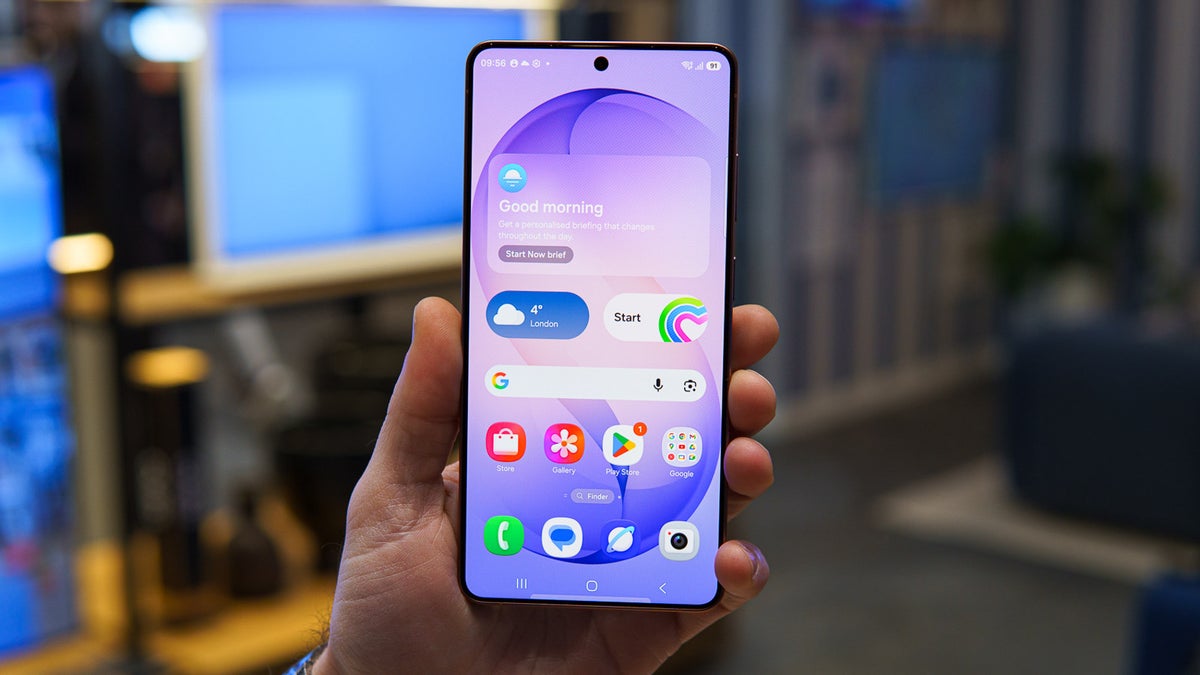
The Galaxy S26 Ultra running One UI 8.5 for illustrative purposes. | Image by PhoneArena
What's changing vs One UI 8:
- Gemini Intelligence takes on complex, multi-step tasks across more than 40 supported apps
- Gemini Notebook brings notes, files, and recordings into a single persistent workspace
- Smarter Now Nudge and more customizable Now Brief cards
- Everything Android 17 adds to the broader ecosystem carries into One UI 9
- Samsung Notes gains new creative tools
- A centralized AI Assistant Activity dashboard lets you review everything automations have done
- Enhanced Privacy Alerts surface potential security risks before they become problems
- Smart Switch now supports QR code transfers from iOS and covers more data types than before
- Quick Share and AirDrop now work together for seamless Galaxy-to-iPhone file sharing
Release timeline:
- One UI 9 stable arrived July 22, 2026, alongside the Galaxy Z Fold 8, Fold 8 Ultra, and Z Flip 8. The Galaxy S26 series stable rollout began September 16, 2026, with older flagships and the wider Galaxy portfolio to follow in phases.
One UI 9 release date
One UI 9 went stable on July 22, 2026, debuting on Samsung's foldable lineup – the Galaxy Z Fold 8, Galaxy Z Fold 8 Ultra, and Galaxy Z Flip 8. Built on Android 17, the update is reaching supported Galaxy devices in regional phases, with carrier and market timing varying.
| One UI version | Announcement |
|---|---|
| One UI 9 | July 22, 2026 |
| One UI 8 (Android 16) | July 9, 2025 |
| One UI 7 (Android 15) | April 10, 2025 |
Samsung confirmed in a newsroom post on September 16, 2026, that the stable One UI 9 update has begun rolling out to the Galaxy S26, S26 Plus, and S26 Ultra – arriving after roughly four months in beta.
Samsung has stated the rollout will continue to other Galaxy devices from there, with the Galaxy Z Fold 7 and Z Flip 7 next in line, followed by older flagships and eventually the broader Galaxy portfolio.
One UI 9 supported Galaxy phones
One UI 9 is expected to cover Galaxy S flagships going back to the Galaxy S23 series, foldables from the Z Flip 5 and Z Fold 5 generation onward, a selection of Galaxy A models, and tablets starting with the Tab S9.
| Galaxy device | Market release date | One UI 9 support |
|---|---|---|
| Galaxy S27 series | Expected early 2027 | Yes |
| Galaxy S26 series | February 26, 2026 | Yes |
| Galaxy S25 series | February 7, 2025 | Yes |
| Galaxy S24 series | January 31, 2024 | Yes |
| Galaxy S23 series | February 17, 2023 | Yes |
| Galaxy Z Fold 8, Z Flip 8 | August 7, 2026 | Yes |
| Galaxy Z Fold 7, Z Flip 7 | July 25, 2025 | Yes |
| Galaxy Z Fold 6, Z Flip 6 | July 24, 2024 | Yes |
| Galaxy Z Fold 5, Z Flip 5 | August 11, 2023 | Yes |
| Galaxy A: select models (A57, A56, A55, A37, A36, A35, A26, A25, A17, A16, A15, A07) | Various years | Yes |
| Galaxy Tab S12 series | Expected late 2026/early 2027 | Yes |
| Galaxy Tab S11 series | September 20, 2025 | Yes |
| Galaxy Tab S10 series | October 3, 2024 | Yes |
| Galaxy Tab S9 series | August 11, 2023 | Yes |
| Tab Active 5 and 5 Pro | January 2024 | Yes |
Not receiving One UI 9: the Galaxy S22 series, Galaxy S21 FE, Galaxy Z Fold 4, and older Galaxy A models.
One UI 9 design
One UI 9 brings a focused set of visual refinements alongside its feature additions.
The Now Bar picks up a darker background. When music is playing, the track name displays at the top of the bar with an animation running along its bottom edge. Samsung's widgets are also moving toward squarer corners, tightening visual consistency across the interface.
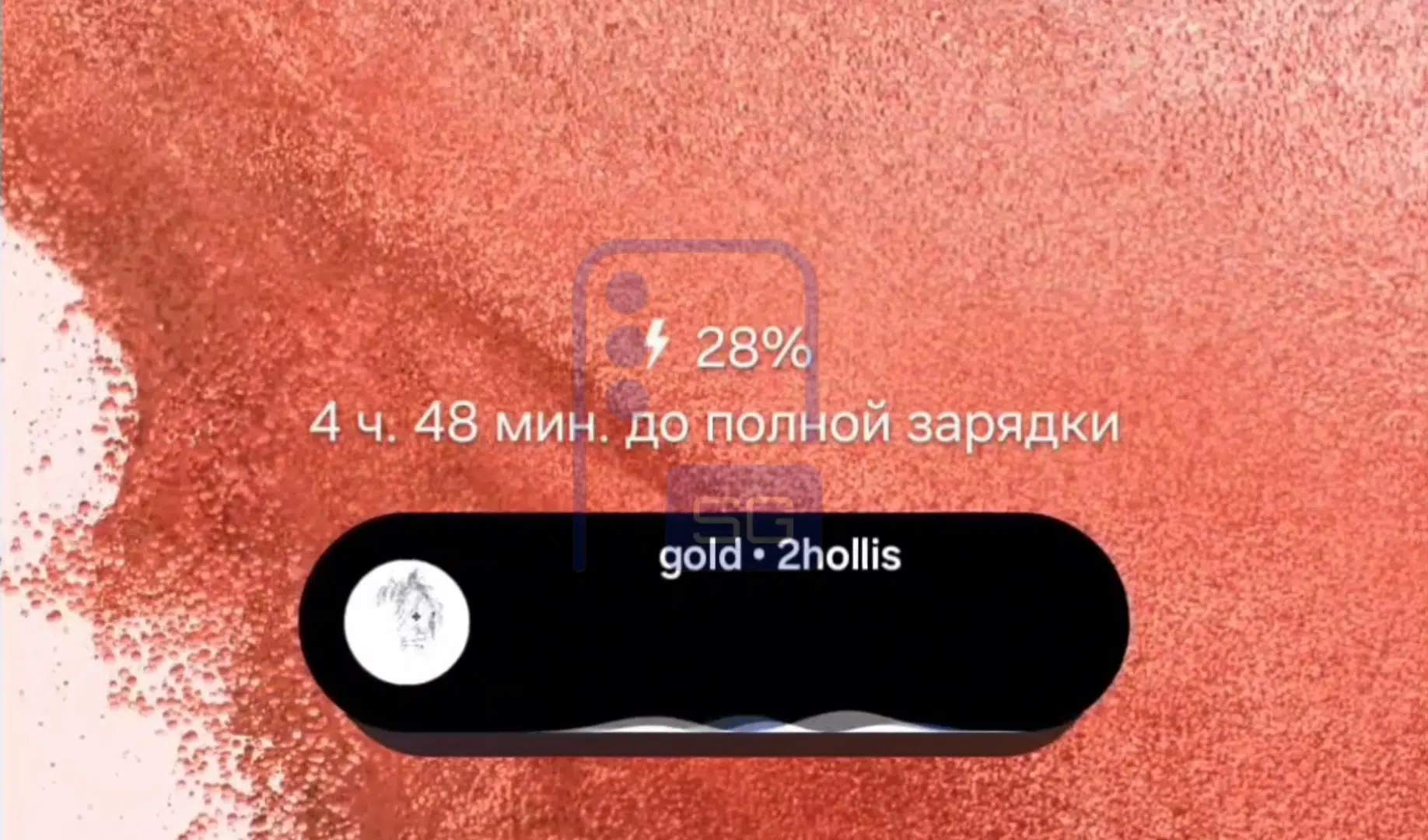
Leaked One UI 9 desgin tweak. | Image by SammyGuru
The Samsung Internet browser is also reportedly getting a visual refresh. You'll apparently get three layout options for the menu and navigation:
- Standard, the classic look
- Bottom, optimized for one-hand use
- Compact, featuring a new floating search bar
In the compact option, the floating search bar dynamically appears and disappears as you scroll up or down.
One UI 9 Compact Search Bar in Samsung Internet
— Mohammed Khatri (@Mohammed_K_2010) February 19, 2026
It has a fade in and fade out animation️
Disappears when you scroll down and re-appears when you scroll up️
Has a slight blur and offers a more immersive experience ️
Looks cute very cute #OneUI9 #Samsung pic.twitter.com/kq8hKneAXW
Beyond that expect a revised Quick Panel with independently adjustable Brightness, Sound, and Media player toggles, giving you more control over how it looks.
One UI 9 top features
Several features are confirmed for One UI 9, with some launching as foldable exclusives before reaching the broader lineup.
Gemini Intelligence
Describe what you need, optionally add screen or image context, and it takes care of the execution: looking up event tickets, locating a nearby restaurant, completing a reservation. Rather than requiring you to manage each step manually, Gemini Intelligence chains the actions together from a single prompt.
The feature requires a flagship-grade chip and launched in the US and Korea in English and Korean, with additional languages and markets expected through the remainder of the year.
Gemini Notebook
Gemini processes the combined content to produce audio overviews, meeting recaps, infographics, and reports. Drag-and-drop support in Split view makes adding material quick.
Now Brief and Now Nudge
AI Assistant Activity dashboard
A new centralized AI Assistant Activity dashboard consolidates everything AI automations have done on your behalf into a single feed. Instead of reconstructing activity across multiple apps, every action is visible in one place, with direct access to the relevant agent for context or behavioral adjustments.
Privacy Alerts
Enhanced Privacy Alerts proactively surface potential security risks – including apps making unnecessary background permission requests – before they have the opportunity to operate unnoticed.
Warranty and Care hub
A new Warranty and Care hub in Settings brings Samsung Care+ enrollment, warranty checks, device diagnostics, and repair requests together in one location, removing the need to navigate between separate apps or web pages.
My FanCam (foldable exclusive)
My FanCam automatically tracks a chosen subject and reframes footage into a selected aspect ratio, turning fast-moving scenes into polished, social-ready clips with minimal editing. Currently limited to foldable devices.
Cine LUT (Galaxy Z Fold 8 Ultra exclusive)
The Galaxy Z Fold 8 Ultra adds Cine LUT support, bringing cinematic color grading and tone control directly into the video recording workflow.
AI-native FlexWindow (Galaxy Z Flip 8 exclusive)
The Galaxy Z Flip 8's cover screen has been rebuilt from the ground up as an AI-native interface. Apps, contextual insights, and quick actions surface directly on the FlexWindow without requiring the phone to be opened.
Updates to Notes app, Contacts app
Samsung Notes gains a set of new creative tools in One UI 9, including decorative tapes and additional pen line styles. The Contacts app adds a direct shortcut into Creative Studio.
Security and accessibility
One UI 9 strengthens protection against suspicious apps – the system can now warn users, block installations outright, and flag apps for removal.
The power menu behavior has also changed: backing out of it now routes to the lock screen rather than returning to the previous app, effectively securing the device the moment the power menu is opened.
On accessibility, a new Text Spotlight feature makes on-screen reading more comfortable, and Mouse Key cursor speed is now adjustable for smoother pointer control.
Quick Share and AirDrop compatibility
Smart Switch improvements
iPhone users running iOS 26.6 or later can now scan a QR code on their current device to wirelessly transfer data to a new Galaxy phone without downloading any additional software. Smart Switch also expands its supported data types to include passwords and passkeys, call history, accessibility settings, and eSIM data.
Ask AI and Samsung Internet Browser updates (unconfirmed)
One UI 9 is rumored to be bringing a new Ask AI feature to the Samsung Internet Browser, with responses powered by Perplexity AI and shaped around whatever you're currently reading – surfacing relevant answers without pulling you away from the page.
Meanwhile, Ask AI is expected to extend into the split-screen browsing as well. Samsung's browser app is also reportedly working on a feature called "Enable Cross Device Resume," though details remain scarce for now.
Updates to the Gallery app (unconfirmed)
The Gallery app is rumored to gain a floating selection box that appears when you pick multiple images, holding up to 15 at once for easier batch review and action. This wasn't confirmed at Galaxy Unpacked 2026.
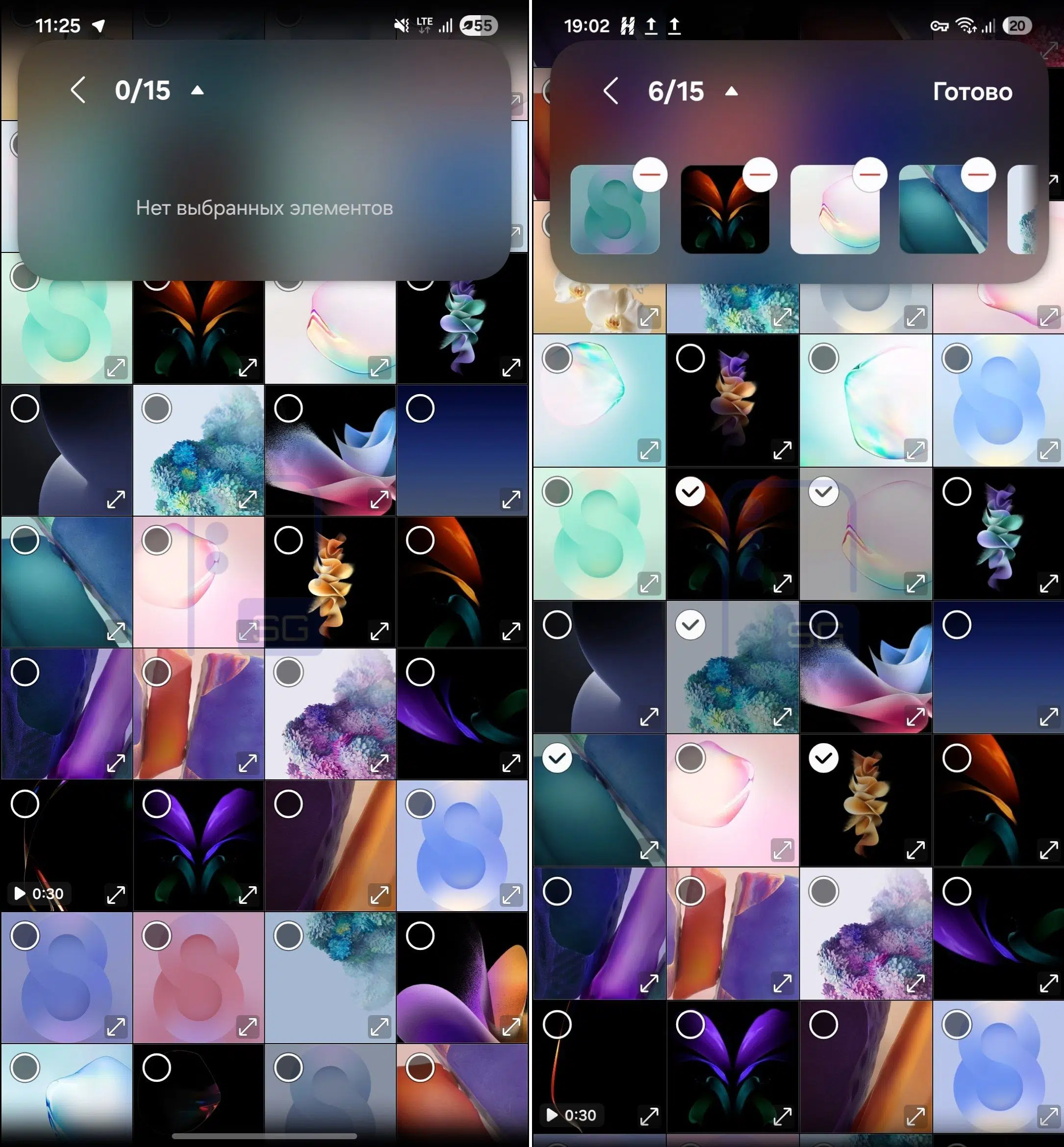
The new selection box in Gallery in One UI 9. | Image by SammyGuru
Bixby (unconfirmed)
Reportedly, Samsung is working on a new way to activate Bixby with One UI 9 – by bringing the phone closer to your face. Hints of this have apparently surfaced in early One UI builds. The feature would likely work alongside the existing wake-word method, not replace it.
One UI 9 beta releases
One UI 9 stable is now live on the Galaxy Z Fold 8, Fold 8 Ultra, Z Flip 8, and as of September 16, 2026, the Galaxy S26 series – starting with South Korea before expanding to other regions. The beta program for the S26 lineup ran across select regions including Germany, India, South Korea, Poland, the UK, and the US before the stable release landed.
A rollout schedule sourced from Samsung Thailand – the only market where Samsung has published specific dates – gives the clearest picture of what's coming and when:
- September 21 – Galaxy S26, S26 Plus, S26 Ultra (broader global rollout)
- September 28 – Galaxy S25, S25 Plus, S25 Ultra, Galaxy Z Fold 7, Z Flip 7
- October – Galaxy S23 FE
Worth noting: these dates are official but specific to Thailand's rollout. Most other regions are still carrying a "coming soon" label for the S26 series and no published timeline for older devices. The S24 series isn't included in the Thai schedule either, though it's broadly expected to follow in October alongside other devices not yet listed.
If you have a Galaxy S26, S26 Plus, or S26 Ultra and are still on a beta build, opting out of the beta program through the Samsung Members app will deliver the stable release over the air. For any device still awaiting the update, the Beta Program banner in the Samsung Members app home screen is where to look, assuming your device and region are supported.
Back up your device before installing any beta build. Pre-release software typically carries instability that makes it a poor fit for a daily driver.
Latest One UI news and rumors
![Another batch of Galaxy S26 series users in the US are getting a nice surprise today [UPDATED]](https://m-cdn.phonearena.com/images/article/183643-wide-two_350/Another-batch-of-Galaxy-S26-series-users-in-the-US-are-getting-a-nice-surprise-today-UPDATED.webp)


Popular stories


Latest News