You'll have more control over your Pixel's status bar before the end of the year
With the release of Android 17 QPR2, compatible Pixel devices will gain new features.
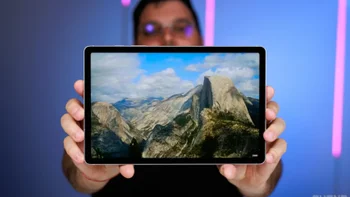
Pixel users will get control of their status bar when Android 17 QPR2 is released. | Image by Google
The status bar is at the top of your phone and uses icons to show which features are active along with battery life, signal strength, a Wi-Fi icon when connected to such a signal, the name of your carrier, and the type of cellular signal you are currently receiving (4G LTE, nationwide 5G, mid-band 5G). Sometimes the status bar gets too cluttered and you wish that you had more control over it.
The Pixel 6a and newer models will receive Android 17 QPR2 when released in December
Google recently released Android 17 QPR2 Beta 4, which is a beta release for the Android Quarterly Platform Release that is scheduled for a December launch. To be clear, Android 17 QPR1 will be released during the first half of next month (September). By the way, Android 17 QPR1 will be the last update for the Pixel 6 and Pixel 6 Pro, which means I better do some deep digging for more change inside my couch so I can pick up the Pixel 11 Pro XL!
One of the features that has appeared in Android 17 QPR2 Beta 4 will take care of that cluttered status bar. First World problems, right? The new beta release features status bar optimization support for both system icons and notification icons.
You can't change the way status bar icons look, but you can hide them
There aren't that many customization options, and you can't change the way the status bar icons look. What you can do is hide status bar icons for mute and vibrate modes when your Pixel is in one of these modes. There is some customization available for notification icons in the status bar. Users can choose to restrict notification icons in the status bar to priority notifications or to show the icon for all notifications.
You can find the options that you have to choose from by going to Settings > System > Status Bar. In addition, Pixel 8, Pixel 9, and Pixel 10 devices get an updated kernel with Android 17 QPR2 Beta 4. The kernel is the core component of the Android Operating System and acts like a bridge connecting the hardware belonging to your handset, and the applications you use.
The kernel controls the CPU, power usage, and system memory. It also contains the drivers that allow software to interact with your phone's screen, Bluetooth, camera, and Wi-Fi. When you open and close an app, the kernel makes sure that enough memory is allocated to the app.
If you love stories about Pixel phones, check out these articles:
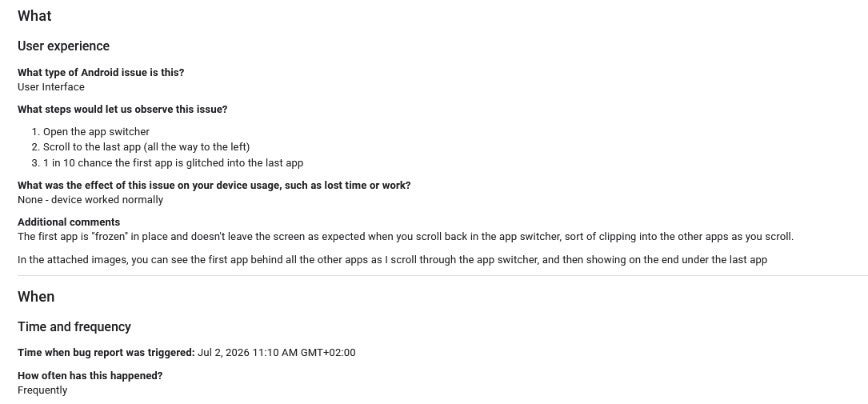
Issue Tracker complaint about a UI glitch in the app switcher. | Image by Google
Since the Pixel 6 line will not get Android 17 QPR2, the phones in that series will not receive the associated beta releases. Thus, the Android 17 QPR2 Beta 4 update will soon be available to these models: Pixel 6a, Pixel 7, Pixel 7 Pro, Pixel 7a, Pixel Fold, Pixel Tablet, Pixel 8, Pixel 8 Pro, Pixel 8a, Pixel 9, Pixel 9 Pro, Pixel 9a, Pixel 10, Pixel 10 Pro, Pixel 10 Pro XL, Pixel 10 Pro Fold, Pixel 10a, Pixel 11, Pixel 11 Pro, Pixel 11 Pro XL, and Pixel 11 Pro Fold.
The update exterminates the following bugs:
- Enabling the "render apps below the cutout area" developer setting caused a transparent status bar in the launcher after exiting fullscreen video playback.
- An issue with thermal management caused devices to overheat and reboot during use unexpectedly.
- Screen mirroring to external USB-C XR glasses was prevented by an issue.
- Gesture navigation stopped working when rendering apps below the display cutout.
- The 80% battery limit optimization caused longer than expected charge times during the final 2% threshold.
- A launcher UI issue where searching for apps in the app drawer failed to process text input.
- Using hardware buttons to invoke the power buttons removed a missing background blur effect behind the navigation bar.
- Instead of going to a connected Bluetooth speaker, phone call audio defaulted to the phone speaker instead.
- A bug that caused the first task card in the Recents app switcher to freeze and visually clip behind other apps during horizontal scrolling.
- An audio service resource lock triggered during screen recording that prevented microphone usage across apps and input methods like Gboard and Gemini until a device restart.
- A System UI visual inconsistency where turning off the screen from the home screen triggered a plain fade instead of the power-button screen-off animation.
- A low-contrast rendering issue in dark mode where the connected Wi-Fi settings cog icon was barely visible. (Issue #536320341)
- A blank screen appeared on connected smart glasses in 3D mode.
- A User Interface issue that prevented the notification bar from being pulled all the way down.
- An issue where WebGL applications could freeze or crash the browser process when combining shadow maps with vertex color attributes by resolving an invalid memory read in the PowerVR GPU driver's texture state processing.
- Low-light Face Unlock failures bypassed Fingerprint Unlock and forced PIN entry.
The Android 17 QPR2 beta has now reached "Platform Stability"
We should also point out that with this release, Android 17 QPR2 has reached Platform Stability. That means beta testers should experience a smoother performance running the beta on their devices.
If you are a member of the Android 17 QPR2 Beta program, you can see if the update has arrived by going to Settings > System > Software update. Follow the directions on the Update card.


Popular stories
Latest News
Things that are NOT allowed:
To help keep our community safe and free from spam, we apply temporary limits to newly created accounts: