Despite Google Messages being the default messaging app on most Android phones, many users still prefer using WhatsApp on the device to send and receive messages. The reason behind this is that it comes with many interesting features, like setting custom themes, sending disappearing messages, and much more. However, there are certain areas where Google Messages has an edge over WhatsApp, like the ability to schedule messages to send later. Fortunately, the feature is now also reported to be coming to the Meta-owned messaging app.
Message scheduling feature to soon land on WhatsApp
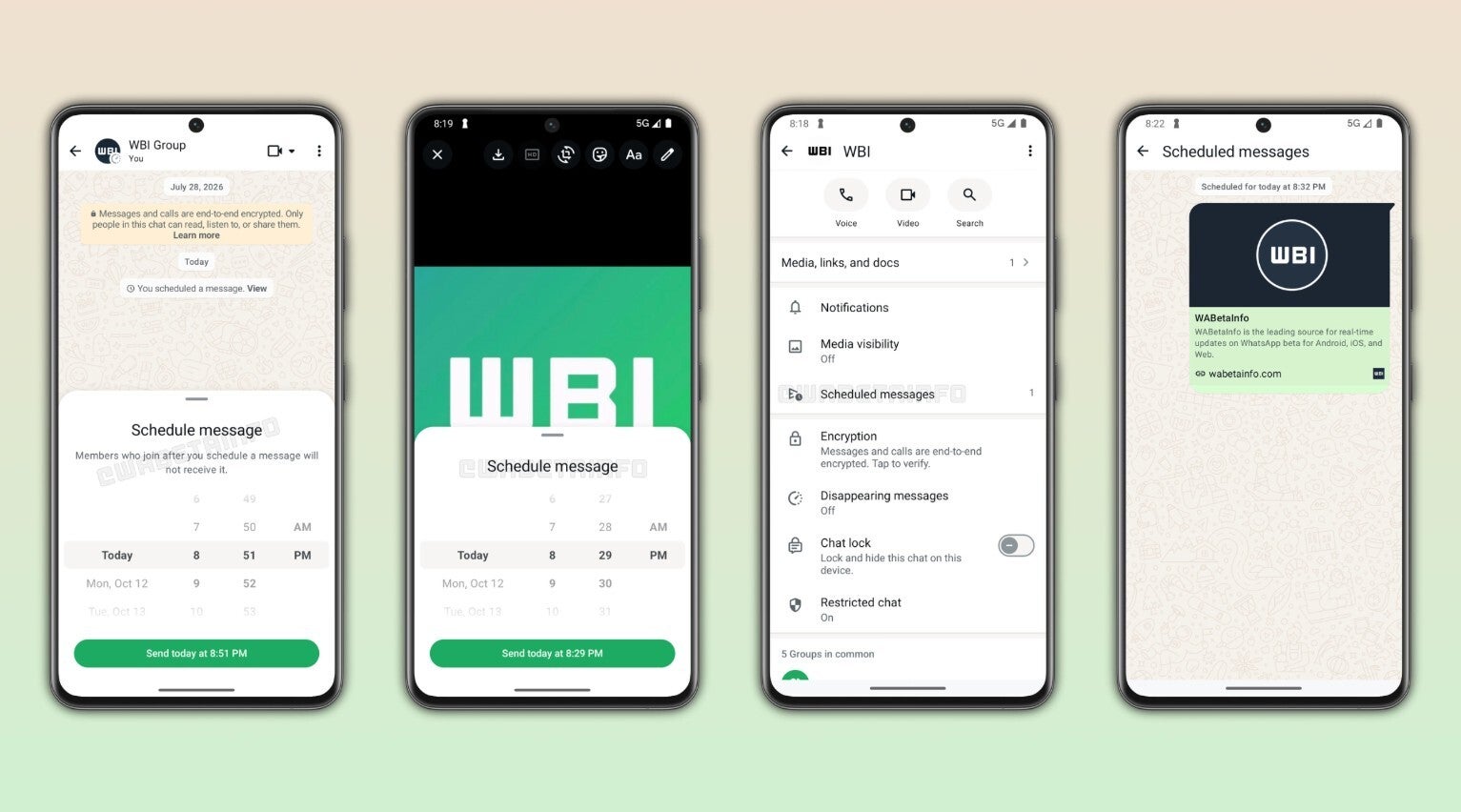
In a WhatsApp Android beta build 2.26.40.7, signs related to the new message scheduling feature have reportedly been spotted. You can clearly see in the image that the function works exactly like you would expect: you will be able to schedule a message to send later.
Schedule messaging feature in WhatsApp. | Image by WABetaInfo
Once you write down the message, you need to tap and hold the send button to activate the schedule message window. Then, you need to choose the time at which you want it to be sent automatically. It will be delivered at the configured time even if you are not connected to the internet at that particular time.
You can schedule normal text, links, and photos as well as videos, and the feature works in both individual and group chats. Furthermore, the capability is compatible with end-to-end encryption. It is also worth noting that the earliest you can schedule a message is 10 minutes from your current time and up to 2 weeks in advance.
Recommended For You
Which do you think is the best messaging app for Android?
4 Votes
It has been in development for a long time
It is certainly not that we are hearing about this scheduled messaging feature coming to WhatsApp for the first time. It has long been reported that the Meta-owned app is preparing a feature like this. Signs related to this were spotted in February this year in both the Android and iOS beta versions of WhatsApp.
However, at that time the function was not accessible to normal users. But now it is available in the WhatsApp beta build that is available for download on the Play Store. This almost confirms that it is most likely to roll out to the stable version of the app if any major problem in it is not reported by the users.
It's one of the most requested features
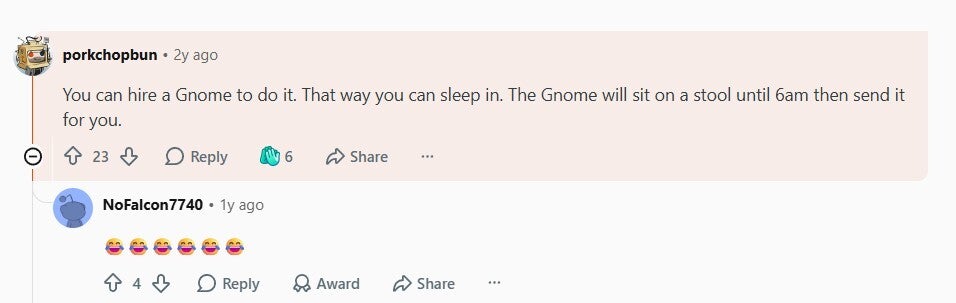
Without any doubt, message scheduling has always been one of the most requested features on WhatsApp. I was able to find plenty of posts and comments on community platforms like Reddit with users basically calling out Meta for not adding such a basic yet very important messaging feature to its app. One user commented under a relevant post that they really can't believe that this capability is available on Instagram but not on WhatsApp.
Comment about message scheduling missing in WhatsApp. | Image by Reddit
For reference, both WhatsApp and Instagram are owned by Meta, and the message scheduling capability is available on Instagram from 2025. Another user joked about the situation and mentioned that you can hire a Gnome that will do the job of sending the message at the time you want, while you continue doing your job.
Most messaging apps already have this feature
Despite WhatsApp being one of the main messaging apps on my Pixel 10, I use Google Messages to send birthday and anniversary messages to my friends because it supports the message scheduling feature. I simply write a message whenever I want and schedule it to be sent at 12:00 a.m. This way, the message gets sent even when I am sleeping comfortably on my bed.
That said, almost all the messaging apps you might have heard of already have this feature. Google Messages and Instagram are surely in the list, but in addition to them, Telegram, which is another major competitor of WhatsApp, has had this capability for a long time. So it's really high time that WhatsApp makes the message scheduling function available to its users as soon as possible.
Mint Mobile is celebrating its 10-year anniversary with a special offer on its six-month subscription plans. For a limited time, you can get your preferred tier (6GB, 17GB, 23GB or unlimited) for just $10/mo. That saves you between 50% and 71% on the carrier's mobile plans, making it way easier to recommend.
Aman Kumar is a news writer at PhoneArena covering Google Pixel phones, Android features, AI-powered smartphone tools, and mobile tech news. Before joining PhoneArena, he spent over five years writing about consumer technology for publications like MakeUseOf, How-To Geek, and Guiding Tech. His current daily drivers are the Pixel 10 and Samsung Galaxy S26 Plus, while his red iPhone SE (2nd gen) remains a personal favorite. Aman also appreciates bold smartphone experiments and still considers the Nokia N-Gage one of the industry’s most iconic designs.
A discussion is a place, where people can voice their opinion, no matter if it
is positive, neutral or negative. However, when posting, one must stay true to the topic, and not just share some
random thoughts, which are not directly related to the matter.
Things that are NOT allowed:
Off-topic talk - you must stick to the subject of discussion
Offensive, hate speech - if you want to say something, say it politely
Spam/Advertisements - these posts are deleted
Multiple accounts - one person can have only one account
Impersonations and offensive nicknames - these accounts get banned
To help keep our community safe and free from spam, we apply temporary limits to newly created accounts:
New accounts created within the last 24 hours may experience restrictions on how frequently they can
post or comment.
These limits are in place as a precaution and will automatically lift.
Moderation is done by humans. We try to be as objective as possible and moderate with zero bias. If you think a
post should be moderated - please, report it.
Have a question about the rules or why you have been moderated/limited/banned? Please,
contact us.













Things that are NOT allowed:
To help keep our community safe and free from spam, we apply temporary limits to newly created accounts: