In addition to the completely new Googlebook, I really like the new Pause point feature announced at the Android Show. Here's everything you need to know about this feature and why I think it can solve the rapidly growing problem of doomscrolling.
What exactly is Google's new Pause point feature?
Pause point is one of the many new features coming with Android 17. It's essentially a Digital Wellbeing upgrade designed to tackle doomscrolling.
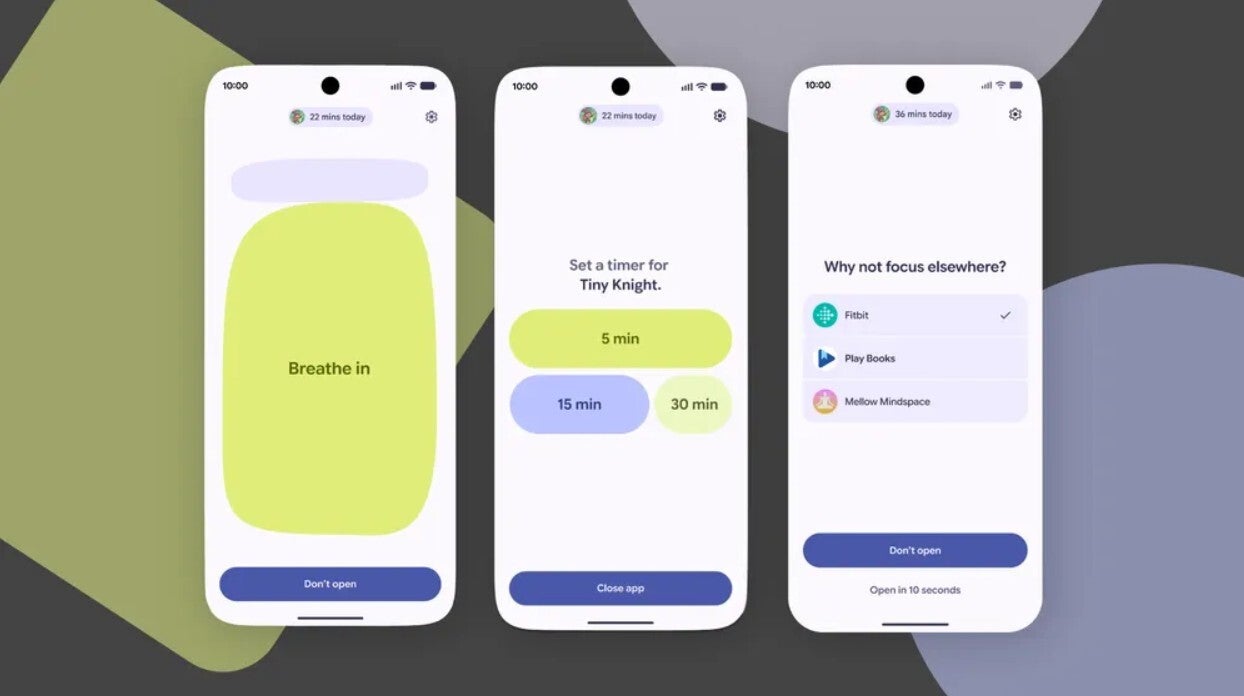
Here's how it will function: when you open a distracting app, for example, Instagram, Pause point will kick in before the app opens and give you a small task, like performing a breathing exercise. During this period, you can engage in self-talk to decide whether you really want to open Instagram or if you're just tapping its icon out of habit.
Why I think it'll be really beneficial
Google Pause point feature in action. | Image by Google
While I have yet to try out this new feature, it looks very promising on paper. I often find myself opening Instagram or YouTube Shorts without any reason and scrolling through reels and short videos for hours.
There have also been times when I spent the entire night using my phone to watch reels. This eventually resulted in me feeling sleepy the entire next day. I have personally realized that I often open apps like Instagram and Facebook just because I had developed a habit of tapping on their icons whenever I pick up my phone.
In such cases, having a 10-second delay can prove to be really beneficial, where I will realize that, "Okay, I really didn't want to open this app right now. Let's focus on something productive."
Do you think the Pause point feature would turn out to be useful?
14 Votes
My sleep schedule is messed up, and I really need it.
42.86%
I'll disable it within minutes.
14.29%
Nothing can stop my just one more reel addiction.
14.29%
I use other apps for stopping my addiction.
28.57%
How it's better than other apps
You will find plenty of apps on the Play Store that claim to fix your doomscrolling habit. The minimalist phone app, for instance, which I have used a lot on my Pixel 10. Most of these apps work on the app limit function, where you can configure the app to show a warning once you have used a distracting app for a certain time.
Recommended For You
Snoozing these warnings is as easy as setting them up. So there's a high possibility that you might end up ignoring a time limit warning and continuing to use the app. Some apps also take the extreme measure of completely locking you out, and I think that's not practical.
Pause point takes the middle ground here by showing a 10-second timer at the start. It also does give you the ability to configure for how long you want to use a certain application. You can also set it up to suggest different apps that you can use instead of the one you were currently trying to open.
For instance, it suggests opening a podcast app instead of Instagram or Facebook. What's even better is that you will have to restart your phone to disable the service. That means you won't be able to get rid of it with a snap decision; instead, you'll have time to decide whether you actually want to disable it or not.
It seems to solve a really concerning issue
The problem of doomscrolling is rapidly growing, and I feel ashamed to admit that I am affected by it as well. It not only wastes your valuable time, but medical research has found that it can lead to some serious conditions like depression, anxiety attacks, sadness, headaches, and more.
Because of this reason, I strongly believe that the Pause point feature will turn out to be really helpful. That said, it will become available with Android 17, whose stable build is expected to come out sometime in June this year.
Mint Mobile's 6-month plans now cost $10/mo
$10
/mo
$35
$25 off (71%)
Mint Mobile is celebrating its 10-year anniversary with a special offer on its six-month subscription plans. For a limited time, you can get your preferred tier (6GB, 17GB, 23GB or unlimited) for just $10/mo. That saves you between 50% and 71% on the carrier's mobile plans, making it way easier to recommend.
Aman Kumar is a news writer at PhoneArena covering Google Pixel phones, Android features, AI-powered smartphone tools, and mobile tech news. Before joining PhoneArena, he spent over five years writing about consumer technology for publications like MakeUseOf, How-To Geek, and Guiding Tech. His current daily drivers are the Pixel 10 and Samsung Galaxy S26 Plus, while his red iPhone SE (2nd gen) remains a personal favorite. Aman also appreciates bold smartphone experiments and still considers the Nokia N-Gage one of the industry’s most iconic designs.
A discussion is a place, where people can voice their opinion, no matter if it
is positive, neutral or negative. However, when posting, one must stay true to the topic, and not just share some
random thoughts, which are not directly related to the matter.
Things that are NOT allowed:
Off-topic talk - you must stick to the subject of discussion
Offensive, hate speech - if you want to say something, say it politely
Spam/Advertisements - these posts are deleted
Multiple accounts - one person can have only one account
Impersonations and offensive nicknames - these accounts get banned
To help keep our community safe and free from spam, we apply temporary limits to newly created accounts:
New accounts created within the last 24 hours may experience restrictions on how frequently they can
post or comment.
These limits are in place as a precaution and will automatically lift.
Moderation is done by humans. We try to be as objective as possible and moderate with zero bias. If you think a
post should be moderated - please, report it.
Have a question about the rules or why you have been moderated/limited/banned? Please,
contact us.













Things that are NOT allowed:
To help keep our community safe and free from spam, we apply temporary limits to newly created accounts: