
Samsung fixes its broken game discovery hub with a new update
The update aims to make game discovery personal and frustration-free.

The Mobile Gaming Hub on your Samsung Galaxy device is about to get a lot smarter. Samsung is rolling out a major update that brings a cleaner interface, personalized game recommendations, and built-in YouTube integration to help you find your next obsession.
Samsung tackles 'broken' game discovery with a fresh look
If you’ve ever felt like app stores are just a cluttered mess of ads and random titles, you aren’t alone. Samsung just announced a significant overhaul of its Mobile Gaming Hub, explicitly acknowledging that "mobile game discovery is broken." The company is trying to fix that by rolling out a redesigned interface globally to all Galaxy smartphones and tablets starting today.
But, the coolest addition might just be the direct YouTube integration. You will now see gameplay clips, walkthroughs, and creator content right inside the Hub, tailored to the games you play, so you don't have to switch apps.
Less searching, more playing
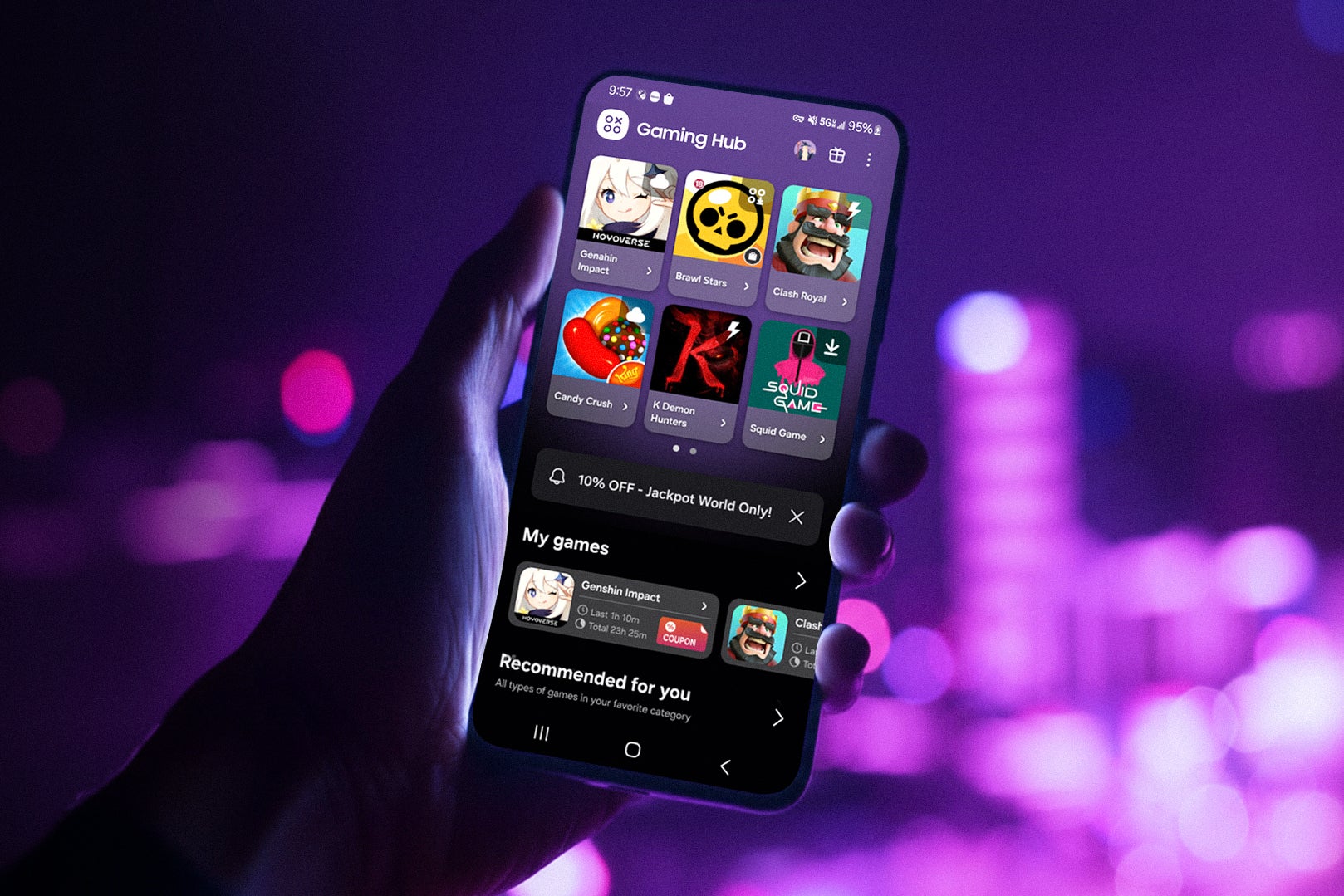
Samsung Mobile Gaming Hub. | Image credit — Samsung
This move is important because, for mobile gamers, finding a decent game can feel like searching for a needle in a haystack of "pay-to-win" clones. By curating content based on what you actually play, Samsung is trying to make its ecosystem stickier than Google Play or the App Store.
Who is this for? Basically, anyone with a Galaxy device who plays games, whether you are a casual puzzler or a competitive shooter fan. If the recommendations work as advertised, it saves you time. The inclusion of video content is also a direct shot at keeping you engaged on the platform. Rather than leaving to search for a guide on Google, Samsung wants to serve that answer up on a silver platter right next to the "Play" button.
Do you use the dedicated Game Launcher or Hub on your phone?
6 Votes
Yes, I use it every day to organize my games.
50%
Sometimes, mostly just to launch apps.
0%
No, I usually disable it or ignore it.
33.33%
I didn't even know my phone had one.
16.67%
Finally, a launcher that feels useful
Pre-installed game launchers can often feel like glorified billboards rather than useful tools. However, this update might actually change many gamers' minds. The idea of having relevant YouTube guides pop up right next to their games is a feature I think anyone, from a casual gamer to the hardcore ones, can appreciate.


Popular stories



Latest News

Things that are NOT allowed:
To help keep our community safe and free from spam, we apply temporary limits to newly created accounts: