After being in the beta phase for some time, the One UI 8.5 version is finally available for eligible devices. It already came pre-installed on all the Galaxy S26 series phones. The May security patch that has been rolled out to Galaxy devices following the latest One UI update has introduced a useful security feature for the Galaxy S25 FE.
Samsung Galaxy S25 FE gets fingerprint booster
The One UI 8.5 update comes with some noticeable changes over its predecessor. One of these is the introduction of the new option to improve the accuracy of fingerprints. Since the latest One UI update came pre-installed on the Galaxy S26 lineup, this feature has been available on all those phones since their launch.
It was expected that it would become available to older Galaxy phones that are compatible with the One UI update, but for some reason Samsung didn't roll it out with the software release. However, it has now been made available with the May security patch that has been released recently.
All that said, you might ask, what's the importance of a new fingerprint accuracy improving tool? You see, there are times when the registered fingerprint fails to work properly. It may happen after installing a new screen protector or when you get a small cut on the registered finger.
Recommended For You
In this case, your usual go-to approach is to delete the registered fingerprint and configure it again. To avoid such situations, some users also rely on workarounds like registering the same finger multiple times to improve its accuracy. While this trick usually works, you end up sacrificing the available fingerprint slots.
The answer to all this is the new fingerprint accuracy improvement feature. It'll ask you to scan your fingerprint ten times to improve its accuracy. This eventually reduces the chances of your phone not recognizing your fingerprint when it isn't perfectly clean or there's some other reason, like you installing a new screen guard.
How to use the new fingerprint accuracy improvement tool
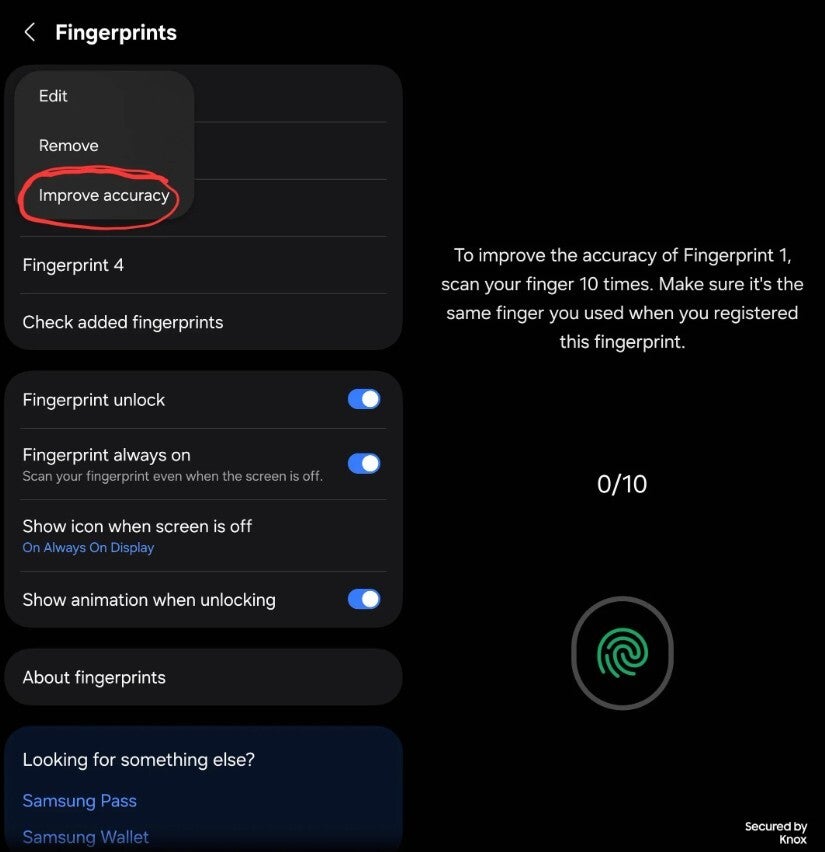
New Improve accuracy option in Fingerprint settings window. | Image by Redditor joel-d2709
Using the new fingerprint accuracy improvement feature is pretty straightforward. To begin with, open the fingerprint setting page on your Galaxy smartphone.
After that, tap one of the registered fingerprints whose accuracy you want to improve, and then select the "Improve accuracy" option that appears. You now need to scan the fingerprint ten times to improve its accuracy.
Do you want Samsung to reserve certain features for Ultra models?
42 Votes
Yes and that's why they cost more.
33.33%
Only hardware-related features should be reserved.
19.05%
Software features should roll out to all Galaxy users.
47.62%
It's still unavailable on the Galaxy S25 Ultra
If Samsung has to make a feature that is currently available only on its latest flagship phones available to older Galaxy models, you would expect that it will begin with last year's flagship device, but surprisingly that doesn't happen in this case. The fingerprint accuracy upgrade, for some reason, has become available on the Galaxy S25 FE first instead of the S25 Ultra.
However, it appears to be an intentional decision, as I can't really think of any reason why the tech giant might decide not to bring this upgrade to its last year's flagship. It's also a software-based capability, so it's also not a case where the fan edition model has some sort of hardware that's missing in the ultra variant. I'm pretty certain that this feature would soon become available on more Galaxy phones, including the S25 Ultra.
Other brands need to introduce something similar
I recently purchased the Galaxy S26 Plus and tried this new feature. Honestly, I really liked how accurate and fast it makes the unlock experience of the Galaxy phone using the fingerprint sensor.
Hopefully, other brands will introduce something similar very soon. I also own a Pixel 10, and I noticed that after installing a new screen guard, its fingerprint mechanism started acting up. Sometimes it took a couple of seconds to recognize my fingerprint, and other times it failed completely.
I eventually had to delete the registered fingerprint and configure it all over again. I most likely wouldn't have faced this problem if Pixel phones also had the capability to improve the fingerprint accuracy.
Trade in your old phone for cash at ecoATM!
Recycle your used phone and get instant cash. Find out how at ecoATM!
Aman Kumar is a news writer at PhoneArena covering Google Pixel phones, Android features, AI-powered smartphone tools, and mobile tech news. Before joining PhoneArena, he spent over five years writing about consumer technology for publications like MakeUseOf, How-To Geek, and Guiding Tech. His current daily drivers are the Pixel 10 and Samsung Galaxy S26 Plus, while his red iPhone SE (2nd gen) remains a personal favorite. Aman also appreciates bold smartphone experiments and still considers the Nokia N-Gage one of the industry’s most iconic designs.
A discussion is a place, where people can voice their opinion, no matter if it
is positive, neutral or negative. However, when posting, one must stay true to the topic, and not just share some
random thoughts, which are not directly related to the matter.
Things that are NOT allowed:
Off-topic talk - you must stick to the subject of discussion
Offensive, hate speech - if you want to say something, say it politely
Spam/Advertisements - these posts are deleted
Multiple accounts - one person can have only one account
Impersonations and offensive nicknames - these accounts get banned
To help keep our community safe and free from spam, we apply temporary limits to newly created accounts:
New accounts created within the last 24 hours may experience restrictions on how frequently they can
post or comment.
These limits are in place as a precaution and will automatically lift.
Moderation is done by humans. We try to be as objective as possible and moderate with zero bias. If you think a
post should be moderated - please, report it.
Have a question about the rules or why you have been moderated/limited/banned? Please,
contact us.










Things that are NOT allowed:
To help keep our community safe and free from spam, we apply temporary limits to newly created accounts: