New Device Care feature allows Galaxy users to block apps spewing out excessive ad notifications
New Device Care feature to help those tired of seeing the screen on their Galaxy device overrun by excessive ad notifications.

Samsung Device Care's new feature blocks apps pushing out excessive ad notifications | Image by PhoneArena
Don't you just hate apps that push out too many ad notifications? Samsung has a solution that you'll be eager to put into use, and it revolves around the Device Care app that has been updated to version 13.8.80.7. The key new feature allows users to block apps that make your head spin by disseminating too many ad notifications.
The new version of the Samsung Device Care system app has a new feature you might want
Device Care is a built-in system app that you might call an optimization suite that is designed to improve aspects of a Galaxy phone such as battery life, performance, and security. Besides Galaxy handsets, the app performs the same functions on Galaxy tablets and PCs.
Unlike your typical app, which you find by looking for the icon in the app drawer, Samsung Device Care can be accessed through the Settings menu. Go to Settings > Device Care (or Battery and device care on older models). Or, you can use the search bar in Settings and type in "Device Care."
Once opened, you'll see tools for:
- Battery.
- Storage.
- Memory (RAM).
- Device protection.
- App optimization.
Toggle on the Excessive Ad Blocking feature to block apps that push out excessive ad notifications
The new version of Device Care features a toggle that will allow you to enable a feature known as Excessive Ad Blocking that detects and blocks third-party apps that hit users with "frequent advertisement alerts". With the feature enabled, third-party apps that send frequent advertising alerts are put in deep sleep so that they can't bother you with these notifications.
Is this a worthy update for the Device Care system app?
35 Votes
Sure, it should remove ad notification clutter.
54.29%
I won't know until I actually use it.
45.71%
It seems like a waste of time to me.
0%
Apps in deep sleep can be viewed by going to Settings > Device care > Care report > Excessive alerts. There are two different options for blocking the apps spewing out excessive ad alerts. A "basic" setting uses Samsung's own data to block these apps whenever they appear on your handset.
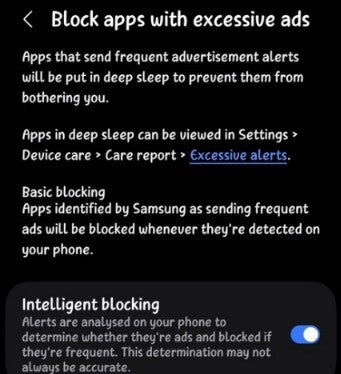
Settings menu for the new feature on the Device Care app.| Image by @KAILASH61229293
Virtual Memory has been around for years; I just think it is useful and cool
An "intelligent" setting analyzes the notifications to determine if they have something to do with advertisements. If they do, the offending apps are blocked since the system has thus determined that they are sending too many ads via notifications. Keep in mind that this feature is not an ad blocker, but when the setting is enabled, it recognizes apps and blocks them from sending notifications if they are sending excessive ad alerts.
An older feature allows you to free up RAM by shutting down apps running in the background by going to Settings > Device care > Memory > Clean now. Doing this will also help extend your phone's battery life. Yeah, this feature has been available for years, unlike the new one that blocks apps from sending excessive ad notifications. Honestly, I just think that this is an interesting feature and wanted those not familiar with it to know that it is available.
Where to find the updated version of Device Care
If you want to prevent certain apps from shutting down in the background, you can go to the Memory menu and have them added to the Excluded apps list. Another cool feature on the Device Care app is called Virtual Memory, and it allows you to turn part of your phone's internal storage into as much as 8 GB of RAM. Inactive apps are moved to the virtual memory freeing up physical RAM for active apps.
The updated version of Device Care is available from the Galaxy Store, and some say that it has already been found on the Galaxy S26 series for a few months. If you can't find it in the Galaxy Store, you might want to make sure that you've installed the stable version of One UI 8.5, which is also supposed to carry the updated Device Care app.
Devices that have been sent the stable One UI 8.5 update include:
- Galaxy S26 series
- Galaxy S25 series
- Galaxy S24 series
- Galaxy Z Fold 7
- Galaxy Z Flip 7
- Galaxy Z Flip 7 FE
- Galaxy Z TriFold
- Galaxy Z Fold Special Edition


Popular stories



Latest News



Things that are NOT allowed:
To help keep our community safe and free from spam, we apply temporary limits to newly created accounts: