The option to change Inbox type is very important for those who receive lots of emails daily, but for some reason, Android users weren't given too many options in regards with the type of their inbox, even though iOS and web already had these features for quite some time.
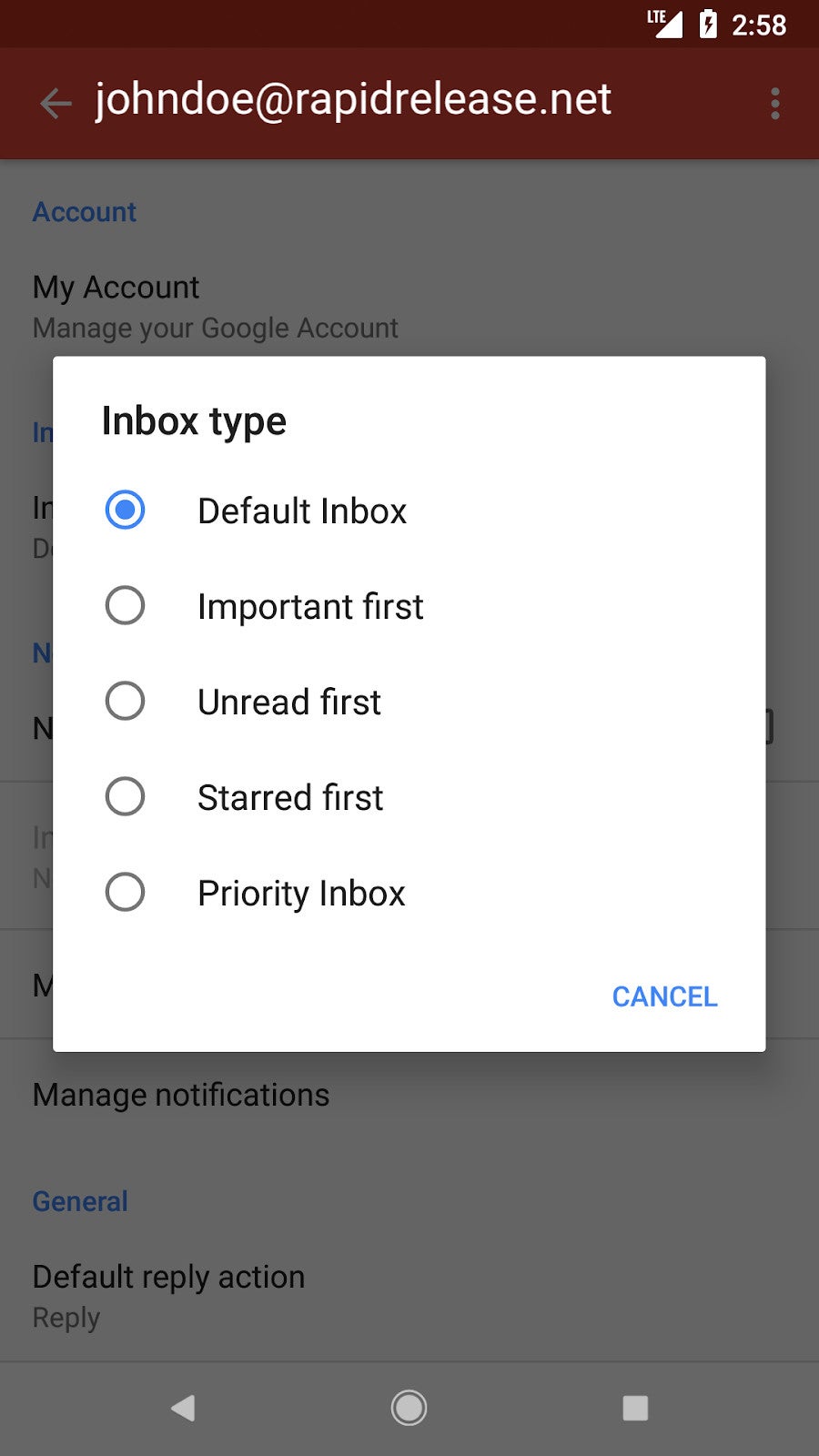
Well, that's not the case any longer, as Google has just announced that it is bringing the option to set your Inbox type directly from your phone. These options will allow Gmail for Android users to sort their inboxes, including unread first, important first, starred first, and priority inbox.
Thanks to the latest update, Gmail users will now be able to see the same email configuration they have selected on the web in their Android apps. On top of that, there's a new option that allows them to change their inbox type directly from the Gmail app for Android, which can be found under Settings / Inbox type.
Keep in mind that since this is a gradual roll-out it may take at least 15 days for the new feature to become visible on some Android devices, so be patient if you don't see the option yet.
On the Visible+ Pro plan, you get access to 5G Ultra Wideband data on Verizon's fastest network. Along with unlimited roaming across Mexico and Canada, 2 days of Global Pass per month, 3x hotspot speeds, 4K streaming, and Smartwatch service.
Cosmin, a tech journalist with a career spanning over a decade, brought a wealth of experience to PhoneArena. His expertise lies in brands like Samsung and Nokia, and he has a keen interest in innovative technologies. After a brief stint in PR, Cosmin returned to tech journalism in 2016, committed to delivering clear and objective news. When he's not writing or appearing as a guest on TV and radio shows, Cosmin enjoys playing RPGs, watching Netflix, and nurturing his passion for history and travel.
COMMENTS (2)
COMMENTS (2)
All comments need to comply with our
Community Guidelines
PhoneArena Community Rules
A discussion is a place, where people can voice their opinion, no matter if it
is positive, neutral or negative. However, when posting, one must stay true to the topic, and not just share some
random thoughts, which are not directly related to the matter.
Things that are NOT allowed:
Off-topic talk - you must stick to the subject of discussion
Offensive, hate speech - if you want to say something, say it politely
Spam/Advertisements - these posts are deleted
Multiple accounts - one person can have only one account
Impersonations and offensive nicknames - these accounts get banned
To help keep our community safe and free from spam, we apply temporary limits to newly created accounts:
New accounts created within the last 24 hours may experience restrictions on how frequently they can
post or comment.
These limits are in place as a precaution and will automatically lift.
Moderation is done by humans. We try to be as objective as possible and moderate with zero bias. If you think a
post should be moderated - please, report it.
Have a question about the rules or why you have been moderated/limited/banned? Please,
contact us.












Things that are NOT allowed:
To help keep our community safe and free from spam, we apply temporary limits to newly created accounts: