I believe that somewhere in Mountain View, California, where Google has its corporate headquarters, there is a huge room where software developers go through the user interfaces of several apps and decide what changes they could make to improve the look of the app, or to add a new feature. Some apps, like Google Messages, Phone by Google, Google Maps, and Google Photos are the subject of these meetings more often than others.
Google doesn't do this, but you might imagine that they do
To make sure that these apps are updated frequently, Google locks the developers inside this room without air conditioning, water, or a toilet. They are given nothing to eat or drink until the developers have come to an agreement on a UI change for the day's special app. No, I really don't think that Google does this, but it would explain some of the small, inconsequential changes that Google makes to an app with a software update. And this article shows you an example of this.
Do you want the updated version of Google Messages?
2312 Votes
Yes. I Iike the new rounded corners for the viewfinder.
62.5%
No. This is no big deal.
14.62%
I don't know yet.
22.88%
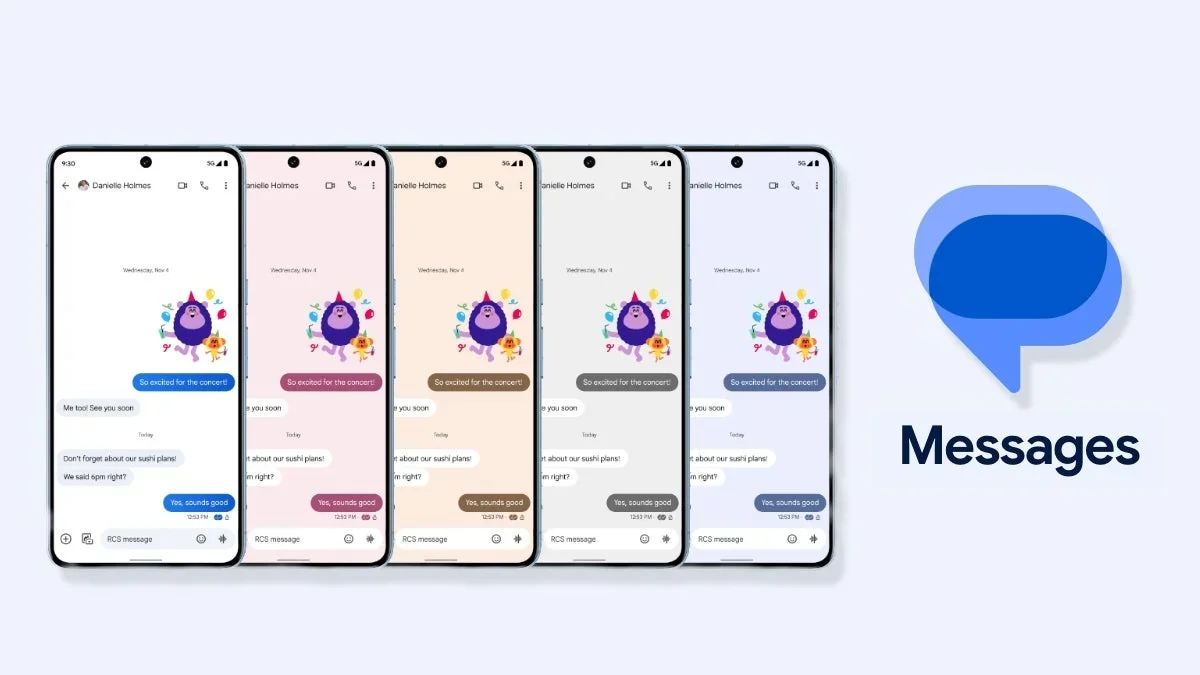
In all seriousness, many of these updates allowed Google to bring the design of these apps up to speed with the Material 3 Expressive design that includes spring-based motion that adds bounce and stretch to swipe-based elements including volume sliders. Buttons and icons change shape when you press on them, and variable fonts might change their looks to capture your attention and try to get you to press a button to read an unread message (it's kind of silly to get you to read a message already read) or take a certain action.
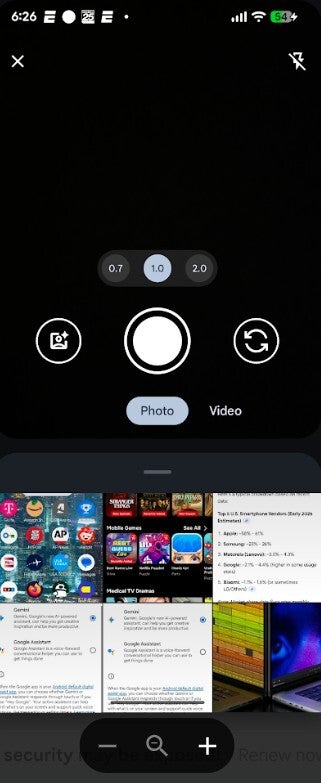
The Google Messages app after the latest update. | Image credit-PhoneArena
The Google Messages app has received an update to its UI and it does result in a change to the camera and photo gallery. Open the Google Messages app and tap on a conversation. Press the "+" button at the left of the text bar on the bottom of the screen. Then tap on Camera (or Gallery if you want to skip the camera and go right to your image library). The updated version of Google Messages will feature a slightly smaller viewfinder that is actually a container with rounded corners at the top and bottom.
How to tell if you have the updated version of Google Maps
You can tell if you have the new version of Google Messages because if you have yet to receive the update, in the camera mode you'll see 1.5 horizontal rows from your gallery. With the shorter viewfinder in the updated version, that increases to 2 rows. If you want to run through your entire gallery, swipe up on the gallery sheet. The updated version was first spotted in a beta version of the Google Messages app and is now available in stable version of Google Messages.
How to force the update to hit your Google Messages app
You might need to Force Stop the app to trigger the update. To do that, go to Settings > Apps > See all xxx apps. Scroll down to Messages and tap on it. That will take you to the Messages App Info page. Press the "Force Stop" button and close the app. When you reopen it, the update should be there. It worked for me. If you don't have the Google Messages app installed on your Android phone, you can get it from the Google Play Store by tapping on this link.
Recommended For You
So, what is the advantage to users of this redesign? Well, it will allow you to see a tad more of your photo gallery without having to swipe up on the gallery sheet. The rounded corners of the smaller viewfinder look pretty cool and for me, that was enough to make it worthwhile to update the app. Truthfully, I can't tell you that these changes should be enough to make you feel compelled to update the Google Messages app. That will be up to you, although I would still recommend doing it.
Mint Mobile's 6-month plans now cost $10/mo
$10
/mo
$35
$25 off (71%)
Mint Mobile is celebrating its 10-year anniversary with a special offer on its six-month subscription plans. For a limited time, you can get your preferred tier (6GB, 17GB, 23GB or unlimited) for just $10/mo. That saves you between 50% and 71% on the carrier's mobile plans, making it way easier to recommend.
Alan, an ardent smartphone enthusiast and a veteran writer at PhoneArena since 2009, has witnessed and chronicled the transformative years of mobile technology. Owning iconic phones from the original iPhone to the iPhone 15 Pro Max, he has seen smartphones evolve into a global phenomenon. Beyond smartphones, Alan has covered the emergence of tablets, smartwatches, and smart speakers.
A discussion is a place, where people can voice their opinion, no matter if it
is positive, neutral or negative. However, when posting, one must stay true to the topic, and not just share some
random thoughts, which are not directly related to the matter.
Things that are NOT allowed:
Off-topic talk - you must stick to the subject of discussion
Offensive, hate speech - if you want to say something, say it politely
Spam/Advertisements - these posts are deleted
Multiple accounts - one person can have only one account
Impersonations and offensive nicknames - these accounts get banned
To help keep our community safe and free from spam, we apply temporary limits to newly created accounts:
New accounts created within the last 24 hours may experience restrictions on how frequently they can
post or comment.
These limits are in place as a precaution and will automatically lift.
Moderation is done by humans. We try to be as objective as possible and moderate with zero bias. If you think a
post should be moderated - please, report it.
Have a question about the rules or why you have been moderated/limited/banned? Please,
contact us.









Things that are NOT allowed:
To help keep our community safe and free from spam, we apply temporary limits to newly created accounts: