Microsoft just rolled out a batch of new security upgrades and fresh recovery options for Windows 11 – basically, tools meant to save you when your laptop won’t boot or your files suddenly go bad.
New security upgrades
Microsoft has been dropping a bunch of Windows updates lately, and some of them push in the same direction: better security and smoother recovery. Some of the new features are still in preview, some are slowly making their way out to users, but all of them show that the company is putting a serious focus on tightening protection. And since I’m convinced security is the most important thing in today’s digital world, I’m starting right there.
Most of these upgrades target organizations first, not everyday users – though if you use a work laptop that runs Windows, they’ll likely benefit you as well. The Windows team outlined several big steps forward in security to help companies stay ahead of increasingly advanced threats.
One major area is encryption. Post Quantum Cryptography (PQC) introduces algorithms built to survive future quantum-based attacks that could break the encryption we rely on today. Windows now has PQC APIs ready to go, meaning organizations can start testing and moving their apps and infrastructure over.
Recommended For You
Microsoft is also boosting BitLocker (a full-disk encryption feature) with hardware acceleration. By letting modern CPUs and SoCs handle the heavy lifting, disk encryption becomes faster and more secure. Encryption keys are now wrapped and isolated directly at the silicon level on supported devices, reducing exposure to CPU or memory vulnerabilities.
These improvements will show up on new hardware starting in spring 2026 and should give businesses stronger, faster protection for sensitive data.
And because unsafe or unsigned apps and drivers are a common attack entry point, App Control for Business steps in by allowing only trusted apps and drivers to run. With Intune’s Managed Installer, it’s easier for IT to allow internal business apps without opening the door to risky software. This kind of control helps block malware from shady attachments or social engineering tricks – even if someone clicks the wrong thing.
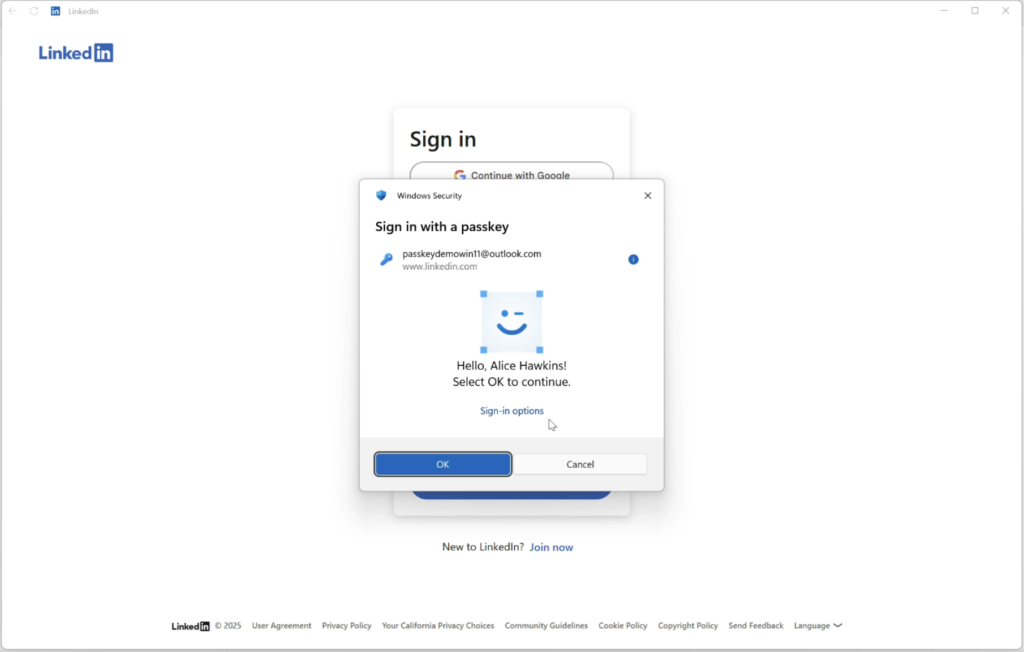
Credential protection is also getting some love. Since stolen identities are still a top attack method, Microsoft has refreshed Windows Hello with quicker and more natural sign-ins.
Passkeys are getting more secure. | Image by Microsoft
On top of that, passkey managers can now plug into Hello – this arrives with the November 2025 security update. The result? Passkeys on Windows are easier to use, more secure, and synced across your devices.
New recovery tools for when your PC breaks down
Now, let’s look at what happens when everything goes off the rails. Microsoft is introducing new recovery features for Windows 11 to make it easier to bring a broken PC back to life.
I think the headline feature is a point-in-time restore option, which will let you roll your device back to an earlier state. This gives you a way out of trouble caused by bad updates, buggy drivers, or configuration mistakes.
Now, this is not something entirely new, but the difference here is that you can actually pick the exact restore point after things go wrong. The only catch I can see is that this will probably require more storage for those backups.
There are also improvements coming to the Windows Recovery Environment (WinRE). Even though WinRE has technically supported networking for years, you had to manually load the network driver first. That’s finally changing – WinRE can now pull the networking driver from your main Windows installation automatically. It starts with ethernet and will eventually support Wi-Fi (WPA2/3) as well.
Microsoft is also rolling out a cloud rebuild option aimed at businesses. IT teams will be able to choose the OS version and language through Intune, and OneDrive for Business will help ensure user data stays intact during the reinstallation. This gives companies more control over how their devices recover from disasters.
A big step forward for Windows security and reliability
These new security features are a solid move for Microsoft, especially since Windows hasn’t always been praised for being the safest platform out there. Seeing the company put this much effort into hardening the system is refreshing.
And the recovery tools? They’re here to make Windows 11 far more resilient. If a bad update or faulty driver takes your PC down, getting it back to normal should be a lot easier – and ideally, your data stays put.
What is the most common cause of a major PC breakdown for you?
10 Votes
A bad Windows or Driver update.
70%
Software/App conflict or misconfiguration.
10%
Malware or a security breach.
0%
Hardware failure (e.g., a hard drive dying).
20%
My take as someone who moved away from Windows
I haven’t been a Windows user for years, but I still remember how frustrating it could get – especially when something broke and recovery turned into a nightmare. One of the moments that pushed me away from Windows was when my laptop crashed out of nowhere, and a bunch of my saved work vanished, and I couldn’t get it back, no matter what I tried.
So seeing Microsoft finally give users better recovery options feels like a long-overdue improvement.
Mint Mobile's 6-month plans now cost $10/mo
$10
/mo
$35
$25 off (71%)
Mint Mobile is celebrating its 10-year anniversary with a special offer on its six-month subscription plans. For a limited time, you can get your preferred tier (6GB, 17GB, 23GB or unlimited) for just $10/mo. That saves you between 50% and 71% on the carrier's mobile plans, making it way easier to recommend.
Tsveta, a passionate technology enthusiast and accomplished playwright, combines her love for mobile technologies and writing to explore and reveal the transformative power of tech. From being an early follower of PhoneArena to relying exclusively on her smartphone for photography, she embraces the immense capabilities of compact devices in our daily lives. With a Journalism degree and an explorative spirit, Tsveta not only provides expert insights into the world of gadgets and smartphones but also shares a unique perspective shaped by her diverse interests in travel, culture, and visual storytelling.
A discussion is a place, where people can voice their opinion, no matter if it
is positive, neutral or negative. However, when posting, one must stay true to the topic, and not just share some
random thoughts, which are not directly related to the matter.
Things that are NOT allowed:
Off-topic talk - you must stick to the subject of discussion
Offensive, hate speech - if you want to say something, say it politely
Spam/Advertisements - these posts are deleted
Multiple accounts - one person can have only one account
Impersonations and offensive nicknames - these accounts get banned
To help keep our community safe and free from spam, we apply temporary limits to newly created accounts:
New accounts created within the last 24 hours may experience restrictions on how frequently they can
post or comment.
These limits are in place as a precaution and will automatically lift.
Moderation is done by humans. We try to be as objective as possible and moderate with zero bias. If you think a
post should be moderated - please, report it.
Have a question about the rules or why you have been moderated/limited/banned? Please,
contact us.












Things that are NOT allowed:
To help keep our community safe and free from spam, we apply temporary limits to newly created accounts: