Siri AI is faster in iOS 27 beta 2
Apple starts fine-tuning Siri AI in iOS 27 beta 2.
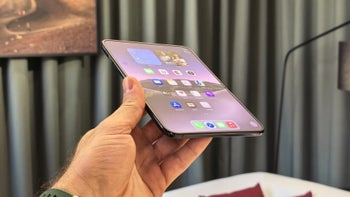
Siri gains speed in latest iOS 27 beta | Image by PhoneArena
One of the things I noticed after installing iOS 27 beta 1 earlier this month was that Siri AI was noticeably slower than Gemini, acting as my AI assistant on my Pixel 6 Pro. When I saw that Apple released iOS 27 developer beta 2 yesterday, I couldn't wait to see if any improvements were made to Siri. To my surprise, Apple did mess around under the hood and made Siri AI faster.
Apple adds "Type to Siri" button in Messages, Notes, and Mail
Apple has also added a Type to Siri button above the QWERTY keyboard in Messages, Notes, and Mail to help you type your request to Siri (please rewrite this in the style of Shakespeare) with a simple tap right away. In the new standalone Siri app, you can select multiple conversations to delete at one time instead of doing it conversation-by-conversation.
What would stop you from using Siri AI all the time?
28 Votes
Hallucinations (from both Siri AI and me)
28.57%
Siri AI takes too long to respond
28.57%
Siri doesn't respond to my queries
7.14%
Better answers and experience from another AI application
35.71%
As someone who loves throwing questions at AI assistants and chatbots, I was somewhat disappointed that Siri AI could not look up past stock prices while Gemini, used as an AI assistant on a Pixel, can. But there is a simple reason for that. Siri is still a beta feature on a beta version of iOS.
What to do if Siri AI can't answer your question
As a result, Siri is optimized to access general world knowledge, and it does not source data from external financial databases-yet. As we get closer to the stable public release of iOS 27, it is possible that we will see Apple do some fine-tuning and allow Siri to find a stock prices from the past.
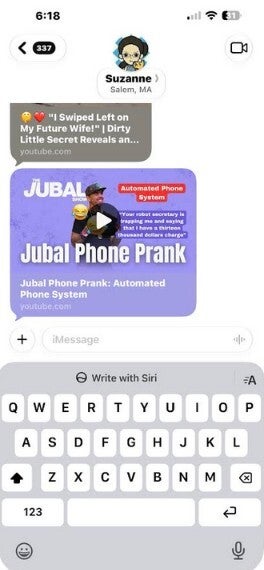
The iOS 27 beta 2 update includes a Type to Siri button |
In the meantime, if you need information or the answer to a query that Siri AI cannot answer, you can do what I do. Put down your iPhone, pick up your Tensor-powered Pixel, and use the Gemini AI assistant. Actually, that's kind of a joke since most people don't have a current iPhone and a spare Pixel 6 or later, unless they are a tech writer.
You might want to install one of these apps on your iPhone
If Siri AI still can't answer a query you have, make sure to install some of the AI assistant apps from the App Store on your iPhone. The ones I recommend and installed on my phones include:
If you are a member of the iOS 27 Beta Program, you should go to Settings > General > Software Update and follow the directions to install iOS 27 developer beta 2. If you're not planning to install the iOS 27 beta on your iPhone 11 and later model, you will receive the stable version of iOS 27 in September. But only models that can run Apple Intelligence will get Siri AI. Those models are:


Popular stories






Latest News



Things that are NOT allowed:
To help keep our community safe and free from spam, we apply temporary limits to newly created accounts: