Transferring files between different operating systems is definitely not the easiest task. Google and Samsung recently introduced AirDrop compatibility for their phones.
Nothing also followed suit and launched a new app called Nothing Warp, which allows you to transfer files between Android devices and Windows PCs, MacBooks, and Linux machines. But guess what, the app didn't even last an entire day, as it is no longer available on the Play Store.
What's different about the Nothing Warp app?
The Nothing Warp app was initially used internally for file transfers. However, the company announced in a blog post yesterday that it's now available for public use. You can download it from the Play Store and use it to send various types of data, including files, links, text, and images, between devices.
The main selling point of this app is that it provides a way to transfer files from your Android smartphone to your Windows PC, MacBook, or Linux machine. On your desktop, you need to have the Nothing Warp browser extension installed in the Chrome browser. Furthermore, you need to be signed in with the same Google account on both the Nothing mobile app and the Nothing Warp browser extension.
Once you have taken care of this, you simply have to access the file on your Android smartphone that you want to share, tap the share button, and you will find the Nothing Warp app available in the share menu. Then, you have to open the app extension on your desktop and click the receive icon. Similarly, you can send the file from your desktop to your Android smartphone.
Recommended For You
All that said, there's a big catch you need to be aware of. The app uses Google Drive as a temporary bridge to make the transfer possible. So what basically happens behind the scenes is that when you send a file, it is first uploaded to your Google Drive account before becoming available on the receiver's device.
The good news is that the uploaded file is automatically deleted from your Google Drive once the transfer is complete. Furthermore, the app isn't exclusive to Nothing smartphones. It works across all Android brands.
It's no longer available
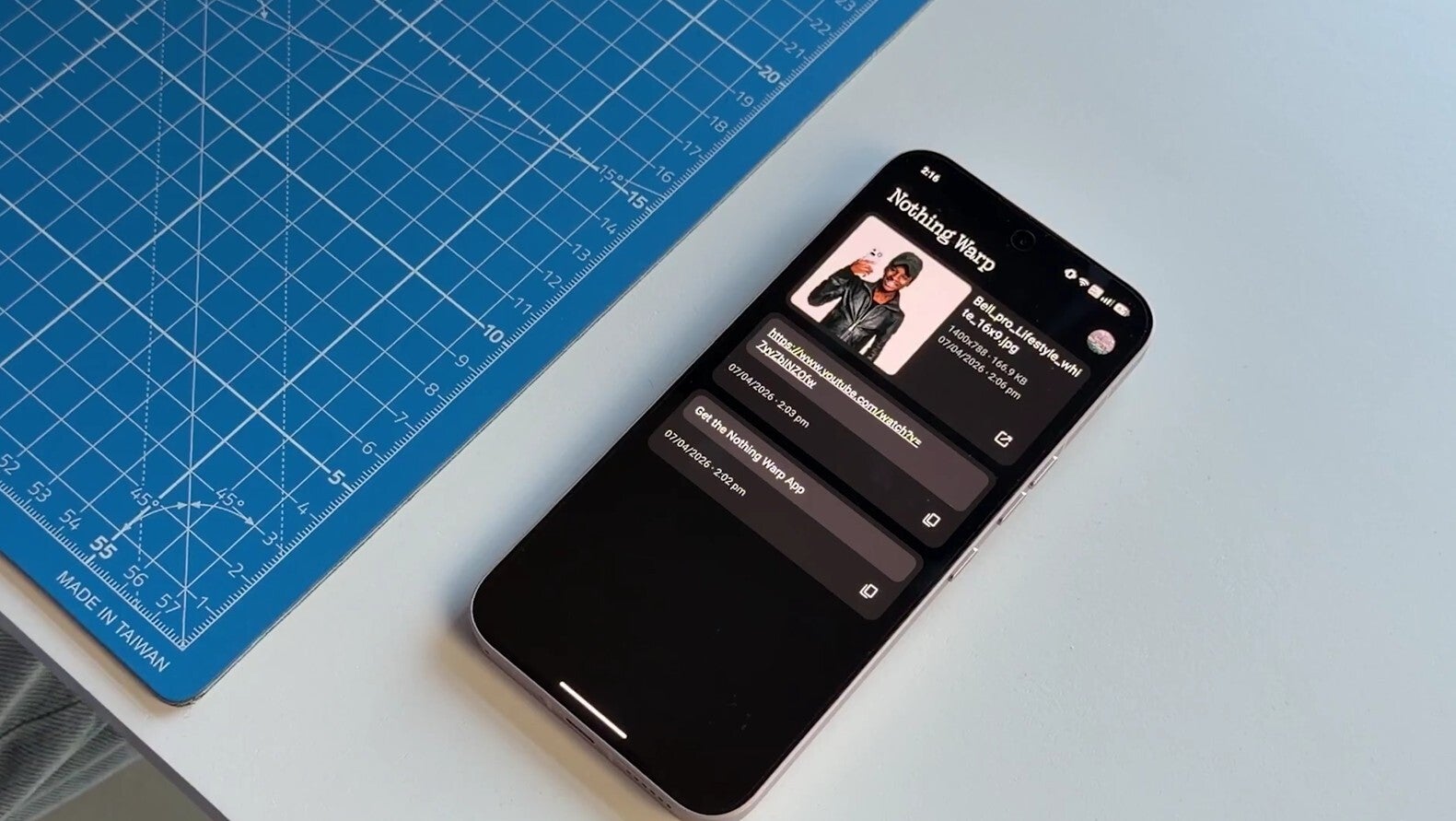
Nothing Warp on a Nothing smartphone. | Image by Nothing
Even before 24 hours had passed since its release, Carl Pei's company decided to remove the app from the Play Store. Many users started reporting on Reddit that it was no longer available for download.
I checked it myself, and yes, the app is gone. "We're sorry, the requested URL was not found on the server" message shows up when opening the Play Store link for the Warp app. Its extension has also been removed from the Chrome Web Store, and what's even more surprising is that its announcement blog post is no longer available.
What's your usual approach for cross-device file sharing?
10 Votes
I rely on cloud apps like Google Drive.
30%
I use built-in sharing features like AirDrop and Quick Share
40%
I use messaging apps like Telegram and WhatsApp.
30%
I go with wired transfer methods like those from 2015.
0%
Why Nothing might have pulled its file transfer app
At the time of writing, there is no official statement from the company on why all traces of its brand-new file transfer app have been removed from everywhere. However, I believe there could be two reasons behind this.
As mentioned above, the file you transfer through Warp is first uploaded to your Google Drive account before it becomes available on the receiver's device. Yes, I understand that this is faster than manually uploading the file from one device to Google Drive and then downloading it on another. Still, Warp's functionality is apparently too dependent on your internet speed.
If you're connected to a slow internet connection, the app will also take a long time to upload the file to your Google Drive account, which will ultimately result in a much longer transfer time to the receiving device.
The second reason I believe is related to your privacy. As it turns out, Warp's browser extension was asking for too many permissions.
To be specific, the extension required you to grant it the permission to "see, create, and delete" files. While all these consents will apparently be used only on files created by the Nothing app, still privacy-focused individuals like me would definitely not prefer trusting a company with any sort of my data.
The Nothing Warp app isn't perfect yet
I'll definitely update this post when Nothing issues an official statement on the removal of its Warp feature. But as mentioned above, I strongly believe the action was possibly taken to address privacy concerns.
Kudos to Nothing for making the app compatible with all Android smartphones and browsers. But that doesn't mean we should neglect the privacy concerns that come with it. Furthermore, using Google Drive as a bridge can slow down the transfer process when internet speeds are low.
Nothing really needs to address these two things before relaunching its file transfer app. That said, I would highly appreciate it if you guys followed me on X and Threads, where I regularly share my views on everything tech-related.
Tello Halloween Promo: $10GB for $10/mo
Don’t miss this scary-good deal: 10 GB for $10/mo. Save $5/mo for your first 3 months. Offer valid now through November 9, 2026.
Aman Kumar is a news writer at PhoneArena covering Google Pixel phones, Android features, AI-powered smartphone tools, and mobile tech news. Before joining PhoneArena, he spent over five years writing about consumer technology for publications like MakeUseOf, How-To Geek, and Guiding Tech. His current daily drivers are the Pixel 10 and Samsung Galaxy S26 Plus, while his red iPhone SE (2nd gen) remains a personal favorite. Aman also appreciates bold smartphone experiments and still considers the Nokia N-Gage one of the industry’s most iconic designs.
A discussion is a place, where people can voice their opinion, no matter if it
is positive, neutral or negative. However, when posting, one must stay true to the topic, and not just share some
random thoughts, which are not directly related to the matter.
Things that are NOT allowed:
Off-topic talk - you must stick to the subject of discussion
Offensive, hate speech - if you want to say something, say it politely
Spam/Advertisements - these posts are deleted
Multiple accounts - one person can have only one account
Impersonations and offensive nicknames - these accounts get banned
To help keep our community safe and free from spam, we apply temporary limits to newly created accounts:
New accounts created within the last 24 hours may experience restrictions on how frequently they can
post or comment.
These limits are in place as a precaution and will automatically lift.
Moderation is done by humans. We try to be as objective as possible and moderate with zero bias. If you think a
post should be moderated - please, report it.
Have a question about the rules or why you have been moderated/limited/banned? Please,
contact us.














Things that are NOT allowed:
To help keep our community safe and free from spam, we apply temporary limits to newly created accounts: