One of the many things I did on my new Pixel 10 was enable its built-in backup function. It ensures that valuable data is not lost even when I lose access to the device on which it is stored.
However, there is a big issue with how the backup feature currently works on all Android devices, including Pixels. It is basically an all-or-nothing affair. Fortunately, this could change very soon if the recent finding pans out to be true.
Here's why Android's current backup feature isn't the best
Backing up data on any Android smartphone is very easy. The exact steps could differ depending on the skin your phone uses, but the general rule of thumb is to open the Settings app, choose System, and then Backup. The main problem here is that you don't get total control over exactly what you could back up.
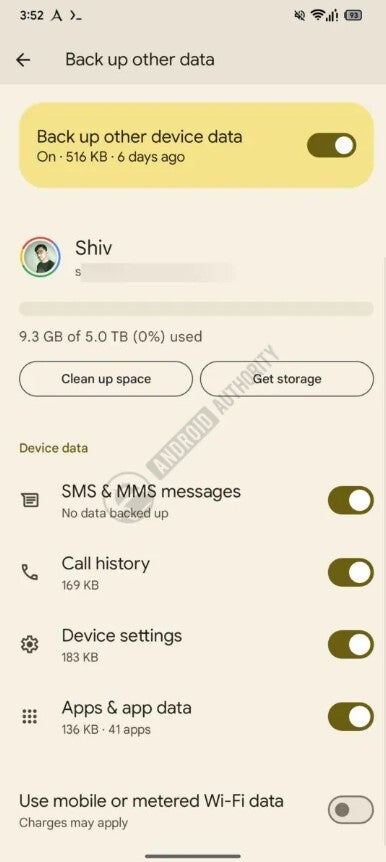
On Pixel phones, for instance, if you open the "Other device data" option, then you will see that you are only allowed to either back up all kinds of other data or nothing at all. This other data includes things like call history, device settings, text messages, and data related to different apps.
The unavailability of individual toggles means oftentimes you end up backing up data that you don't really need. This eventually results in unwanted things taking up valuable space in your cloud storage that could have otherwise been used by other data that you really want to back up.
A much-needed change is on the way
Individual toggles for each type of data. | Image by Android Authority
Google has apparently realized that not everyone wants all of their data to be backed up to the cloud. As such, they are reportedly working on giving you more control over what you really want to back up and what you don't. The change has been spotted in the Google Play Services beta version 26.22.30.
Recommended For You
It has been spotted in the beta build that the backup tool lets you manually enable or disable the items that you want to back up from your device. For instance, you can turn off the toggle next to the device settings, and it will stop backing them up to the cloud.
Once you turn off either of the toggles, a confirmation window will pop up asking you for a final permission before disabling the selected option. The window will also inform you that once you disable the toggle, all the existing backed-up data for that particular option will be deleted from the cloud.
What's your current strategy when cloud storage gets full?
11 Votes
Delete old photos.
18.18%
Reupload photos at a lower quality.
0%
Upgrade my storage plan.
27.27%
Clean up apps and files.
36.36%
I really need some cleaning tricks to save cloud storage.
18.18%
iOS has had this ability for years
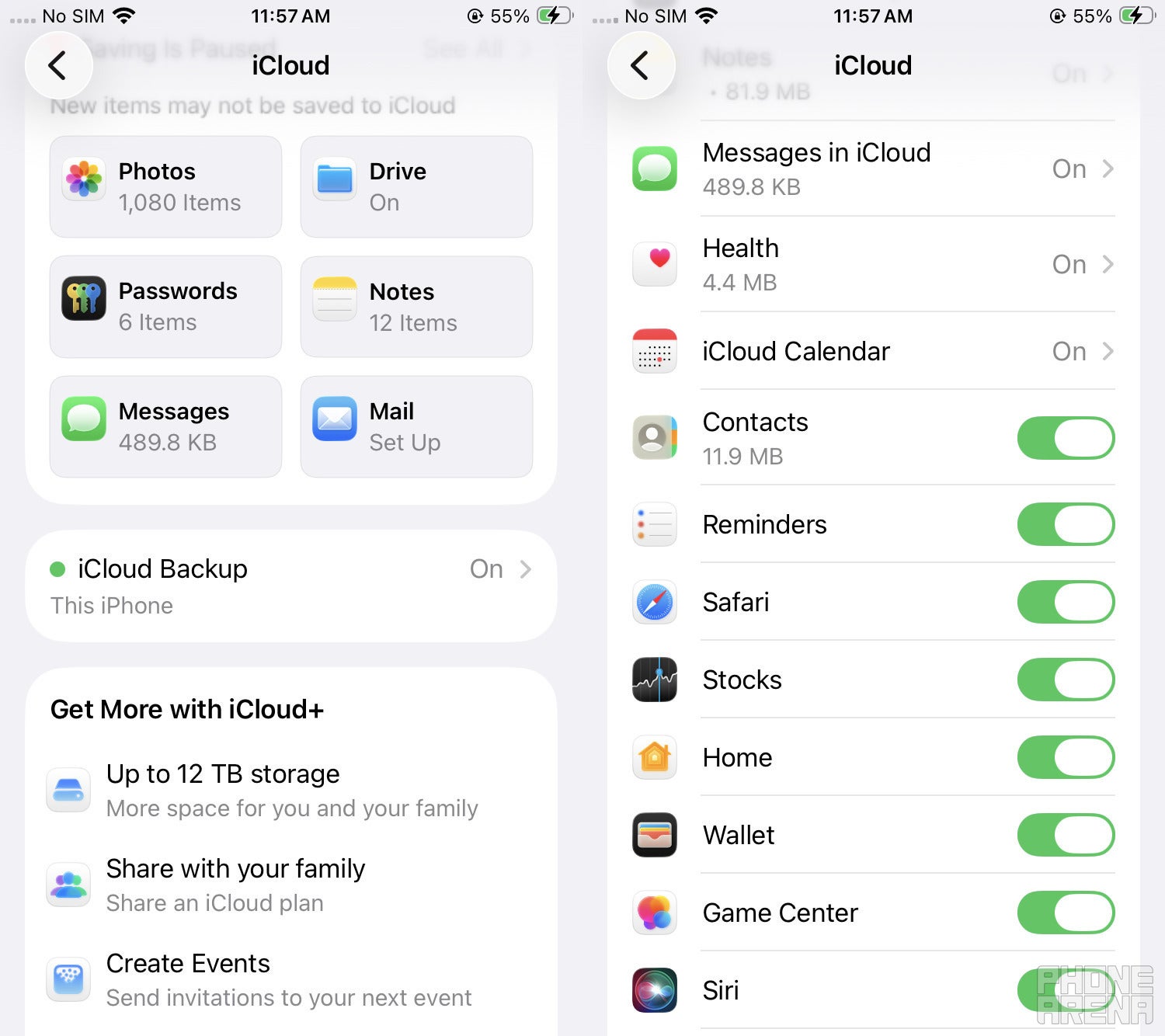
iCloud backup feature. | Image by PhoneArena
When I switched to Pixel 10 from iPhone last year, one of the many differences I noticed between the two was that unlike Android, iOS does give you full control of the things you want to back up to iCloud. A user on Reddit also mentioned that they had been using this functionality on iOS for the last 10 years.
Basically, once you have given your iPhone permission to back up the data to iCloud, you need to tap the Saved to iCloud box and then turn on the toggle next to the item that you want to be backed up to iCloud. For instance, if you don't want your Siri data to get backed up, you just need to disable the switch next to it.
It's still in beta, though
This isn't the only backup-related change Android is expected to get. It was reported last year that the OS could give you the ability to decide whether you want to back up a particular app's data to the cloud or not.
I, personally, think that this, along with the change mentioned above, would be introduced together in the stable version to everyone. However, there's no certainty on when it could happen, but I really hope that it happens very soon, as it could save you from purchasing a Google One plan.
Free Galaxy A17 5G with Straight Talk
Get a free Galaxy A17 with Straight Talk. To claim this deal, you need to pair the phone with activation on a Silver Unlimited Plan or higher. This tier costs $45 per month. Offer valid through 01/10/27 while supplies last online.
Aman Kumar is a news writer at PhoneArena covering Google Pixel phones, Android features, AI-powered smartphone tools, and mobile tech news. Before joining PhoneArena, he spent over five years writing about consumer technology for publications like MakeUseOf, How-To Geek, and Guiding Tech. His current daily drivers are the Pixel 10 and Samsung Galaxy S26 Plus, while his red iPhone SE (2nd gen) remains a personal favorite. Aman also appreciates bold smartphone experiments and still considers the Nokia N-Gage one of the industry’s most iconic designs.
A discussion is a place, where people can voice their opinion, no matter if it
is positive, neutral or negative. However, when posting, one must stay true to the topic, and not just share some
random thoughts, which are not directly related to the matter.
Things that are NOT allowed:
Off-topic talk - you must stick to the subject of discussion
Offensive, hate speech - if you want to say something, say it politely
Spam/Advertisements - these posts are deleted
Multiple accounts - one person can have only one account
Impersonations and offensive nicknames - these accounts get banned
To help keep our community safe and free from spam, we apply temporary limits to newly created accounts:
New accounts created within the last 24 hours may experience restrictions on how frequently they can
post or comment.
These limits are in place as a precaution and will automatically lift.
Moderation is done by humans. We try to be as objective as possible and moderate with zero bias. If you think a
post should be moderated - please, report it.
Have a question about the rules or why you have been moderated/limited/banned? Please,
contact us.













Things that are NOT allowed:
To help keep our community safe and free from spam, we apply temporary limits to newly created accounts: