Google Photos keeps stacking on features, and the newest one hiding in its code might raise an eyebrow. It hints at Google leaning on a rival's app to do a job it has spent the past year building its own tool to handle.
A fresh edit button is heading to Memories
Memories has always been the low-effort corner of Google Photos, the auto-generated carousel of old photos and clips that greets you at the top of the app. Until now, your only real control was muting the audio or pulling out an image you did not want.
We flagged an early attempt at editing inside Memories back in 2024, so the idea is not new. What is new is how much further this version goes.
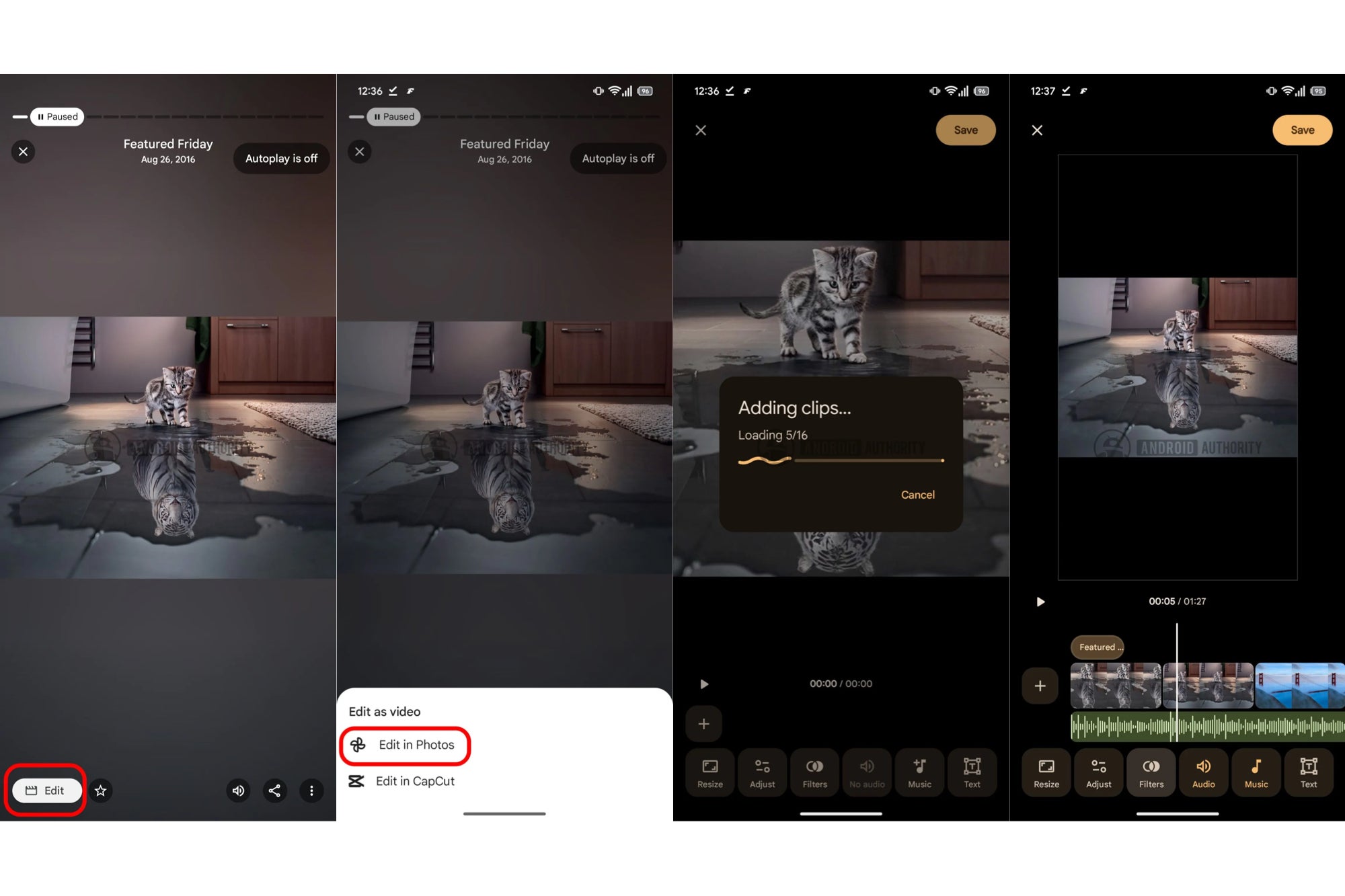
A new report says a teardown of Google Photos (version 7.78.0.920664585) turned up an "Edit" button in the works for Memories. Tapping it opens an "Edit as video" sheet with two paths: edit inside Google Photos, or edit in CapCut.
The in-app route would finally let you set how long each photo or clip stays on screen, plus adjust the audio and add text overlays. It borrows the layout from the Highlight video tool already living in the Create tab.
APK breakdown of the Google Photos app revealing an 'Edit in Capcut' workflow. | Image by Android Authority
Why CapCut is showing up in a Google app
Here is the part worth sitting with: CapCut belongs to ByteDance, the same company behind TikTok. Google is reportedly wiring a one-tap shortcut into a competitor's editor right as it pushes its own video tools harder than ever.
Recommended For You
The same report says Highlight video is also gaining image filters and new Fit or Fill options for framing. A separate teardown points to a "New for you" hub in the Create tab that would gather Google's generative tools like Remix and Animation in one place.
How do you prefer to handle editing your photos and clips?
23 Votes
All in one place. Keep it inside Google Photos for me.
47.83%
I'd rather use a real editor like CapCut and skip Photos.
4.35%
Photos is getting bloated, I don't need more tools.
17.39%
Editing? I just want my pictures backed up and safe.
30.43%
What the handoff really signals
So why funnel people to CapCut at all? Google recently built its own templates aimed squarely at CapCut and TikTok, which makes this teardown read like a quiet admission that the in-house editor still cannot match a dedicated app.
The kinder take is that it is smart hedging. Casual users get a fast in-app trim, and anyone who wants finer control gets a clean exit to CapCut without hunting through a share menu.
The feature pile is getting hard to ignore
For the record, I am all for the photo editing tools in Google Photos, since the AI cleanup features save me real time. Memories, though, is something I only reach for during the yearly recap.
A built-in video editor tucked inside it feels like a feature made for someone who is not me. Google keeps adding tools faster than people can find them, and at some point the app starts fighting its own simplicity.
None of this is locked in either. Teardowns show what Google is testing, not what ships, so treat the CapCut button as a maybe for now.
If you want more takes like this one, come find me on X and Threads, where I am always up for arguing about which Google features we really needed.
Mint Mobile's 6-month plans now cost $10/mo
$10
/mo
$35
$25 off (71%)
Mint Mobile is celebrating its 10-year anniversary with a special offer on its six-month subscription plans. For a limited time, you can get your preferred tier (6GB, 17GB, 23GB or unlimited) for just $10/mo. That saves you between 50% and 71% on the carrier's mobile plans, making it way easier to recommend.
Johanna Romero is a Senior News Writer at PhoneArena, covering mobile technology news across Android, iOS, wearables, and the Google ecosystem she knows best. Drawing on 15 years in IT and tech support from 2007 to 2022, she brings a user-friendly eye for the practical features and lesser-known tricks readers care about. Google named her an official #TeamPixel member in 2022, and she also reviews the latest devices on her YouTube channel, JoJo the Techie.
A discussion is a place, where people can voice their opinion, no matter if it
is positive, neutral or negative. However, when posting, one must stay true to the topic, and not just share some
random thoughts, which are not directly related to the matter.
Things that are NOT allowed:
Off-topic talk - you must stick to the subject of discussion
Offensive, hate speech - if you want to say something, say it politely
Spam/Advertisements - these posts are deleted
Multiple accounts - one person can have only one account
Impersonations and offensive nicknames - these accounts get banned
To help keep our community safe and free from spam, we apply temporary limits to newly created accounts:
New accounts created within the last 24 hours may experience restrictions on how frequently they can
post or comment.
These limits are in place as a precaution and will automatically lift.
Moderation is done by humans. We try to be as objective as possible and moderate with zero bias. If you think a
post should be moderated - please, report it.
Have a question about the rules or why you have been moderated/limited/banned? Please,
contact us.











Things that are NOT allowed:
To help keep our community safe and free from spam, we apply temporary limits to newly created accounts: