Samsung Galaxy Watch and Pixel Watch models running the Wear OS 6 update are experiencing a display issue that appears to affect only third-party watch faces.
It's likely a race condition
The Google Wear OS 6 update introduced plenty of exciting upgrades, such as a better always-on display experience, enhanced tiles, and an all-new design language called Material 3 Expressive. However, along with these welcome changes, an unwanted display bug also appeared in Wear OS 6, reportedly affecting both Pixel Watches and Galaxy Watches running this update.
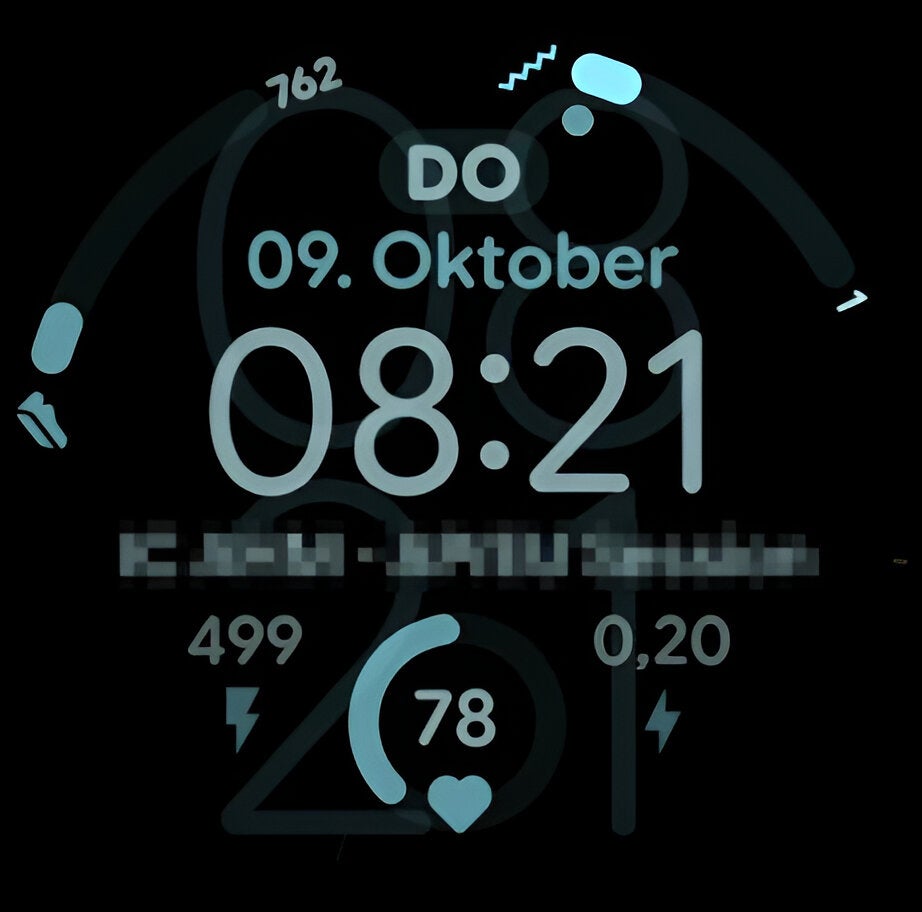
If you have the always-on display setting enabled on your Pixel or Galaxy Watch, it will dim the screen brightness and show only essential information when you're not actively using the watch. Ideally, once you unlock your watch, the always-on display should disappear completely, and the configured watch face should take over. However, the display bug is disrupting this whole transition effect. Elements of the always-on display are reportedly not going away even when the watch switches to the normal face.
These faded elements overlap with the regular watch face, making it difficult to view the on-screen information. Users facing this problem report that the bug only affects third-party watch faces. The pre-installed ones' faces remain unaffected. This behavior has led developers to believe that the issue stems from how the latest OS manages standard API transition layers for third-party apps.
Recommended For You
Notably, the issue starts occurring only after a third-party watch face has been applied for a while, rather than immediately after you apply it. The display glitch has been reported on a wide range of devices running Wear OS 6, such as the Pixel Watch 4, Watch 3, and the Galaxy Watch 8 and Ultra series. Both Google and Samsung have acknowledged this issue, and there is an open case about it on both the Google Issue Tracker and the Samsung developer forum.
After investigating the XML code of the watch faces, developers believe that the display bug is a "race condition." It's essentially a software flaw that occurs when multiple processes try to control shared data simultaneously, eventually resulting in an unwanted or incorrect outcome.
That said, a new opacity fade was introduced for the always-on display transitions with the Wear OS 6 update. The fade animation should ideally finish before the watch goes to sleep. However, if this doesn't happen, the watch gets stuck between displaying both the active and ambient modes. As a result, you may notice a ghosting effect when the always-on display activates or when you wake up your watch.
Is there any fix available?
AOD elements overlapping the normal watch face elements on a Pixel Watch. | Image by Redditor SmallPitch
The issue was first reported in October last year, and affected users were hoping that Google would resolve it in the Wear OS 6.1 update. The update started rolling out to eligible devices in December, but the display issue reportedly remains unsolved. Until the bug is officially addressed, there are a few solutions that seem to "temporarily" fix the problem.
As mentioned above, the glitch occurs after you've been using a third-party watch face for a while. You can switch to a different watch face whenever this problem appears.
Additionally, if you know how to edit XML codes, you can set the transition time to 0, which disables the fading animation that the developer believes is causing the visual glitch. Since the issue only affects third-party watch faces, you also have the option to use the pre-installed ones until a permanent fix becomes available.
On which Wear OS 6 eligible device are you facing this display bug?
15 Votes
Google Pixel Watch 3.
13.33%
Google Pixel Watch 4.
13.33%
Samsung Galaxy Watch 8 series.
13.33%
Samsung Galaxy Watch Ultra.
0%
I've not experienced this on any of my Wear OS 6 devices yet
60%
A fix could arrive anytime
It's been over a couple of months since the bug was first reported, and it's unfortunate that it still hasn't been addressed. I'm really impressed with all the upgrades that came with Wear OS 6, especially the always-on display media controls but a display bug like this completely ruins the overall smartwatch experience.
The Mountain View giant has been quite active in listening to users' complaints and quickly addressing their reported issues. I recently faced an annoying issue on my Pixel Watch 3, where there was a delay in displaying notifications.
Along with many other Pixel Watch users, I reported this problem on the Google forum. Fortunately, Google listened to these complaints, and the issue completely disappeared after installing the April 2025 update. Similarly, I'm quite hopeful that a fix will soon be made available for the ongoing display issue affecting Pixel and Samsung watches running the Wear OS 6 or 6.1 update.
Mint Mobile's 6-month plans now cost $10/mo
$10
/mo
$35
$25 off (71%)
Mint Mobile is celebrating its 10-year anniversary with a special offer on its six-month subscription plans. For a limited time, you can get your preferred tier (6GB, 17GB, 23GB or unlimited) for just $10/mo. That saves you between 50% and 71% on the carrier's mobile plans, making it way easier to recommend.
Aman Kumar is a news writer at PhoneArena covering Google Pixel phones, Android features, AI-powered smartphone tools, and mobile tech news. Before joining PhoneArena, he spent over five years writing about consumer technology for publications like MakeUseOf, How-To Geek, and Guiding Tech. His current daily drivers are the Pixel 10 and Samsung Galaxy S26 Plus, while his red iPhone SE (2nd gen) remains a personal favorite. Aman also appreciates bold smartphone experiments and still considers the Nokia N-Gage one of the industry’s most iconic designs.
A discussion is a place, where people can voice their opinion, no matter if it
is positive, neutral or negative. However, when posting, one must stay true to the topic, and not just share some
random thoughts, which are not directly related to the matter.
Things that are NOT allowed:
Off-topic talk - you must stick to the subject of discussion
Offensive, hate speech - if you want to say something, say it politely
Spam/Advertisements - these posts are deleted
Multiple accounts - one person can have only one account
Impersonations and offensive nicknames - these accounts get banned
To help keep our community safe and free from spam, we apply temporary limits to newly created accounts:
New accounts created within the last 24 hours may experience restrictions on how frequently they can
post or comment.
These limits are in place as a precaution and will automatically lift.
Moderation is done by humans. We try to be as objective as possible and moderate with zero bias. If you think a
post should be moderated - please, report it.
Have a question about the rules or why you have been moderated/limited/banned? Please,
contact us.




Things that are NOT allowed:
To help keep our community safe and free from spam, we apply temporary limits to newly created accounts: