A cool new feature for the Google News app is rolling out now to Android and iOS versions of the app. Those who have received the updated version of Google News will notice a new fourth tab on the bottom of the screen with the label "Listen." The first time you see this tab, it comes with a notification that says, "New! Listen to the morning's top stories." The tab's icon features a pair of over-the-ear headphones with the Gemini AI sparkle.
Google has said that it wants to work with publishers to explore new Google News features
This new tab is part of Google's plan to "explore how AI can help drive more engaged audiences." To complete this task, Google says it is "working with publishers to experiment with new features in Google News. For example, we’re testing AI-powered article overviews on participating publications’ Google News pages to give people more context before they click through. And we’re experimenting with audio briefings for those who prefer listening."
Will you use the Google News Audio Briefing feature?
67 Votes
Absolutely! I love listening to the latest news.
43.28%
No way. I have no desire to know what's going on.
20.9%
I might try it some day.
35.82%
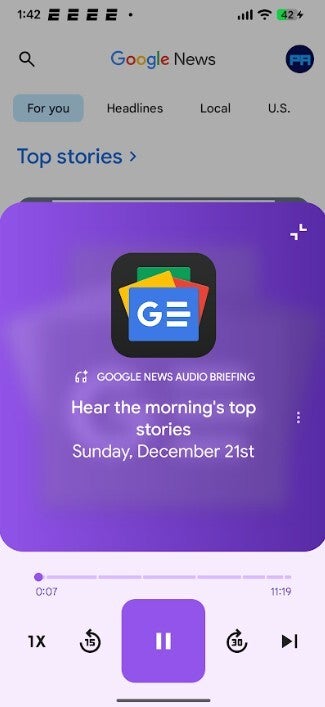
Speaking about these audio briefings, they can be heard by tapping the Listen tab. On the next page, pressing the play button at the bottom of the screen will start streaming the Google News Audio Briefing. The controls on the bottom of the app allow you to adjust the speed of the briefings from 30% slower to twice as fast. You can tap for a quick 15-second rewind or go 30 seconds into the future. The three-dot overflow menu can take you to the featured article and also allows you to send feedback to Google.
The Google News Audio Briefing feature is coming now to Android users and will soon be available on iOS
The Material 3 Expressive Play button changes shape when you press on it, and the current story that you're listening to is headlined in the large container above the progress indicator. The bottom of the container features two pills, the one on the right shows the featured article that the audio briefing is discussing. The pill on the left shows other stories that you can choose to hear audio briefings about.
The new Audio Briefing feature on the Android and iOS versions of Google News. | Image credit-PhoneArena
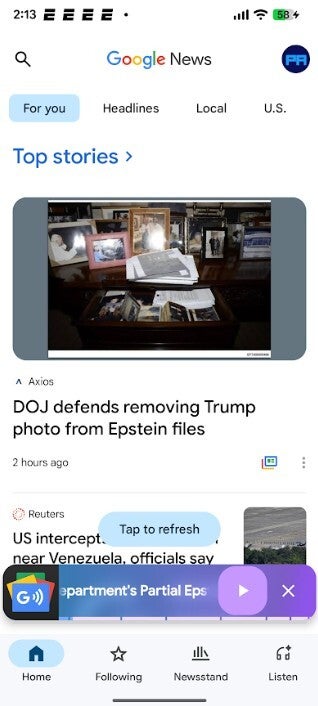
Minimizing the briefing feature turns it into a miniplayer above the bar at the bottom of the screen which allows you to hear an overview while exploring the rest of the Google News app or browsing through your phone. The Google News Audio Briefing feature is found on version 5.146.x of the Google News app for Android. You can install the app on your Android phone by downloading it from the Google Play Store; simply tap on this link.
Recommended For You
Minimizing the briefing feature turns it into a miniplayer above the bottom bar of the screen. | Image credit-PhoneArena
Those with an iPhone can find the Google News Audio Briefing feature on version 6.5 of the Google News app for iOS. The latter can be installed from the App Store by tapping on this link.
You can browse your phone and the Google News app while listening to your news briefing
The Google News app is a news aggregator that collects headlines and stories from publications all around the world, covering many subjects. Instead of having to view many individual websites to get the news, one app, Google News, gets you updated on what is happening in the world. With the new Audio Briefing feature, in minutes (usually between 10 and 15 minutes) you can be briefed by the app on all of the big stories at the moment.
If you're a big news buff, chances are that you already have the Google News app on your Android or iOS phone. The Google News Audio Briefing feature is nice to have because it allows you to multitask by doing other things while listening to the news briefing. The news stories that Google decides to brief do change during the course of the day. If a big story hits the online news apps at 3 PM ET, you should be able to hear all about on the Google News app not that long afterwards.
Tello Halloween Promo: $10GB for $10/mo
Don’t miss this scary-good deal: 10 GB for $10/mo. Save $5/mo for your first 3 months. Offer valid now through November 9, 2026.
Alan, an ardent smartphone enthusiast and a veteran writer at PhoneArena since 2009, has witnessed and chronicled the transformative years of mobile technology. Owning iconic phones from the original iPhone to the iPhone 15 Pro Max, he has seen smartphones evolve into a global phenomenon. Beyond smartphones, Alan has covered the emergence of tablets, smartwatches, and smart speakers.
A discussion is a place, where people can voice their opinion, no matter if it
is positive, neutral or negative. However, when posting, one must stay true to the topic, and not just share some
random thoughts, which are not directly related to the matter.
Things that are NOT allowed:
Off-topic talk - you must stick to the subject of discussion
Offensive, hate speech - if you want to say something, say it politely
Spam/Advertisements - these posts are deleted
Multiple accounts - one person can have only one account
Impersonations and offensive nicknames - these accounts get banned
To help keep our community safe and free from spam, we apply temporary limits to newly created accounts:
New accounts created within the last 24 hours may experience restrictions on how frequently they can
post or comment.
These limits are in place as a precaution and will automatically lift.
Moderation is done by humans. We try to be as objective as possible and moderate with zero bias. If you think a
post should be moderated - please, report it.
Have a question about the rules or why you have been moderated/limited/banned? Please,
contact us.















Things that are NOT allowed:
To help keep our community safe and free from spam, we apply temporary limits to newly created accounts: