Despite Microsoft's regular efforts to push its Edge browser on Windows, Google Chrome still remains the default option for most users on their Windows PCs. However, that might change soon, as a new player has entered the competition. We're talking about the Samsung Internet Browser, which has finally graduated from beta, and its stable build is now available for everyone to download.
Here's everything Samsung Browser brings to the table
It's been some time since the Samsung Browser entered its beta testing phase. The South Korean giant has now announced that with the release of version 30.0.0.95, the browser has finally exited beta. It comes with many incredible features that might make you ditch Google Chrome for it.
First up, it offers cross-device continuity features across multiple devices. This means that in addition to the basic bookmark and history syncing that you get in most browsers, it allows you to open a web page on your Android smartphone and then switch to your Windows PC and continue browsing from where you left off on your phone. However, there are a few boxes you need to tick for this continuity feature to work.
You need to log in with the same Samsung account on both devices. The Samsung Continuity service or the Galaxy Connect app must be installed on your Windows computer. It's also worth noting that the continuity capability is currently only available on the Galaxy Book 3, 4, 5, and 6 families. The good news, however, is that Samsung has said that it will be rolled out to more devices soon.
Recommended For You
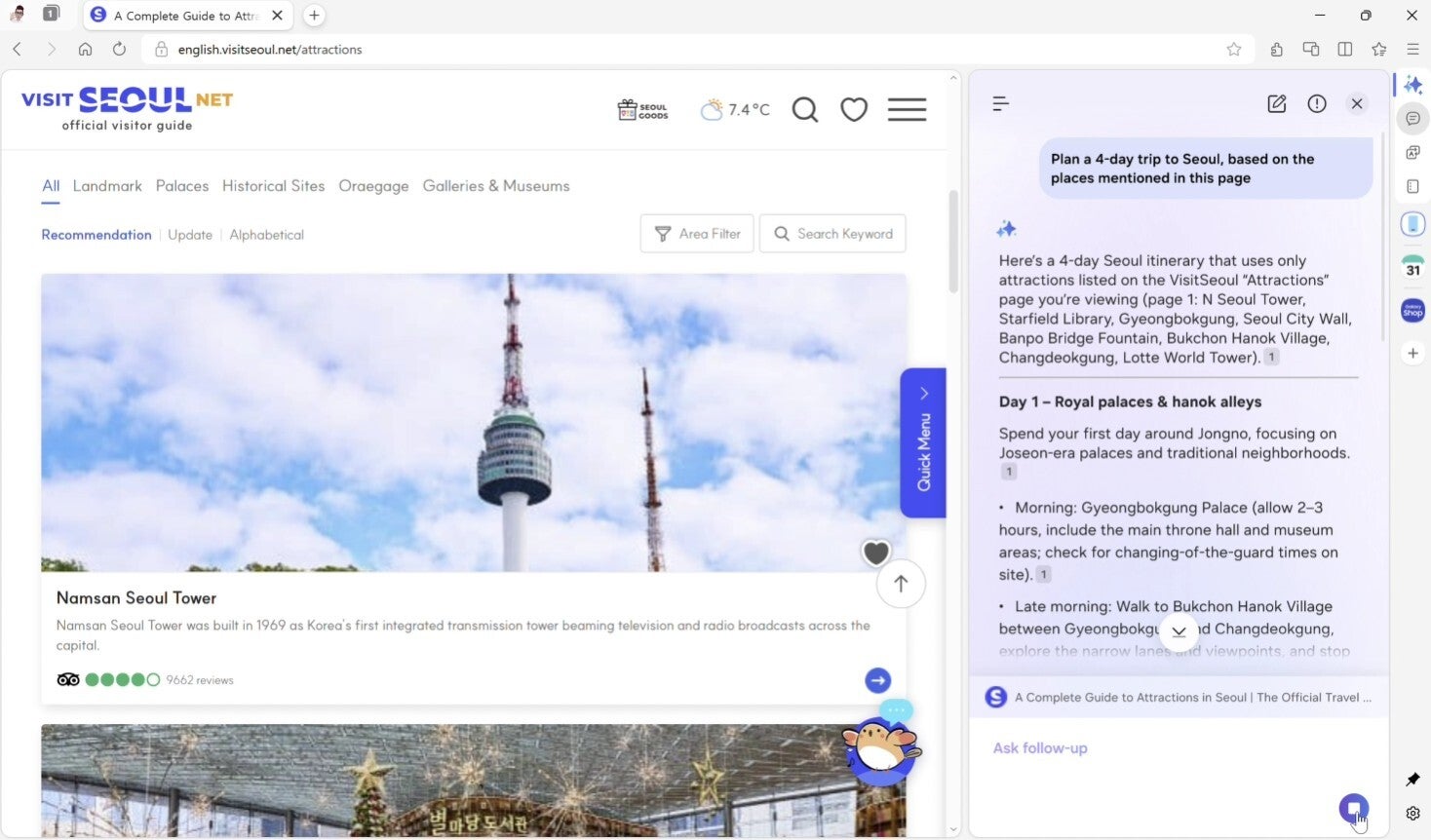
If you like to use AI to streamline your browsing experience, then I'm pretty sure you are going to like the Perplexity integration in the Samsung Browser. The AI tool also powers the new Bixby that's live in the One UI 8.5 update. In the browser, it understands the content being displayed on the screen and allows you to take action on it without much manual interference. The tech giant gave a couple of examples in its blog post explaining how this feature actually works.
For instance, if you're viewing a web page related to a trip to Seoul, you can trigger the AI assistant and give a command like, "Plan a full-day trip to Seoul based on the places mentioned on this page." The tool will take a few seconds and then come up with a response relevant to your command. You can also ask follow-up questions, like converting the trip plan into a table.
What's the one reason you would consider switching to Samsung Browser?
32 Votes
The Continuity features.
25%
The name of Samsung.
12.5%
Perplexity integration.
12.5%
I'm not switching to Samsung Browser.
50%
Everyone's favorite smartphone browser is now on Windows
Samsung Browser AI Assistant. | Image by Samsung
After Chrome and Safari, Samsung Browser is reportedly one of the most used browsers on smartphones. The incredible features that it offers are the main reason behind its more than 1 billion downloads on the Google Play Store alone. It has also received some noticeable changes recently, like getting its name changed from Samsung Internet to Samsung Browser on smartphones.
Now that it is available on Windows as well, I am pretty certain it will give tough competition to some of the top players like Google Chrome, Mozilla Firefox, and Microsoft's own Edge browser. I've always felt that Chrome is a bit resource-hungry. And while it is very early to comment on how the Samsung option will perform on Windows, in my initial impression, I found it to be pretty fast and consuming fewer resources than Chrome, as per the Task Manager data.
All that said, you can download Samsung Browser on your PC if it is running Windows 10 (version 1809 and above) or Windows 11. While the continuity feature is available to everyone, the AI upgrades are currently limited to selected countries, which include South Korea and the US. It will reportedly become available in other regions very soon.
Get iPhone 18 Pro with Visible, get $480 off!
$719
/mo
$1199
$480 off (40%)
On the Visible+ Pro plan, you get access to 5G Ultra Wideband data on Verizon's fastest network. Along with unlimited roaming across Mexico and Canada, 2 days of Global Pass per month, 3x hotspot speeds, 4K streaming, and Smartwatch service.
Aman Kumar is a news writer at PhoneArena covering Google Pixel phones, Android features, AI-powered smartphone tools, and mobile tech news. Before joining PhoneArena, he spent over five years writing about consumer technology for publications like MakeUseOf, How-To Geek, and Guiding Tech. His current daily drivers are the Pixel 10 and Samsung Galaxy S26 Plus, while his red iPhone SE (2nd gen) remains a personal favorite. Aman also appreciates bold smartphone experiments and still considers the Nokia N-Gage one of the industry’s most iconic designs.
A discussion is a place, where people can voice their opinion, no matter if it
is positive, neutral or negative. However, when posting, one must stay true to the topic, and not just share some
random thoughts, which are not directly related to the matter.
Things that are NOT allowed:
Off-topic talk - you must stick to the subject of discussion
Offensive, hate speech - if you want to say something, say it politely
Spam/Advertisements - these posts are deleted
Multiple accounts - one person can have only one account
Impersonations and offensive nicknames - these accounts get banned
To help keep our community safe and free from spam, we apply temporary limits to newly created accounts:
New accounts created within the last 24 hours may experience restrictions on how frequently they can
post or comment.
These limits are in place as a precaution and will automatically lift.
Moderation is done by humans. We try to be as objective as possible and moderate with zero bias. If you think a
post should be moderated - please, report it.
Have a question about the rules or why you have been moderated/limited/banned? Please,
contact us.













Things that are NOT allowed:
To help keep our community safe and free from spam, we apply temporary limits to newly created accounts: