One of the major advantages of Pixel phones over other Android devices is that they come with almost no bloatware. There are definitely some apps that come pre-installed on Google phones as well, but all of them are really useful. One of these is the My Pixel app, which is reported to get a very useful upgrade very soon.
What is the My Pixel app?
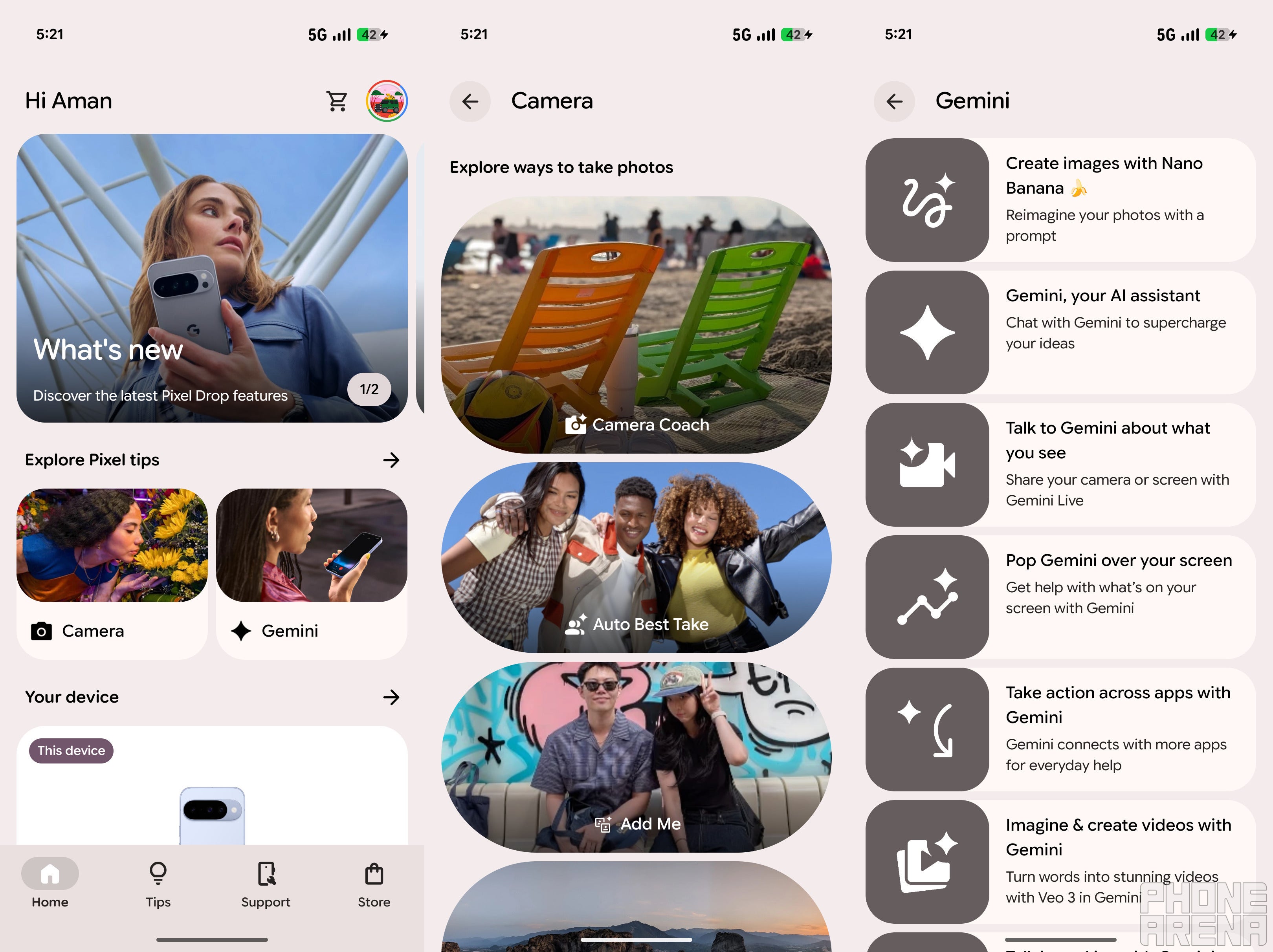
The My Pixel app is basically a guide for anyone who is new to the Pixel ecosystem. As the name suggests, it contains all the information about your Pixel smartphone. You can access it to learn more about the features of your smartphone.
For instance, you can open the app and check out how the recently introduced Camera Coach features work. You can also check out all the Gemini capabilities that your device supports, like learning how to create images with Nano Banana.
The bottom of the page also displays news related to Pixel devices. For instance, at the time of writing, this section includes a video that better describes everything new that was added in the March feature drop. Furthermore, there are Support and Store tabs as well.
You can access the Support tab to fix any ongoing issue with the device. The Store tab basically takes you to the Google Store, from where you can purchase different Google products like the Pixel Watch 4 or a case for your current Pixel phone. All in all, the My Pixel app is the go-to place to learn about almost anything you want to do on your Google Pixel phone.
The app has a big problem
Different categories of the My Pixel app. | Image by PhoneArena
The My Pixel app is definitely very useful, but it has a big problem – it doesn't have a built-in search feature. Since the platform contains a lot of menus and offers explanations for almost all the Pixel features, sometimes it can get a bit difficult to locate the thing you are looking for. You will often find yourself going through different categories to find a particular answer.
Recommended For You
What's the next upgrade you really want to see in the My Pixel app?
87 Votes
A dedicated AI assistant for fixing issues.
21.84%
Detailed battery-health tracking.
31.03%
Easier access to hidden Pixel features.
39.08%
More insights about the phone.
8.05%
A fix is apparently coming
The good news is that the tech giant has finally realized that an in-app search feature is very necessary and is working on it. Signs related to it have been reportedly spotted in the My Pixel app version 8.5.1.920713064. The strings that have been found while digging into the app code suggest that the search tool is internally called "Koda."
While it's not confirmed, there's a possibility that the app will start suggesting search queries when the feature actually becomes live. The strings that have been discovered show plenty of examples, which include how to customize the home screen, optimize battery, phone cases, 100x zoom, and screen spam calls.
The mention of phone cases might be an indication that the search tool might not be limited to only tips and features, but it will also include Google Store content. That's all the information available about the upcoming feature at the moment.
It would definitely make the app more user-friendly
When I switched from iPhone 15 to Pixel 10 last year, the My Pixel app really helped me a lot to understand the device completely. I initially thought it was a useless app, but once I started using it, I realized that it contains all the information about my phone. But honestly, that time I also thought that a built-in search tool would be really beneficial in the app.
Fortunately, that could be coming very soon. However, as mentioned above, the feature is apparently still in its very early stages, so there's no certainty on exactly when it could become live. All that said, I really hope that along with introducing such useful features, Google addresses all the performance issues that have been reported in Pixel phones recently.
Mint Mobile's 6-month plans now cost $10/mo
$10
/mo
$35
$25 off (71%)
Mint Mobile is celebrating its 10-year anniversary with a special offer on its six-month subscription plans. For a limited time, you can get your preferred tier (6GB, 17GB, 23GB or unlimited) for just $10/mo. That saves you between 50% and 71% on the carrier's mobile plans, making it way easier to recommend.
Aman Kumar is a news writer at PhoneArena covering Google Pixel phones, Android features, AI-powered smartphone tools, and mobile tech news. Before joining PhoneArena, he spent over five years writing about consumer technology for publications like MakeUseOf, How-To Geek, and Guiding Tech. His current daily drivers are the Pixel 10 and Samsung Galaxy S26 Plus, while his red iPhone SE (2nd gen) remains a personal favorite. Aman also appreciates bold smartphone experiments and still considers the Nokia N-Gage one of the industry’s most iconic designs.
A discussion is a place, where people can voice their opinion, no matter if it
is positive, neutral or negative. However, when posting, one must stay true to the topic, and not just share some
random thoughts, which are not directly related to the matter.
Things that are NOT allowed:
Off-topic talk - you must stick to the subject of discussion
Offensive, hate speech - if you want to say something, say it politely
Spam/Advertisements - these posts are deleted
Multiple accounts - one person can have only one account
Impersonations and offensive nicknames - these accounts get banned
To help keep our community safe and free from spam, we apply temporary limits to newly created accounts:
New accounts created within the last 24 hours may experience restrictions on how frequently they can
post or comment.
These limits are in place as a precaution and will automatically lift.
Moderation is done by humans. We try to be as objective as possible and moderate with zero bias. If you think a
post should be moderated - please, report it.
Have a question about the rules or why you have been moderated/limited/banned? Please,
contact us.













Things that are NOT allowed:
To help keep our community safe and free from spam, we apply temporary limits to newly created accounts: