Google doesn't always add completely new features to its apps; sometimes it restores things it removed, thinking users would like the change but later finding most users were unhappy. The latest feature the company is reintroducing is an easier way to switch between two SIMs when sending texts with Google Messages.
What's the issue with Google Messages currently
Google Messages was always convenient and friendly for those using dual SIMs on their smartphones. Once you were done writing your message, you simply had to tap the SIM icon next to the text box and select the SIM from which you wanted to send the message.
But I really don't know why the company changed this UI and made it a lot more complicated to switch between SIMs in Google Messages. Currently, you need to first launch the Messages app, select the person to whom you want to send the text, tap their profile, and then select your preferred SIM from the Send with switcher.
Basically, the current approach requires a lot of taps and is much more complicated than before.
Google might be rectifying its mistake
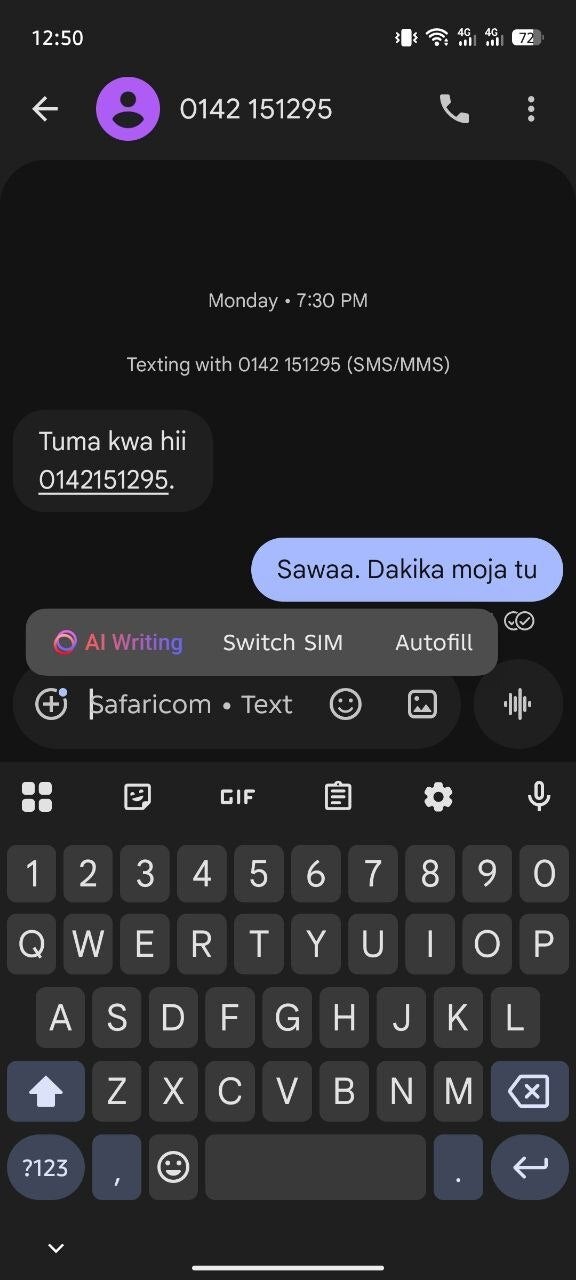
Switch SIM option in Google Messages. | Image by Piunikaweb
The good news is that Google has apparently realized that the current method of switching between two installed SIMs isn't the most convenient. While the company is not reverting to the previous UI, it has reportedly added a new design.
The change has been spotted in the beta build of the Google Messages app. You now simply need to tap and hold the compose box, and then a floating pop-up menu will appear with three options – AI Writing, Autofill, and Switch SIM.
Recommended For You
The addition of this Switch SIM option is definitely good news, but there's a catch that you need to be aware of. As it turns out, you would think that tapping on this option would instantly switch between the first and second SIM. But unfortunately this isn't the case.
Tapping the button actually takes you to the SIM picker option that you find in the profiles page of the contact to whom you want to send the text. So, basically you are still changing your active SIM from the same place; it's just that you have gotten a new shortcut to instantly reach that location.
That said, it isn't as though Google gave us a surprise out of nowhere by making this UI change. We already got a hint last year that something like this could happen very soon.
What's your biggest complaint about Google Messages lately?
42 Votes
Unnecessary UI changes.
21.43%
Unavailability of useful features.
40.48%
I don't have any issues with Google Messages at all.
7.14%
Availability of unwanted features like Gemini.
30.95%
There's a quality-of-life update as well
In addition to introducing a completely new SIM switch option, the latest beta build of the Google Messages app brings a small but important quality-of-life change as well. When both you and the person to whom you are trying to send the message have RCS enabled, then you will see "RCS message" written in the empty text field. When the other person doesn't have RCS Chat enabled, the text field will show "Text message."
In the latest beta build, the "Text message" visual from the empty text field has been replaced with the name of the active carrier. For instance, you might see "Airtel" written in the empty text field if it is selected as your active carrier.
It could have been more seamless
Using more than one SIM card isn't as common these days as it used to be before, but there's definitely a significant number of users who still use two SIMs on their phones. I remember having a Chinese smartphone in my childhood that allowed installing up to four SIM cards.
Anyway, people were really not happy with Google messing up the SIM switching UI in its messaging app for really no reason. A post on the Google Community forum clearly indicates that users really liked the previous design.
That said, the UI change that has been spotted in the beta build is definitely more practical than what is currently available, but I believe it could have been a lot more seamless. It would have been better if tapping the Switch SIM option had instantly switched to the other installed SIM.
Mint Mobile's 6-month plans now cost $10/mo
$10
/mo
$35
$25 off (71%)
Mint Mobile is celebrating its 10-year anniversary with a special offer on its six-month subscription plans. For a limited time, you can get your preferred tier (6GB, 17GB, 23GB or unlimited) for just $10/mo. That saves you between 50% and 71% on the carrier's mobile plans, making it way easier to recommend.
Aman Kumar is a news writer at PhoneArena covering Google Pixel phones, Android features, AI-powered smartphone tools, and mobile tech news. Before joining PhoneArena, he spent over five years writing about consumer technology for publications like MakeUseOf, How-To Geek, and Guiding Tech. His current daily drivers are the Pixel 10 and Samsung Galaxy S26 Plus, while his red iPhone SE (2nd gen) remains a personal favorite. Aman also appreciates bold smartphone experiments and still considers the Nokia N-Gage one of the industry’s most iconic designs.
A discussion is a place, where people can voice their opinion, no matter if it
is positive, neutral or negative. However, when posting, one must stay true to the topic, and not just share some
random thoughts, which are not directly related to the matter.
Things that are NOT allowed:
Off-topic talk - you must stick to the subject of discussion
Offensive, hate speech - if you want to say something, say it politely
Spam/Advertisements - these posts are deleted
Multiple accounts - one person can have only one account
Impersonations and offensive nicknames - these accounts get banned
To help keep our community safe and free from spam, we apply temporary limits to newly created accounts:
New accounts created within the last 24 hours may experience restrictions on how frequently they can
post or comment.
These limits are in place as a precaution and will automatically lift.
Moderation is done by humans. We try to be as objective as possible and moderate with zero bias. If you think a
post should be moderated - please, report it.
Have a question about the rules or why you have been moderated/limited/banned? Please,
contact us.






Things that are NOT allowed:
To help keep our community safe and free from spam, we apply temporary limits to newly created accounts: