Pixel users thinking about exiting the Android 16 QPR Beta program can do so now without having to wipe their devices as long as they didn't install Android 16 QPR3 Beta 1, which was released today by Google. If you already installed the update, it is the Beta for the March 2026 Pixel Drop, which means you should stick with the Beta until the stable version of Android 16 QPR3 is launched in March. Later in this article I'll explain how you can opt out and say adios to the Android 16 QPR Beta program.
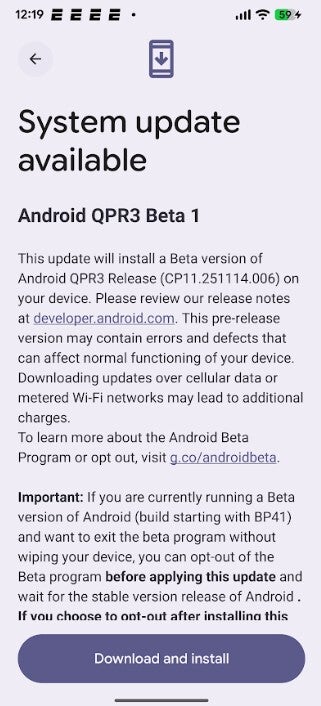
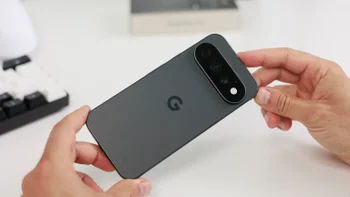
Google releases Android 16 QPR3 Beta 1. | Image credit-PhoneArena
These Pixel phones can install Android 16 QPR3 Beta 1
Android 16 QPR3 Beta 1 is build CP11.251114.006 and it comes with the 2025-12-05 security patch. It is available for the following Pixel models:
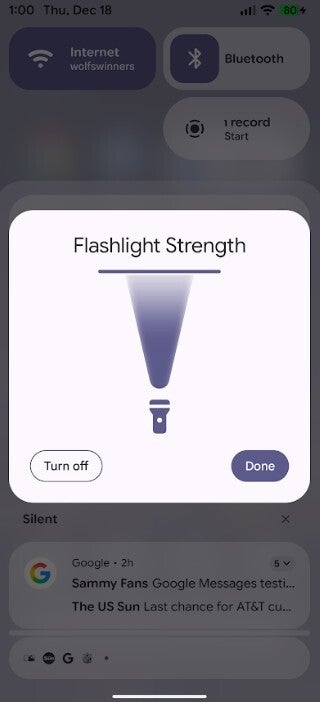
To install the update go to Settings > Software updates > System update. If you get a card for the update, tap the button at the bottom of the screen to start the Download and Installation process. One new feature is an improvement to the Pixel's flashlight. Opening the flashlight from the Quick Settings panel will reveal a new box for the feature that says Flashlight Strength on top.
Recommended For You
New flashlight controls found in Android 16 QPR3 Beta 1. | Image credit-PhoneArena
Your Pixel's flashlight can be stronger in Android 16
Swiping down on the bar at the top of the illustration of the flashlight's glow will reduce the strength of the light until it turns off. Swiping up until you reach the line on the top will make the light brighter and stronger. When you have the flashlight just the way you want it, tap on the Done button so that you can use the flashlight at your preferred setting. When you're done with the flashlight, tap the Turn off button.
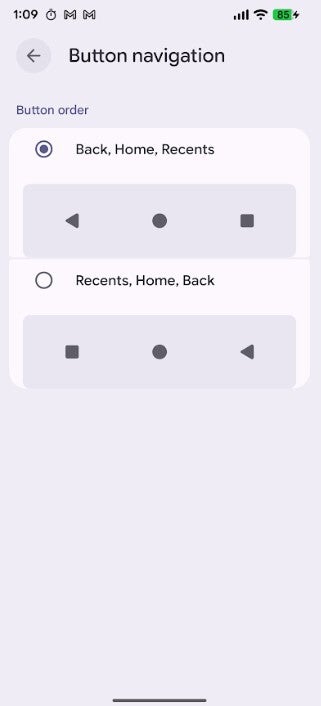
You can choose to flip the order of the Back and Recents icons in 3-button navigation. | Image credit-PhoneArena
Another change in the new Beta release will also allow you to switch the order of the navigation buttons if you use 3-button navigation instead of gesture navigation. The current order of the three buttons is Back, Home, and Recents. You can switch Back and Recents by going to Settings > System > Navigation mode. Look for the gear icon next to 3-button navigation. Press on the gear icon and you'll be given a choice whether to use the current Back, Home, and Recents or switch to Recents, Home, and Back.
Find out which apps are tracking your Pixel's location
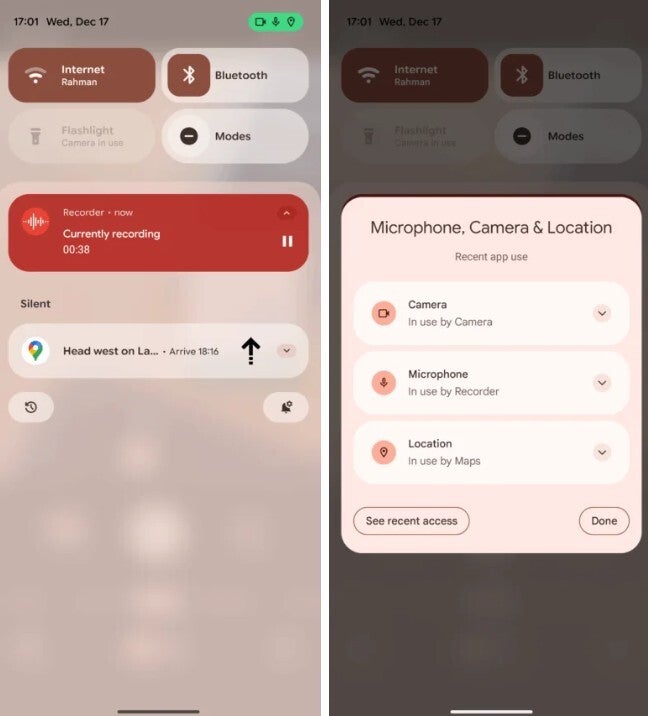
Android 16 QPR3 Beta 1 features the expandable location indicator which will show a blue location icon in the status bar if your Pixel's GPS is being used by an app. You'll see the indicator in the upper right corner of the display. Tap on it and it opens up to show you which of your apps is currently using your Pixel's camera, microphone, and GPS (location). From the pop-up you can revoke permissions or close the app so it won't follow you.
The expandable location indicator tells you which apps are tracking your location. | Image credit-Android Authority
If you see a solid blue chip in the status bar in the upper right corner, it means an app is accessing only your location. If an app is using your Camera or Microphone at the same time as your location, the indicator turns green.
How to leave the Android 16 Beta program without having to wipe your data
If you've received the update for Android 16 QPR3 Beta 1 and haven't installed it yet, you can exit the QPR beta program without having to wipe all of your data off of your phone. Do not do the following if you've installed Android 16 QPR3 Beta 1 or else you will lose all of your data. If you haven't installed the update, go to www.google.com/android/beta or tap on this link. When you get to the Android Program website, click the box that says, "View your eligible devices."
Are you exiting the Android 16 QPR3 Beta program?
14 Votes
Yes. Now is a good time to do so.
42.86%
No. I want to keep receiving Android 16 QPR3 Betas.
57.14%
You will be taken to a page with a picture of your Pixel. Underneath that image is a box that says Android 16 QPR2 Beta, opt out. If you want to take a break with the Beta program, tap on it. You will soon get a software update with stable Android 16 QPR2. Install it and you'll be back on the stable path of Android 16. You'll be able to rejoin the Beta program at any time.
Six-month unlimited plan is now 57% off
$90
$210
$120 off (57%)
Mint Mobile is now allowing you to get whichever plan you like for either three, six, or 12 months for just $15/mo. If you go for the six-month unlimited service, for instance, you'll now have to pay just $90 upfront instead of $210.
Alan, an ardent smartphone enthusiast and a veteran writer at PhoneArena since 2009, has witnessed and chronicled the transformative years of mobile technology. Owning iconic phones from the original iPhone to the iPhone 15 Pro Max, he has seen smartphones evolve into a global phenomenon. Beyond smartphones, Alan has covered the emergence of tablets, smartwatches, and smart speakers.
A discussion is a place, where people can voice their opinion, no matter if it
is positive, neutral or negative. However, when posting, one must stay true to the topic, and not just share some
random thoughts, which are not directly related to the matter.
Things that are NOT allowed:
Off-topic talk - you must stick to the subject of discussion
Offensive, hate speech - if you want to say something, say it politely
Spam/Advertisements - these posts are deleted
Multiple accounts - one person can have only one account
Impersonations and offensive nicknames - these accounts get banned
To help keep our community safe and free from spam, we apply temporary limits to newly created accounts:
New accounts created within the last 24 hours may experience restrictions on how frequently they can
post or comment.
These limits are in place as a precaution and will automatically lift.
Moderation is done by humans. We try to be as objective as possible and moderate with zero bias. If you think a
post should be moderated - please, report it.
Have a question about the rules or why you have been moderated/limited/banned? Please,
contact us.











Things that are NOT allowed:
To help keep our community safe and free from spam, we apply temporary limits to newly created accounts: