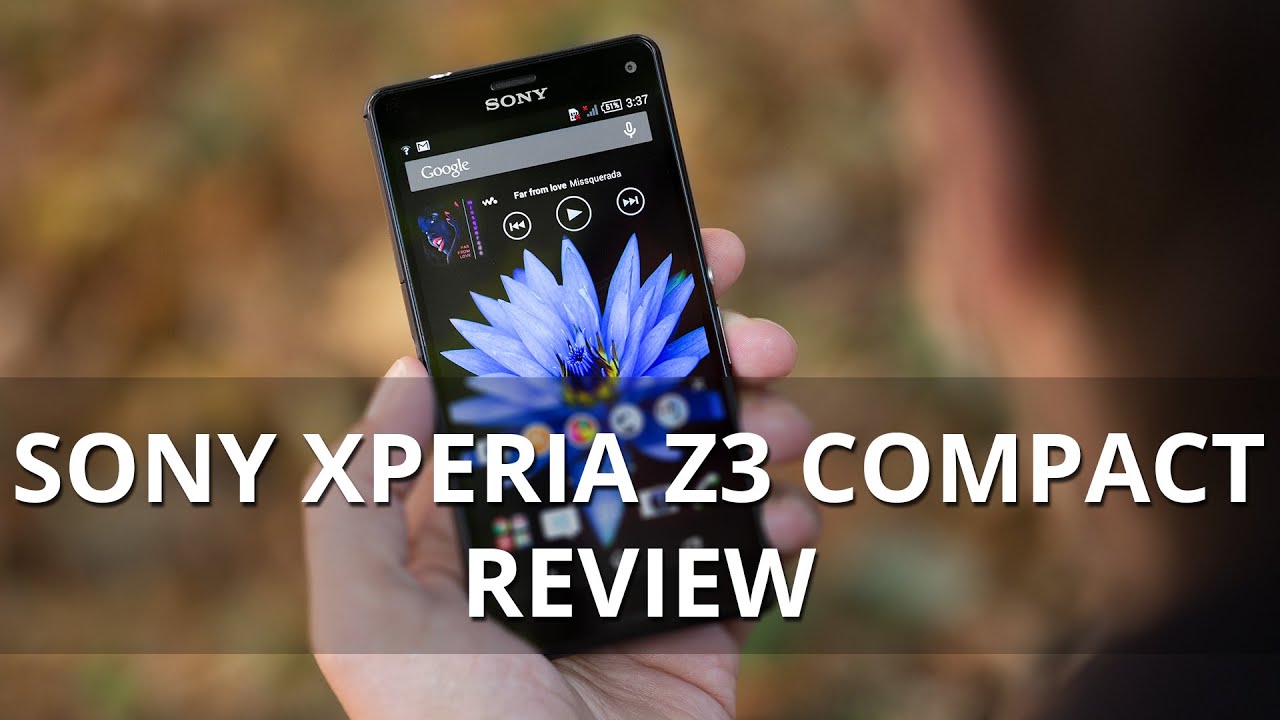
Sony Xperia Z3 Compact Review
You can now read:
Introduction
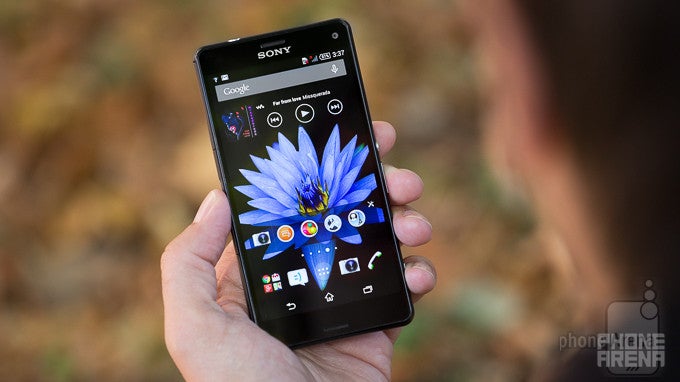
Compact in size, but not in performance: welcome to the Sony Xperia Z3 Compact.
Nearly a year after Sony released its first Xperia Z1 Compact following a simple recipe for a non-compromise flagship-grade device in a compact size, it’s time for its successor: the Z3 Compact. While last year’s Z1 Compact was in a class of its own, as practically all other Android manufacturers were making only cut-down versions of flagships that were just not as powerful or alluring, this year, competition has just started to appear. The Z3 Compact, however, has time on its side: Sony has tried to keep what people liked about the original Z1 Compact, and improved on the things that needed some polish. Despite getting a larger, 4.6” screen, the Z3 Compact remains just as petite and single-hand-use-friendly as the original, and it’s got an even faster processor and longer-lasting battery.
In the box:
- 1.5A wall charger
- Sony MDR-NC31E Digital Noise Cancelling headset (only included in some markets)
- User manual
- microUSB Cable
Design
With a mass exodus to larger screens and subsequently bigger devices all across the Android top-end, the spec-stuffed Sony Xperia Z3 Compact is a welcome change with its petite dimensions. In fact, it retains the same width and height as its 4.3” predecessor, while at the same time packing a more spacious, 4.6” display. This remarkable feat is achieved by reducing the screen bezel all-around, so that the screen can occupy 70% of the front side. Needless to say, such a compact 4.6” phone fits easily in pockets and is a pleasure to use with a single hand. Speaking of size, the Z3 Compact is also thinner than its predecessor - it clocks in at 8.6mm (0.34”) thickness, and it’s lighter as well.
In terms of materials, the Z3 Compact features tempered glass panels on the back and the front, which don’t get scratched as easily as the plastic panels on the Z1 Compact. The front now also matches the color of the backside - another minute detail that Sony has worked out in the Z3 Compact. Interestingly, Sony has embedded separate pieces of polycarbonate on the four edges of the phone, which should theoretically take the hit if you drop your phone and help it resist impact better.
We’ve left one of the best design features last: the Z3 Compact is waterproof and carries an IP68 certification. What this means is that Sony’s compact gadget is protected against dust and can withstand immersion in fresh water up to 5 feet deep for as long as 30 minutes. Nice!

5 x 2.56 x 0.34 inches
127 x 64.9 x 8.6 mm
4.55 oz (129 g)

5.75 x 2.83 x 0.29 inches
146 x 72 x 7.3 mm
5.36 oz (152 g)

5.59 x 2.85 x 0.32 inches
142 x 72.5 x 8.1 mm
5.11 oz (145 g)

5 x 2.56 x 0.34 inches
127 x 64.9 x 8.6 mm
4.55 oz (129 g)

5.75 x 2.83 x 0.29 inches
146 x 72 x 7.3 mm
5.36 oz (152 g)

5.59 x 2.85 x 0.32 inches
142 x 72.5 x 8.1 mm
5.11 oz (145 g)
See the full Sony Xperia Z3 Compact vs Sony Xperia Z3 vs Samsung Galaxy S5 size comparison or compare them to other phones using our Size Comparison tool.
Display
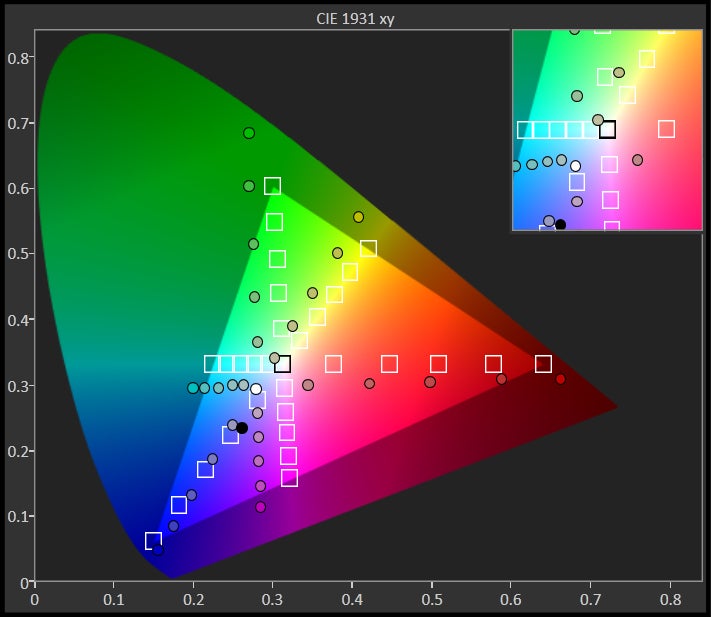
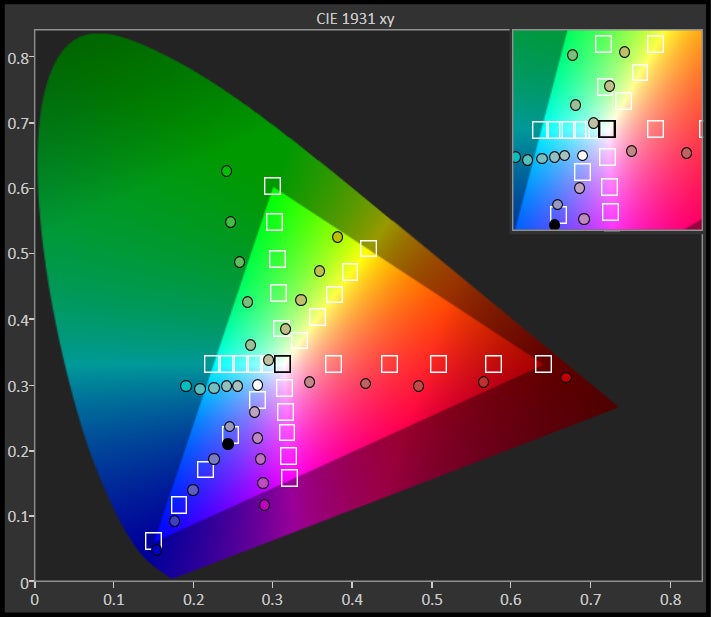
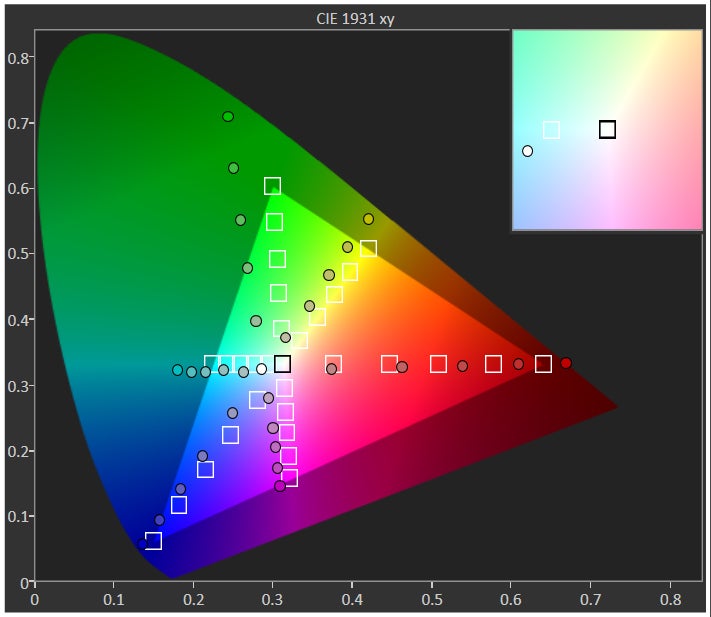
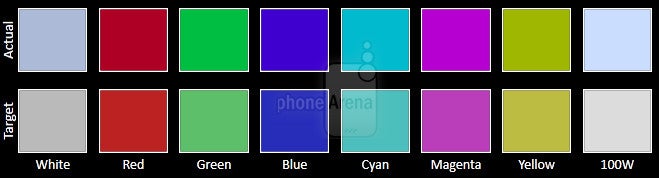
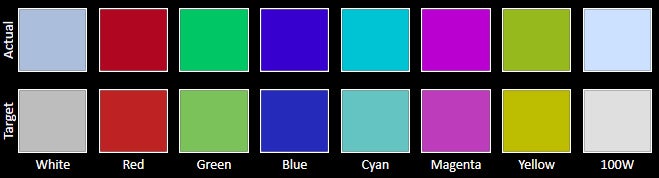
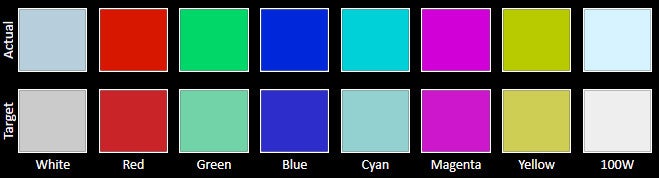
A 4.6” display in the same body as the 4.3” Xperia Z1 Compact is an impressive feat, but screen quality on the Z3 Compact is underwhelming.
The Z3 Compact comes with a 4.6-inch 720x1280 pixels IPS display featuring Sony’s TRILUMINOS technology. Some people would be disappointed with the fact that Sony has not gone for a 1080x1920 Full HD display (and yet others will point out that we already have Quad HD screens out there), and might be wondering whether a 720p resolution is not a critical flaw. The short answer is no - pixel density comes in at 319ppi, which translates into a fairly sharp picture. A little jagginess of pixels can be noticed when you read tiny fonts, but for common use and pretty much everything else, you won’t be bothered by pixelization. On the flip side, a 720p display consumes less energy, which in turn allows for a longer battery longevity.
Sony’s X-Reality is also on board and the feature boosts contrasts in the default picture and video apps, making for even more eye-popping colors. Naturally, this worsens rather than fixing color accuracy issues - colors are even less accurate in this mode.
It’s also worth mentioning that the screen features a ‘Glove-on’ mode that recognizes touch even when you operate it with your gloves on, but you first need to enable the feature in settings.



Interface and Functionality
The latest Android 4.4 KitKat is adorned with Sony's Xperia UI: a fast skin with nice first-party apps like Walkman, and even integration with PlayStation 4.
The Z3 Compact ships with the latest of Android, 4.4 KitKat, with Sony’s Xperia user interface on top. Sony’s skin is a fairly clean and clutter-free affair that stands out with its snappy speed of operation. It boasts zippy to-the-point animations and a selection of well-made Sony applications. The company has not gone for the current trend of flat looks, but nonetheless its user interface does not look outdated in any way.
The dropdown menu consists of the default notifications tab and a second ‘quick settings’ tab with various toggles. We would have preferred to have all of these in a single tab, as that would make access a bit quicker, but that might be just us.
The messaging follows the same route of simplistic, not overcrowded looks. We loved the fact that you can customize the stock keyboard and add quick access to symbols and numbers via a long hold, for instance.
There are quite a few novelties and Sony exclusives in the interface as well. First, a nice new option is to record your screen on video - just hold the power/lock key and select it. You can also have video from the front camera on top of that screen recording, a nice touch for those who make online tutorials for instance.
Processor and Memory
Compact, yet packing no compromises in terms of performance: flagship-grade 2.5GHz Snapdragon 801 with 2 gigs of RAM flies on the Z3 Compact.
The Sony Xperia Z3 Compact is a device of no compromises when it comes to hardware. It features the powerful Snapdragon 801 system chip, the same one as in the majority of other flagship devices. We’re happy to say that the Z3 Compact is impressively quick and boasts a buttery-smooth performance.
The particular processor is the MSM8974-AC version, manufactured on the 28nm HPm process. Here we have a quad-core Krait 400 processor running at up to 2.5GHz, and an Adreno 330 clocked at up to 578MHz. There is also 2GB of LPDDR3 RAM (truth be told, though, the larger Xperia Z3 comes with 3 gigs).
The Z3 Compact comes with 16GB of internal storage, of which around 12GB are actually available to the end user, but luckily you can expand the memory via microSD cards of up to 128GB. Note, however, that with recent changes in Android you no longer can simply copy say a game or an app you have to your microSD card when you run out of storage.
Internet and Connectivity
Chrome is the default browser, and with 4G LTE and a capable chip, surfing is a smooth ride.
The Z3 Compact ships with Chrome as the only built-in browser. Chrome stands out with its zippy loading speeds, nicely optimized for touch, card-based interface, and great cross-device syncing capabilities. In our experience, surfing the web was a smooth ride - pages load quickly, and zooming in and out happens without a stutter.
Camera
The 20-megapixel camera on the Z3 Compact delivers very good image quality with mostly nice colors and good detail. 4K video recording is also on board.
The Sony Xperia Z3 Compact comes with a 20.7-megapixel main camera with a single LED flash and a 2.2-megapixel front shooter. The main camera features a 1/2.3” sensor, the largest of all Android sensors out there. How big is it? Compared to, say, an average for a flagship, 1/3” sensor, it’s nearly 64% bigger. At the same time, because of the high megapixel count, pixel size comes in at the pretty small 1.1 micron pixels. In terms of optics, Sony's G lens is one of the widest lenses we’ve seen on Android - a 25mm one. While great for shooting landscapes or in a small room (more content gets into the frame), this is a bit of an extreme lens that takes some getting used to the width of the shots at first. Aperture is set at f/2.0, making this also one of the fastest smartphone lenses out there.
That’s hardly all the modes, though: you have camera tricks with augmented reality that detects the geometry of the scene and can make animated dinosaurs appear on top of your image or what not (fun features with little practicality). Tou have live YouTube streaming via the Social life mode, a straightforward option that would be very useful to some. You have a creative effect for various fun filters and overlays; there is the Sound Photo that records sound along with the picture. And then Multi Camera records simultaneously from both the front and rear cameras. Then, you have modes that duplicate other modes to complicate things even further: for instance, you can enable burst shots in the settings, but you also have a Timeshift mode that captures 30 shots in 2 seconds (tip: Timeshift will start shooting even before you press the shutter key).
What about the image quality? As we said, we recommend using the simple 8-megapixel images captured in Superior Auto in most cases. Images in it look very good, with lively color and plentiful detail. Pictures are not perfect though, and the camera occasionally - rarely - misjudges colors (you can see the cold-looking pictures of the cars below, for instance), but they are definitely on par with what most other flagships offer. Indoors, the camera does a very good job as well, keeping noise at a reasonable level and colors are pleasingly balanced. With the flash on we do get a very slight blue cast (no dual-tone flash here), but on the whole picture quality is good.
The sweep panorama option is still a big disappointment - images come out with a low resolution, lacking sorely in detail. Sony also brags about adding an ISO settings as high 12800 for Low Light mode for still images, which should help if you shoot in pitch dark. In other modes, ISO peaks at around ISO 3200, and ISO 2000 is the maximum in night scene mode for video.
Up front, there is a 2.2-megapixel shooter that does a decent (but not stellar job) with selfies.
Sony Xperia Z3 Compact sample images
Sony Xperia Z3 Compact sample videos
Multimedia
The bluish display takes out a bit of the video experience, but for all else, media looks good on the Z3 Compact.
Sony brings its Walkman app for music. Apart from doing all that a typical music app should do - namely, categorize your music by albums, artists, songs, and so on; allow you to view your songs per folder; give you an equalizer to tweak the sound - the Walkman app also has some brand new signature Sony features. The most notable one is support for the Digital Sound Enhancement Engine (DSEE) HX codec. This codec allows you to play compatible files at close to high-resolution audio quality. In combination with the new, 5-pin headset jack, you can pick up a pair of Sony MDR-NC31EM earbuds (bundled in the box with the Z3 Compact in select regions), and enjoy this hi-res audio with noise cancellation.
Thankfully, Sony has also increased the volume output of the speakers, something that was an issue with the quiet Z1 Compact speakers. In the Z3 Compact we have dual, front-firing, stereo speakers with what goes by the bombastic “S-Force Front Surround” name. This is the same tech that Sony debuted in the Z2 half a year ago.
In terms of sound quality, though, sound comes out a bit muffled - be it because of the water-sealing of the device or another reason - and in an ideal world, we’d like a bit more clarity and depth.
Sony’s video player gets the job done with a bit of extra flare - you get to see a short sequence of every video as a live thumbnail, so you get an idea about its contents. That’s a nice touch. For all else, you have fairly rich codec support, and we could play all files we threw at the player with ease.
Call Quality
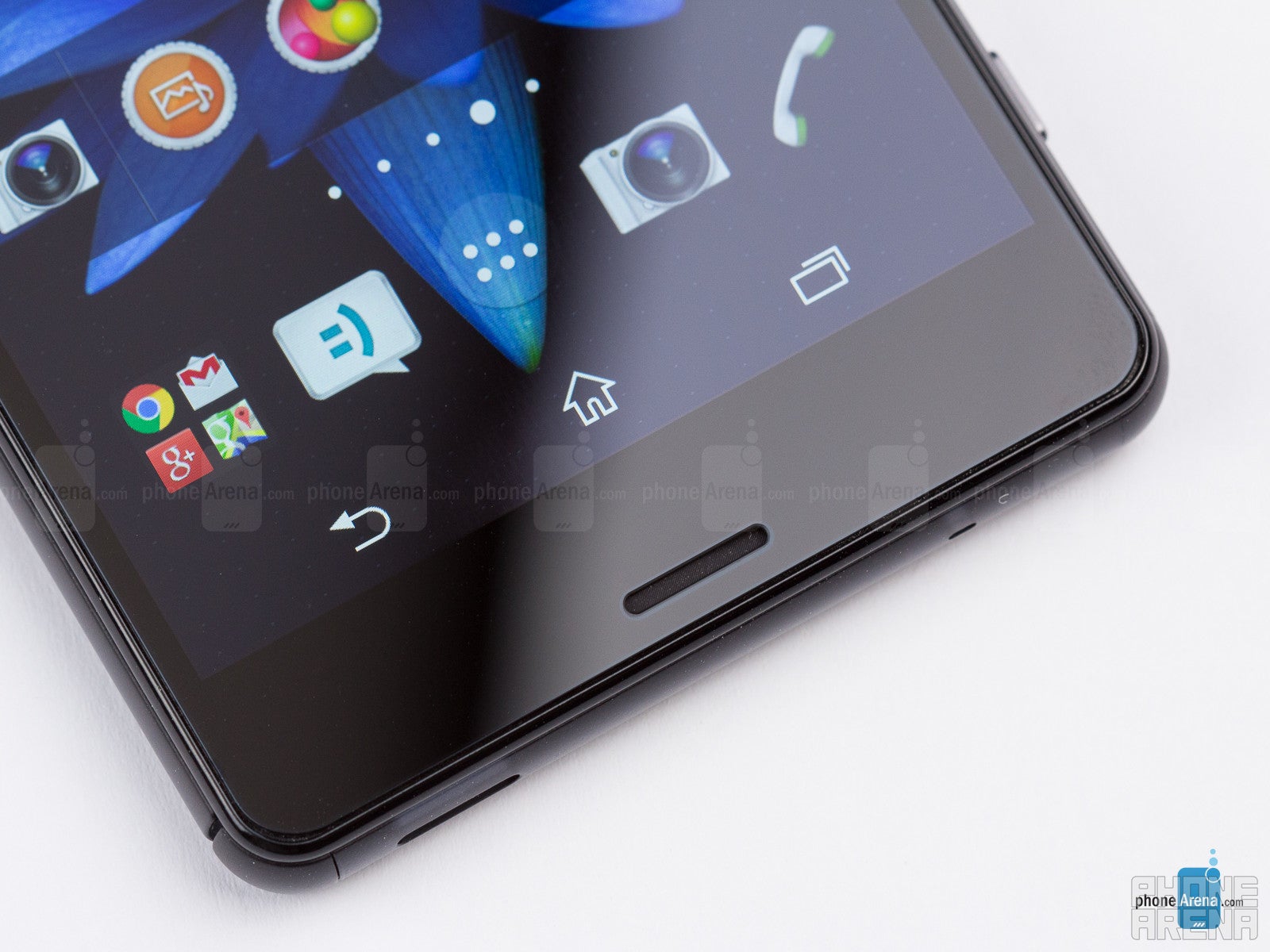
On the other end of the line, call quality is excellent. The microphone conveys voices clearly and loudly. There are in fact two microphones on the
Battery life
We have concluded our own testing of the Xperia Z3 Compact, where we run a custom script that replicates a real-life load on the device. Unlike in real life, though, our test has the phone running without interruption. The results are in and they are impressive: the Xperia Z3 Compact scored highest amongst all non-phablet smartphones with a battery result of 10 hours and 2 minutes. This testifies to Sony's promises for two-day battery life, and we're happy to finally be in that territory with our smartphones.
We’re also very happy to see that Sony has added a new Ultra STAMINA mode that blacks out wallpapers and leaves only barebones functionality. This is made to squeeze the most out of your battery, in a manner similar to what Samsung first did with its Ultra Power Saving Mode. Thus with a 40% left of charge, the Z3 Compact in Ultra STAMINA mode claims it can last for more than 4 days.
Here are all the apps that are available when you are in Ultra STAMINA mode: Phone, Contacts, Messaging, Camera, Album, Calendar, Alarm & Clock, Calculator, FM Radio. The browser is sorely missing, but camera is there. It’s all about compromise. Keep in mind that Sony’s implementation is also a bit clunkier than others’ as deactivating ultra stamina mode will actually force-restart your device.
We have also run a test to see how fast the phone recharges. Unfortunately, it seems that the Z3 Compact does not feature any kind of the new QuickCharge technologies that allow a very fast charge-up of the phone. You'd need to wait nearly 3 hours and a half for a full re-charge of the handset's 2,600mAh battery.
Conclusion
The Xperia Z3 Compact takes the successful formula of the Z1 Compact and makes it better in practically every way: the glass panel contributes to a more premium feel, colors are livelier, and the handset is thinner, lighter and water-proof; it keeps the same petite dimensions, but gets a larger, 4.6” screen; the processor is the newer and faster Snapdragon 801; the camera is a good performer; and the battery is a class above most.
The topping on the cake is price: the Z3 Compact launches with a full retail price of Euro 499, nearly 25% cheaper than a flagship. It’s also much cheaper than its main Android rival - the Samsung Galaxy Alpha, which starts at €599. The Galaxy Alpha is similar in terms of features and premium design, but its price swings the scales in Z3 Compact’s favor.
In the land of ‘minis’, the HTC One mini 2 looks like the most viable alternative: it’s got great design as an advantage, and a decent camera, but it’s underpowered in comparison with the Z3 Compact. The Galaxy S5 mini lacks the premium design, but is also a well-rounded ‘mini’. Both alternatives have a much lower price that plays to their advantage, though.
Another phone of a similar size and premium looks is the Apple iPhone 6, but the new iPhone is even more expensive. We, however, consider the iPhone 5s a worthy alternative, too - it’s still more expensive than the Z3 Compact, but it has Apple’s rich ecosystem of apps and games on its side.
You can now read:


Popular stories


Latest News



Things that are NOT allowed:
To help keep our community safe and free from spam, we apply temporary limits to newly created accounts: