Ovla makes it possible to blend text with photos organically
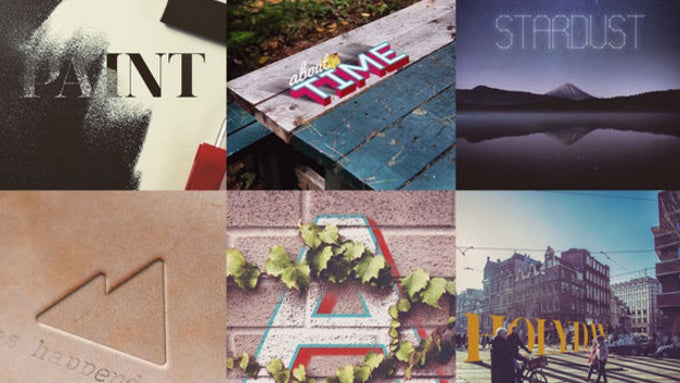
Adding thoughtful text to an image can really make it special, but with most apps, you can only add a few fonts and it's hard to blend this text onto the image, so that it looks organic.
Add a message to your images
OVLA comes as a solution to all those problems: it features 18 fonts, but where it excels is the way it blends them into the image, making the text feel almost as if it was there when you took the picture. You can emboss, distort and add 3D effects to your image text, but most importantly you can tweak every little thing about their positioning: color, location, angle, alignment, bending, space between letters/lines, blending and so on.When you nail the effect the right way, a photo can feel more like an artwork and convey a message that would otherwise be hard to share.
OVLA (pronounced as ovelay-a) is available on iPhones and iPads for a $1 price, and you can check it out right below.

Follow us on Google News

Popular stories





Latest News

Things that are NOT allowed:
To help keep our community safe and free from spam, we apply temporary limits to newly created accounts: