Google recently released the March feature drop to all eligible Pixel devices. The update brings plenty of exciting upgrades, like the new Now Playing app, the ability to create custom icons using AI, Magic Cue for Google Messages, and more. Unfortunately, the March update also appears to bring an annoying bug that affects the 80% battery limit feature on Pixel devices.
Charging the last few percentages is taking hours on Pixel phones
With the December 2024 Feature Drop, Google introduced an option to limit charging on Pixel smartphones to 80%. When enabled, the phone charges at its normal pace until the battery reaches 80% capacity, at which point charging stops automatically. All this is done to keep the device's battery healthy for longer.
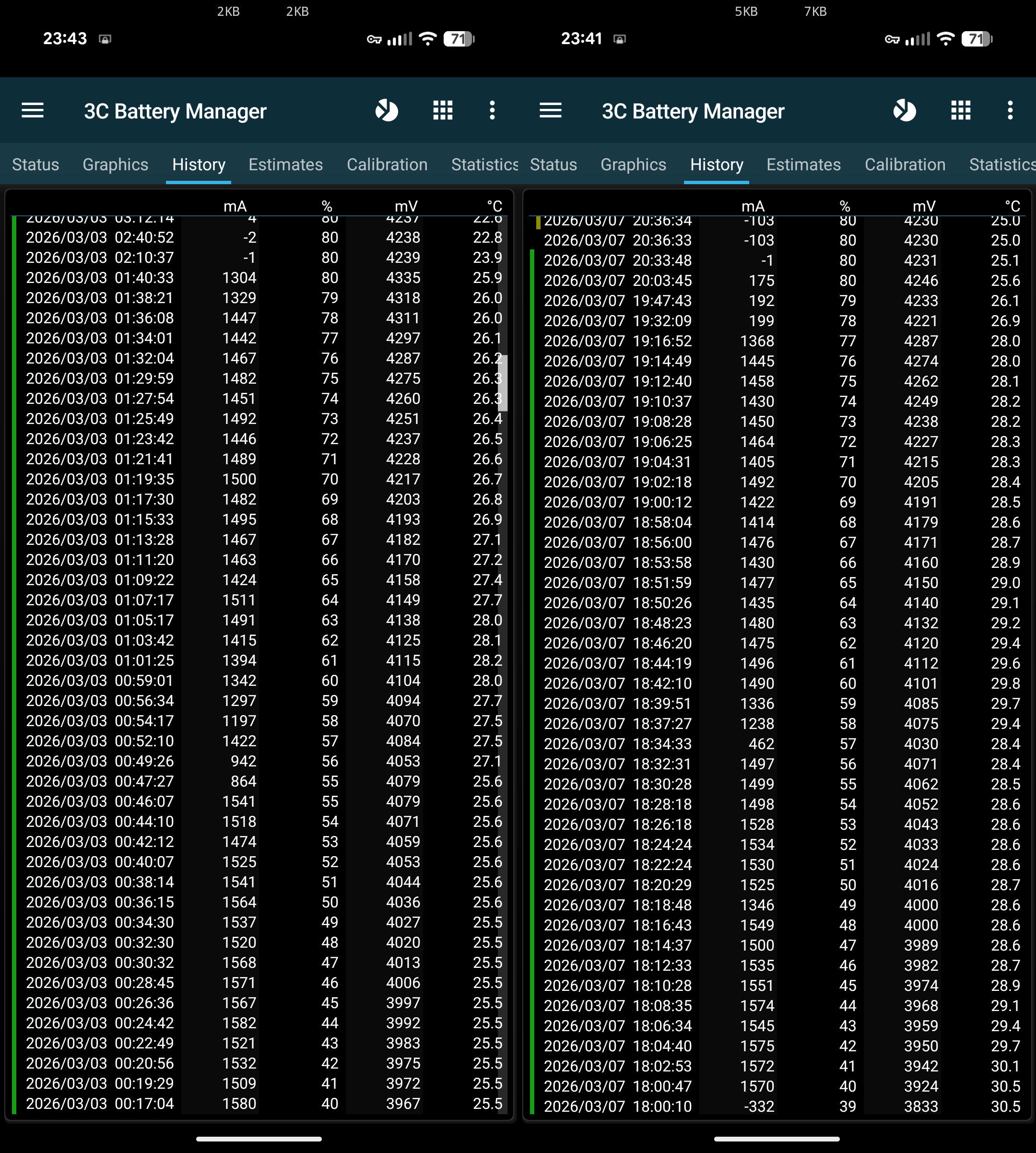
However, after downloading the March 2026 update, many users are reporting that their Google phones with the charging limit feature enabled are taking almost an hour to charge the last remaining 2-3% from 80%. A Redditor mentioned that their device took almost 47 minutes to go from 77% to 80%. Before the update, charging the same remaining 3% took only around 6 minutes. A faulty charger is definitely not to blame, as they reportedly used the same 7.5 W A-to-C charger both times. Another user commented that their Pixel took almost 30 minutes to go from 78% to 80% charge.
Recommended For You
The issue isn't limited to a particular model. Users have reported it on the latest Pixel 10 series, Pixel 9 lineup, and several older Pixel lines as well. This clearly indicates that the problem stems from a software bug introduced in the March update, rather than a hardware issue affecting only specific Google phone models.
That's exactly how the feature is intended to perform, as per Google
Time taken by Pixel to charge from 77% to 80% before and after the update. | Image by Redditor andyooo
While most of the affected users are certain that the slow charging is being caused by a bug in the latest Pixel update, Google disagrees. The same issue was also recently reported on the Issue Tracker. A comment under this post, which appears to be from a Google employee, says that this behavior isn't caused by any bug. Instead, it's exactly how the 80% charge limit feature is designed to function.
It has been further noted that "in the current software build, the device charges at normal speed until it reaches approximately 77%, at which point it transitions to a lower current to reach the final 80% limit." However, the comment also mentions that "we (Google) are currently working on optimizing the user experience."
Are you going to install the March Feature Drop knowing it slows down charging on your Pixel?
94 Votes
Yes, as I can't wait to try the features it brings.
9.57%
I'd wait until this is fixed.
40.43%
I've already installed the update and regret it.
28.72%
I don't use charge limit, so I'll install the update.
21.28%
Something seems fishy
Google says the latest software update reduces your Pixel's charging speed near the limit to manage battery health. I can't thank you enough for that, Google. But does that mean that prior to this update, the feature wasn't actually helping maintain battery health?
I wouldn't have minded if just a couple of extra charging minutes had been added. For instance, charging the remaining 3% up to the 80% limit could have taken around 10-12 minutes instead of the previous 5-6 minutes. But taking almost an hour to go from 77% to 80% feels comically slow.
Some of you might say, "Why not simply unplug the charger at 77%? The remaining 3% wouldn't give more than 10 to 15 minutes of screen time." But why settle for something you know was performing well but has been made a pain without any reason?
All that said, the only solution you have right now is to turn off the charging optimization option, which will eventually make your phone charge to 100% instead of stopping at 80%. As aforementioned, the tech giant is said to be working on optimizing the user experience of this capability. Let's hope that by this they mean the engineers are working to reduce the time your Pixel currently takes to juice up the last few percent of the battery with the charge limit enabled.
Tello Halloween Promo: $10GB for $10/mo
Don’t miss this scary-good deal: 10 GB for $10/mo. Save $5/mo for your first 3 months. Offer valid now through November 9, 2026.
Aman Kumar is a news writer at PhoneArena covering Google Pixel phones, Android features, AI-powered smartphone tools, and mobile tech news. Before joining PhoneArena, he spent over five years writing about consumer technology for publications like MakeUseOf, How-To Geek, and Guiding Tech. His current daily drivers are the Pixel 10 and Samsung Galaxy S26 Plus, while his red iPhone SE (2nd gen) remains a personal favorite. Aman also appreciates bold smartphone experiments and still considers the Nokia N-Gage one of the industry’s most iconic designs.
A discussion is a place, where people can voice their opinion, no matter if it
is positive, neutral or negative. However, when posting, one must stay true to the topic, and not just share some
random thoughts, which are not directly related to the matter.
Things that are NOT allowed:
Off-topic talk - you must stick to the subject of discussion
Offensive, hate speech - if you want to say something, say it politely
Spam/Advertisements - these posts are deleted
Multiple accounts - one person can have only one account
Impersonations and offensive nicknames - these accounts get banned
To help keep our community safe and free from spam, we apply temporary limits to newly created accounts:
New accounts created within the last 24 hours may experience restrictions on how frequently they can
post or comment.
These limits are in place as a precaution and will automatically lift.
Moderation is done by humans. We try to be as objective as possible and moderate with zero bias. If you think a
post should be moderated - please, report it.
Have a question about the rules or why you have been moderated/limited/banned? Please,
contact us.














Things that are NOT allowed:
To help keep our community safe and free from spam, we apply temporary limits to newly created accounts: