The number of upgrades Google Messages has received recently clearly indicates that it is currently at the top of Google's priority list. The latest update to the app brings a much-needed behavior change to its smart reply feature. Here's everything you need to know about this change and why I think it should have been this way since the day it was introduced.
Have more control over your messages
In 2018, Google rolled out the smart reply feature to its messaging app. When enabled, the app reads the last message you received and then uses on-device AI to suggest relevant responses. For instance, if you receive a message asking about your health, the feature might suggest replies like "I'm doing great" or "I'm not feeling good today."
While this sounds great on paper, I've always felt that this feature needs a slight behavior change. You see, whenever you tap one of the suggested smart replies, Google Messages automatically sends it. It's like you show a little interest in a particular shirt in a clothing store, and the shopkeeper instantly creates a bill for it.
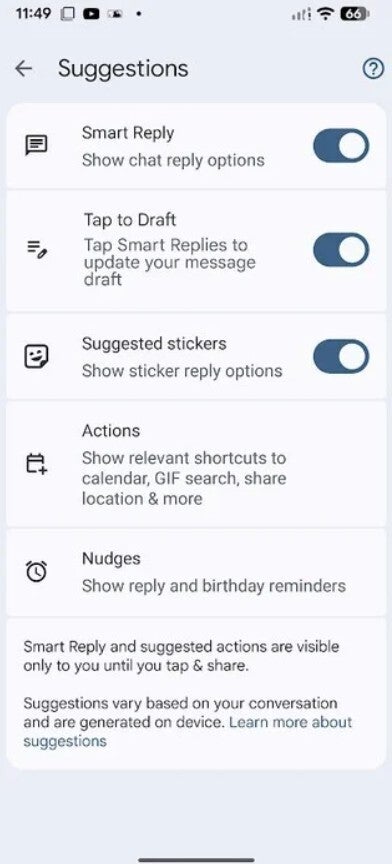
Instead, it should work like this: when you tap a smart reply, it loads into the text field, and then you can send it manually if you want or edit it and add extra details if needed. Fortunately, Google has realized this is the ideal approach and introduced a new "Tap to Draft" option in its messaging app.
Recommended For You
It can be enabled by navigating to Message Settings > Suggestions > Tap to Draft. If you've disabled its toggle, the previous behavior takes over – a smart reply will be sent automatically when you tap it.
Which recent Google Messages upgrade do you love the most?
50 Votes
Tap to Draft toggle.
32%
Copy only what you want.
32%
An easier way to create groups.
4%
Ability to check message edit history.
8%
Real-time location sharing.
24%
It was actually a much-needed change
Tap to Draft toggle in Google Messages. | Image by PhoneArena
Ever since its introduction, I have used the smart reply feature almost daily. Even so, I often tapped on one of the suggested replies, thinking the app would let me edit it, only to end up sending a follow-up text to clarify or add extra information I had initially intended to include in an already sent smart reply.
Some of you might say that you use Google Messages' edit function to add pertinent information to an already sent smart reply. But don't you think that's extra labor that could have been easily avoided if the tech giant had taken the approach of drafting the smart reply instead of sending it automatically?
Fortunately, after several years, Google has finally realized that the majority of users would prefer to draft a smart reply before sending it instantly. As a result, the company has introduced this change. I've spotted the new "Tap to Draft" option in the beta build 20260303_00_RC00. It will likely become available in the stable version of the app in the coming days.
Six-month unlimited plan is now 57% off
$90
$210
$120 off (57%)
Mint Mobile is now allowing you to get whichever plan you like for either three, six, or 12 months for just $15/mo. If you go for the six-month unlimited service, for instance, you'll now have to pay just $90 upfront instead of $210.
Aman Kumar is a news writer at PhoneArena covering Google Pixel phones, Android features, AI-powered smartphone tools, and mobile tech news. Before joining PhoneArena, he spent over five years writing about consumer technology for publications like MakeUseOf, How-To Geek, and Guiding Tech. His current daily drivers are the Pixel 10 and Samsung Galaxy S26 Plus, while his red iPhone SE (2nd gen) remains a personal favorite. Aman also appreciates bold smartphone experiments and still considers the Nokia N-Gage one of the industry’s most iconic designs.
A discussion is a place, where people can voice their opinion, no matter if it
is positive, neutral or negative. However, when posting, one must stay true to the topic, and not just share some
random thoughts, which are not directly related to the matter.
Things that are NOT allowed:
Off-topic talk - you must stick to the subject of discussion
Offensive, hate speech - if you want to say something, say it politely
Spam/Advertisements - these posts are deleted
Multiple accounts - one person can have only one account
Impersonations and offensive nicknames - these accounts get banned
To help keep our community safe and free from spam, we apply temporary limits to newly created accounts:
New accounts created within the last 24 hours may experience restrictions on how frequently they can
post or comment.
These limits are in place as a precaution and will automatically lift.
Moderation is done by humans. We try to be as objective as possible and moderate with zero bias. If you think a
post should be moderated - please, report it.
Have a question about the rules or why you have been moderated/limited/banned? Please,
contact us.













Things that are NOT allowed:
To help keep our community safe and free from spam, we apply temporary limits to newly created accounts: