When the March Pixel Drop was announced earlier this month, Google gave only a cursory mention to transit alerts. This was quickly followed by a support document regarding the new Transit mode. The features are now rolling out widely, perAndroid Authority.
Automatically tweaking commute setting
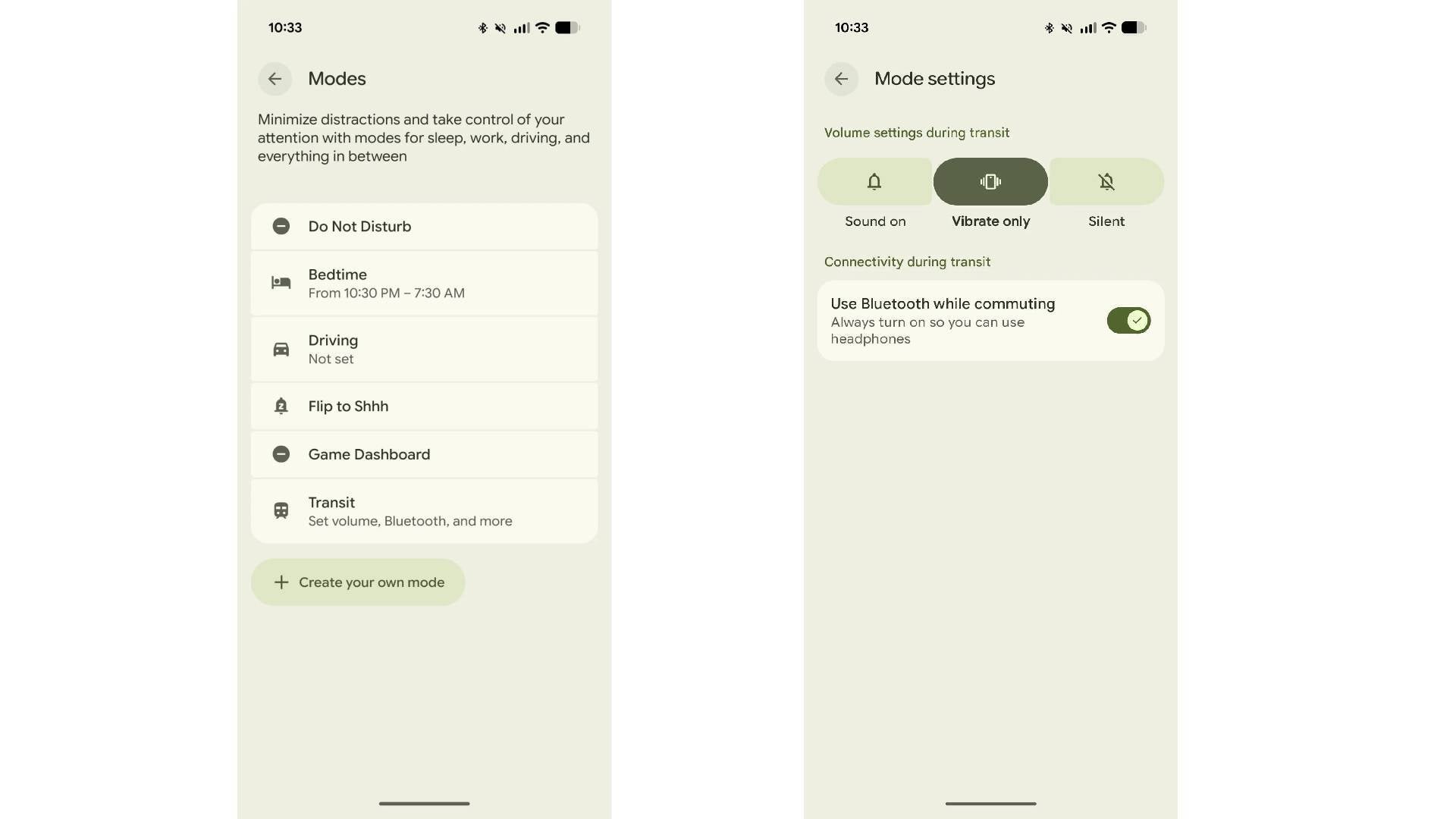
Pixel Transit Mode settings. | Image by 9to5Google
The growing list of custom notification modes on Google's Pixel handsets lets you manage how alerts are delivered throughout the day.
The new Transit mode lets you create a specific profile for your commute. You can configure it to adjust volume, automatically enable Bluetooth, limit notifications, and silence interruptions like alarms.
The goal is to eliminate the need to fiddle with settings every time you travel. Instead of manually toggling Bluetooth to connect your earbuds, you can rest assured it will already be active.
To set up the mode, you simply add your home and work address, and allow access to background location and to Google Timeline or location history.
Real-time commute info
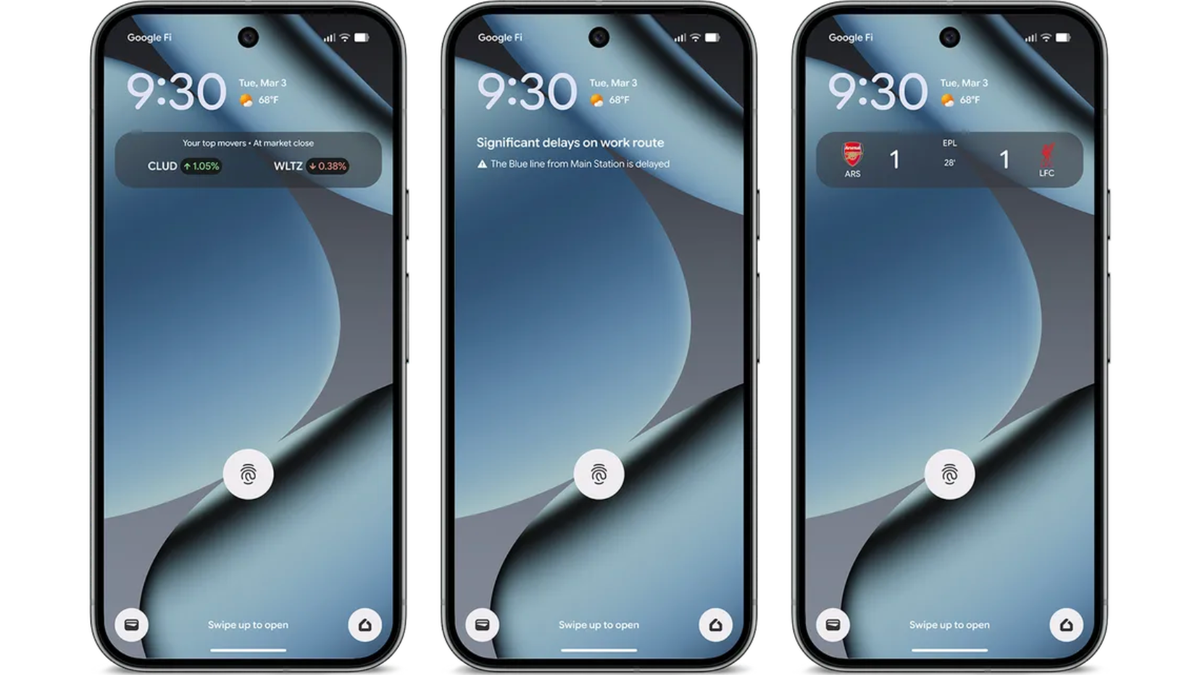
In addition to managing device behavior during your travels, the March 2026 Pixel Drop introduced real-time transit info to the At a Glance widget. This displays live commute conditions, such as delays, directly on your screen.
Your phone may take a few weeks to learn your routine, after which it will begin surfacing these updates on your home screen and lock screen.
Both features can be accessed under the Modes menu, which lives in Settings. They are available on the Pixel 7 and newer handsets.
Recommended For You
What do you find Pixel Modes helpful for?
26 Votes
Minimizing distractions.
15.38%
Not having to fiddle with settings every time.
19.23%
I forgot they existed.
38.46%
For invading my privacy.
26.92%
Getting more out of your Pixel
As our screen time increases, so does the complexity of how we use our devices at different times of the day. This is where Pixel Modes shine, ensuring your preferred settings activate based on your activity.
Custom settings are especially useful during a morning commute when most of us are rushing out the door without the time to adjust settings manually.
Seamless experience comes at a price
Automating these tweaks is about more than just convenience. By kicking in automatically, Transit mode reduces distractions when you are on the move.
This aligns with the broader push by manufacturers to make devices more helpful. By adapting itself to the situation without user input, the Pixel blends seamlessly into your lifestyle.
However, while Transit mode promises a more peaceful journey, it is another instance of users granting devices deeper insight into their lives, including their travel patterns. The phone no longer just reacts to your needs, it anticipates them. At the very least, it might spare you the angry glares of fellow commuters when an alarm goes off at the wrong time.
Get iPhone 18 Pro with Visible, get $480 off!
$719
/mo
$1199
$480 off (40%)
On the Visible+ Pro plan, you get access to 5G Ultra Wideband data on Verizon's fastest network. Along with unlimited roaming across Mexico and Canada, 2 days of Global Pass per month, 3x hotspot speeds, 4K streaming, and Smartwatch service.
Anam Hamid is a computer scientist turned tech journalist who has a keen interest in the tech world, with a particular focus on smartphones and tablets. She has previously written for Android Headlines and has also been a ghostwriter for several tech and car publications. Anam is not a tech hoarder and believes in using her gadgets for as long as possible. She is concerned about smartphone addiction and its impact on future generations, but she also appreciates the convenience that phones have brought into our lives. Anam is excited about technological advancements like folding screens and under-display sensors, and she often wonders about the future of technology. She values the overall experience of a device more than its individual specs and admires companies that deliver durable, high-quality products. In her free time, Anam enjoys reading, scrolling through Reddit and Instagram, and occasionally refreshing her programming skills through tutorials.
A discussion is a place, where people can voice their opinion, no matter if it
is positive, neutral or negative. However, when posting, one must stay true to the topic, and not just share some
random thoughts, which are not directly related to the matter.
Things that are NOT allowed:
Off-topic talk - you must stick to the subject of discussion
Offensive, hate speech - if you want to say something, say it politely
Spam/Advertisements - these posts are deleted
Multiple accounts - one person can have only one account
Impersonations and offensive nicknames - these accounts get banned
To help keep our community safe and free from spam, we apply temporary limits to newly created accounts:
New accounts created within the last 24 hours may experience restrictions on how frequently they can
post or comment.
These limits are in place as a precaution and will automatically lift.
Moderation is done by humans. We try to be as objective as possible and moderate with zero bias. If you think a
post should be moderated - please, report it.
Have a question about the rules or why you have been moderated/limited/banned? Please,
contact us.













Things that are NOT allowed:
To help keep our community safe and free from spam, we apply temporary limits to newly created accounts: