Saving your parking location in Google Maps has been available across platforms for a very long time. However, unlike some other navigation apps, you needed to do that manually, either by going through the menus on your phone or via a pop-up button on Android Auto. Now, iOS users are getting another option.
Google Maps on iOS can now automatically save your parking location
Google Maps can now detect when you’ve parked your car and automatically save the location. Once you get back and start driving again, the app will remove the saved location.
The feature is currently available only for iOS and works when you connect your phone and Google Maps to your car. That connection can be done through Bluetooth, USB, or CarPlay. The parking location remains saved for 48 hours unless you manually remove it or start driving.
Customized icons for your parking location
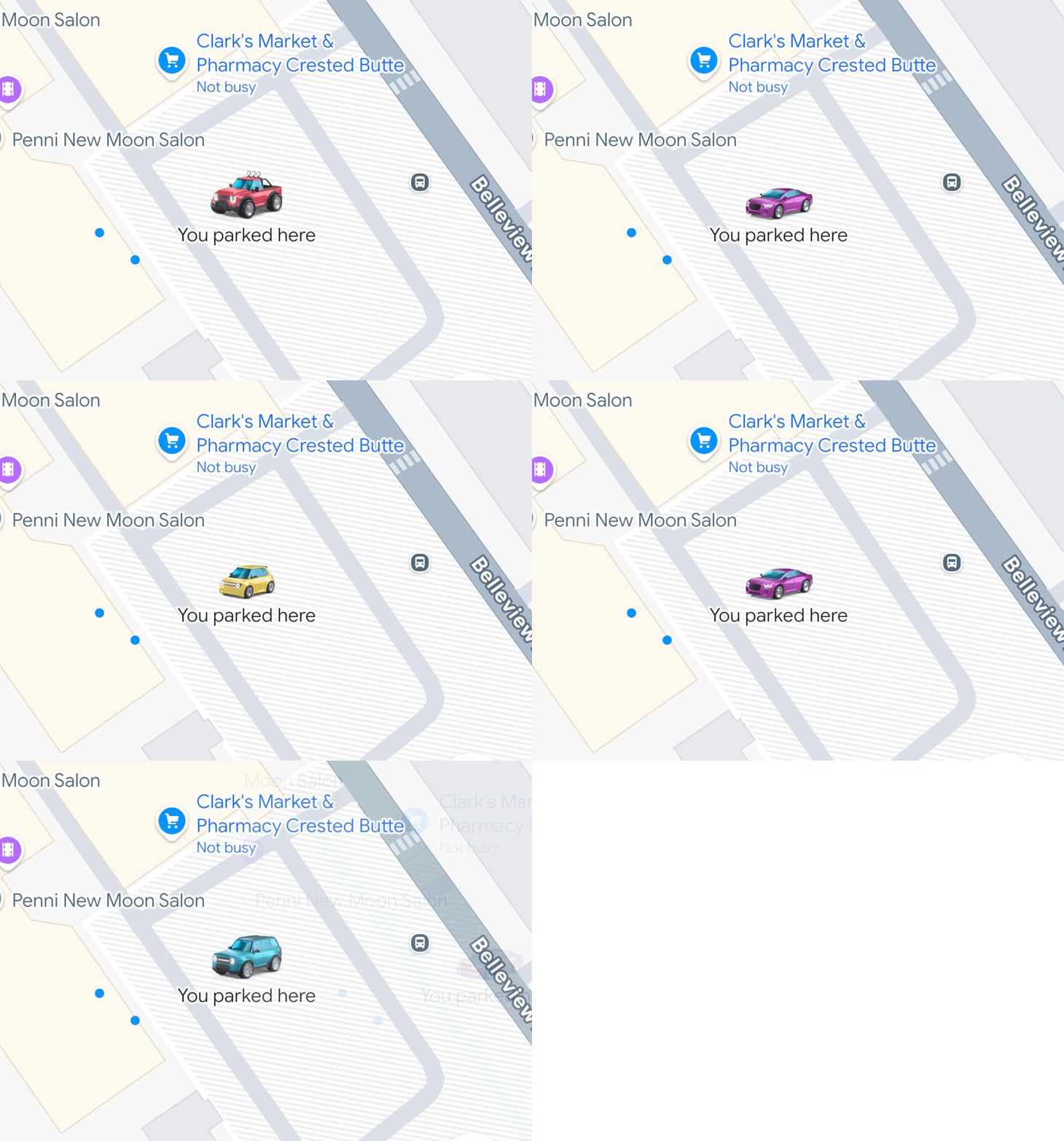
Customized car icons on Google Maps. | Image by Image credit – Rio Akasaka on LinkedIn
Google hasn’t made an official announcement for the new feature, but its Senior Product Manager for Maps, Rio Akasaka, talked about it in a LinkedIn post. In another post, Akasaka announced that Google Maps will use your customized car icon to mark your parking location in the app. If you don’t use a custom car icon, you will only get the default “P” icon.
Do you use your navigation app to remember where you parked your car?
25 Votes
Yes, I do that all the time
20%
Only when I’m in a new place
44%
No, but I’ll start now that it’s automatic
16%
No, I don’t need such a feature
20%
Neither Akasaka’s post nor the Google Maps support page has any information about whether and when the feature will be available on Android. It is surprising how long it took Google to add it to its app, though. Both Waze and Apple Maps have had a similar feature available for years.
Recommended For You
A welcome addition
While I’ve never been in a situation as absurd as the plot of ‘Dude, Where’s My Car?,’ I’ve had my fair share of parking confusion. Such a simple feature is the easy solution Google should’ve had long ago, but better late than never.
Tello Halloween Promo: $10GB for $10/mo
Don’t miss this scary-good deal: 10 GB for $10/mo. Save $5/mo for your first 3 months. Offer valid now through November 9, 2026.
Ilia, a tech journalist at PhoneArena, has been covering the mobile industry since 2011, with experience at outlets like Forbes Bulgaria. Passionate about smartphones, tablets, and consumer tech, he blends deep industry knowledge with a personal fascination that began with his first Nokia and Sony Ericsson devices. Originally from Bulgaria and now based in Lima, Peru, Ilia balances his tech obsessions with walking his dog, training at the gym, and slowly mastering Spanish.
A discussion is a place, where people can voice their opinion, no matter if it
is positive, neutral or negative. However, when posting, one must stay true to the topic, and not just share some
random thoughts, which are not directly related to the matter.
Things that are NOT allowed:
Off-topic talk - you must stick to the subject of discussion
Offensive, hate speech - if you want to say something, say it politely
Spam/Advertisements - these posts are deleted
Multiple accounts - one person can have only one account
Impersonations and offensive nicknames - these accounts get banned
To help keep our community safe and free from spam, we apply temporary limits to newly created accounts:
New accounts created within the last 24 hours may experience restrictions on how frequently they can
post or comment.
These limits are in place as a precaution and will automatically lift.
Moderation is done by humans. We try to be as objective as possible and moderate with zero bias. If you think a
post should be moderated - please, report it.
Have a question about the rules or why you have been moderated/limited/banned? Please,
contact us.














Things that are NOT allowed:
To help keep our community safe and free from spam, we apply temporary limits to newly created accounts: