
Galaxy S26 Ultra Q&A: Your questions answered!
Here are your Galaxy S26 Ultra questions, answered.
We may earn a commission if you make a purchase from the links on this page.
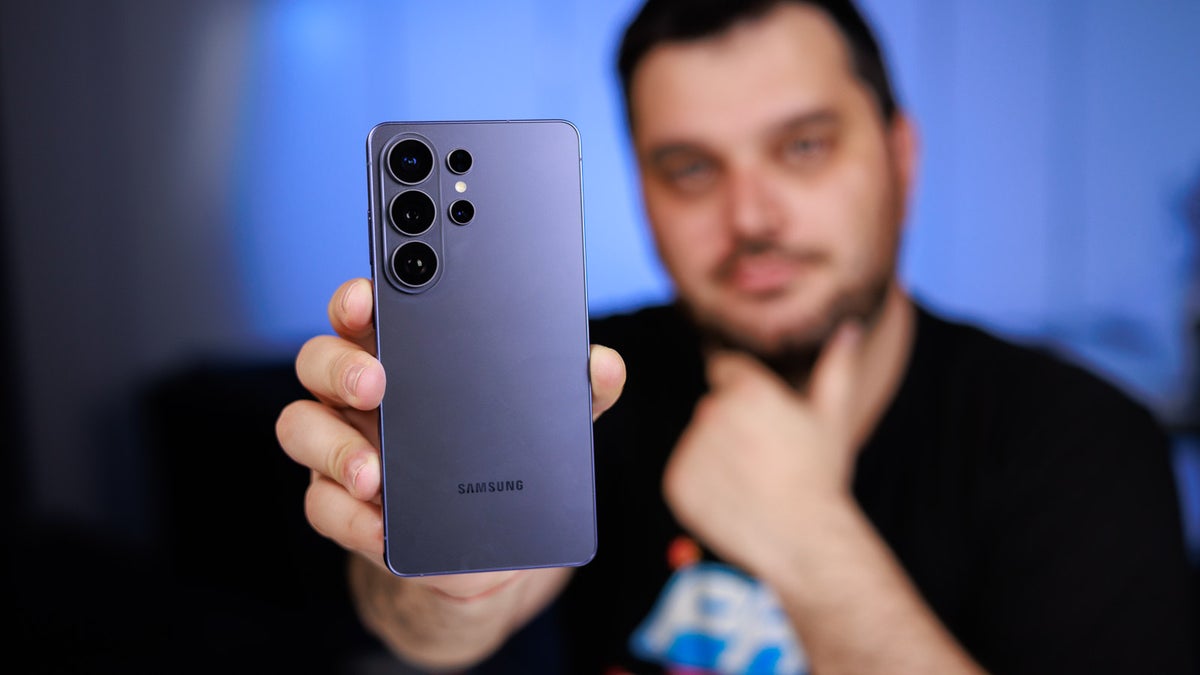
The Galaxy S26 Ultra is Samsung's best phone right now. | Image by PhoneArena
Sponsored content created with Samsung.
Earlier this year, we kicked off our Q&A session for the Galaxy S26 Ultra, where we let you ask us questions about Samsung’s latest flagship range.
You asked, and now it’s time to answer all the questions for anything Galaxy S26-related.
Galaxy S26 Ultra: Your questions answered
Camera
Q: How is the camera vs the Galaxy S25 Ultra and Galaxy S24 Ultra, are there any real improvements in zoom, night photos, video, etc?
A: Samsung has introduced a few but key improvements to the Galaxy S26 Ultra cameras that improve low-light photography, or Nightography, as Samsung calls it[2]. The maximum apertures on both the main and the 5X periscope cameras have been increased: from f/1.7 to f/1.4 and from f/3.4 to f/2.9, respectively. A wider aperture allows more light to hit the respective sensors and directly improves low-light image quality.
Increasing the maximum aperture has also allowed the Galaxy S26 Ultra to take pictures and videos at a lower ISO, which essentially means that your photos and videos have less noise and better overall quality. Shutter time is also decreased slightly, so you get less motion blur than before. Older Galaxy phones (like the Galaxy S25 Ultra and Galaxy S24 Ultra that you mention) favored a longer shutter time, which easily blurred moving subjects, but that's less of an issue with the Galaxy S26 Ultra.
The same beneficial gains can also be experienced with video-recording, the Galaxy S26 Ultra also supports the all-new Samsung-developed APV video codec, which is much more efficient than similar ones but still delivers excellent video quality. Google recently revealed that APV support will be launching to many other phones along with Android 17, which is great news.
The Galaxy S26 Ultra fared well in our camera benchmark test, but the lack of significant hardware changes means that it doesn’t necessarily resolve more detail than the Galaxy S25 Ultra. The color science has been notably improved towards realism, which is a notable upgrade.
Q: How is the zoom quality compared to the S25 Ultra?
A: We notice some slight improvements, mostly due to the differences in post-processing. The older Galaxy S25 Ultra still performs mighty fine, but the Galaxy S26 Ultra has a slight leg-up. The improved aperture allows the zoom camera to favor a slightly faster shutter speed, which leads to less motion blur, especially when capturing moving subjects.
Q: The screen seems brighter on the S25 Ultra, does anyone else agree?
A: It might seem brighter, but in reality, it isn't. Our in-house tests indicate that the two devices boast the same brightness, 2420 nits for the Galaxy S26 Ultra versus 2373 nits for the Galaxy S25 Ultra.
This is a very minor difference that the naked eye can't really detect, so the two should appear similarly bright. Now, the extra pixel grid inside the Galaxy S26 Ultra display might affect other properties of the screen like default vividness and the viewing angles might not be as good, but the peak brightness shouldn't be affected by Privacy Display[1] if it's disabled.
Display Measurements:
Here are our lab test results which clearly show that the Galaxy S26 Ultra is the phone with higher peak brightness, albeit by a little.
You'll definitely benefit from that slight brightness upgrade when you use the phone in bright daylight conditions.
Q: Can you enable the privacy display only for some apps, for example when I open instagram I want privacy display to turn on for a while. Second, can you still choose what device to record audio from when recording video? Oh, and is it bad if you insert the S Pen the wrong way?
A: Yes, you can absolutely only enable Privacy Display for select apps only; that's the whole point of it. You can select what apps should be protected with Privacy Display by heading to the respective menu in Settings > Display.
A: Samsung has introduced a few but key improvements to the Galaxy S26 Ultra cameras that improve low-light photography, or Nightography, as Samsung calls it[2]. The maximum apertures on both the main and the 5X periscope cameras have been increased: from f/1.7 to f/1.4 and from f/3.4 to f/2.9, respectively. A wider aperture allows more light to hit the respective sensors and directly improves low-light image quality.
The Galaxy S26 Ultra fared well in our camera benchmark test, but the lack of significant hardware changes means that it doesn’t necessarily resolve more detail than the Galaxy S25 Ultra. The color science has been notably improved towards realism, which is a notable upgrade.
A: We notice some slight improvements, mostly due to the differences in post-processing. The older Galaxy S25 Ultra still performs mighty fine, but the Galaxy S26 Ultra has a slight leg-up. The improved aperture allows the zoom camera to favor a slightly faster shutter speed, which leads to less motion blur, especially when capturing moving subjects.
Display
Q: The screen seems brighter on the S25 Ultra, does anyone else agree?
A: It might seem brighter, but in reality, it isn't. Our in-house tests indicate that the two devices boast the same brightness, 2420 nits for the Galaxy S26 Ultra versus 2373 nits for the Galaxy S25 Ultra.
This is a very minor difference that the naked eye can't really detect, so the two should appear similarly bright. Now, the extra pixel grid inside the Galaxy S26 Ultra display might affect other properties of the screen like default vividness and the viewing angles might not be as good, but the peak brightness shouldn't be affected by Privacy Display[1] if it's disabled.
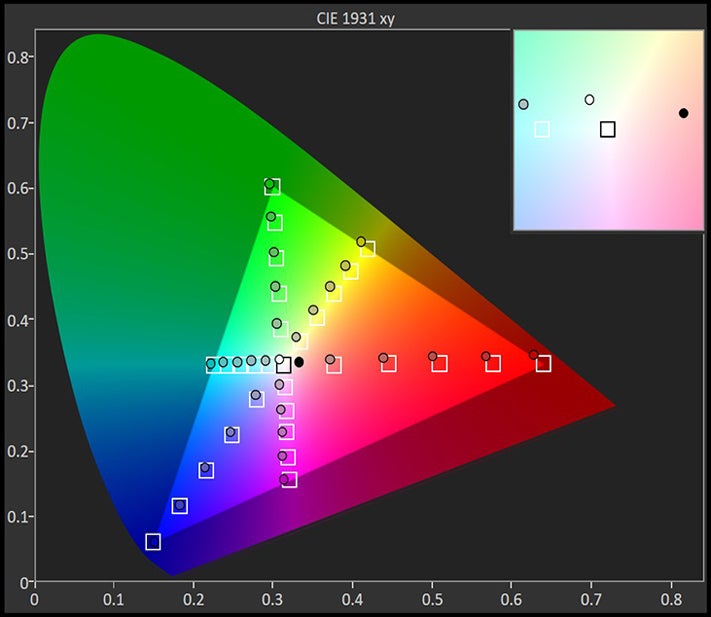
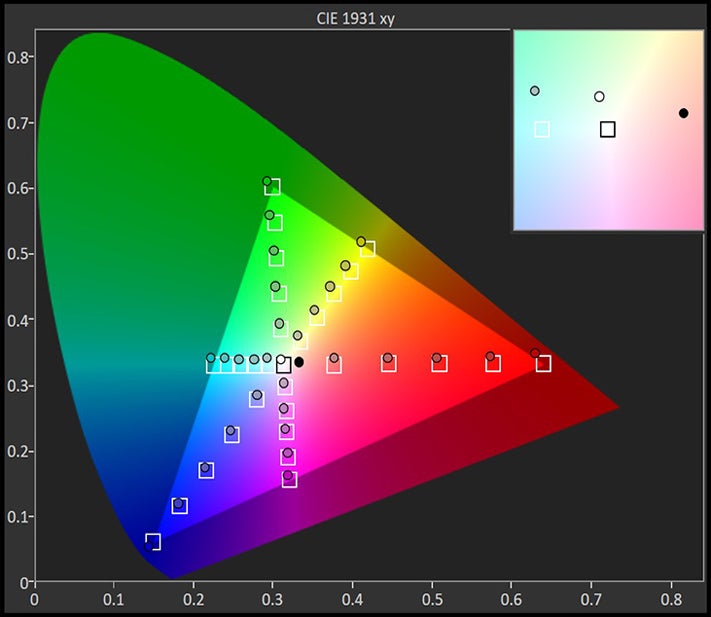
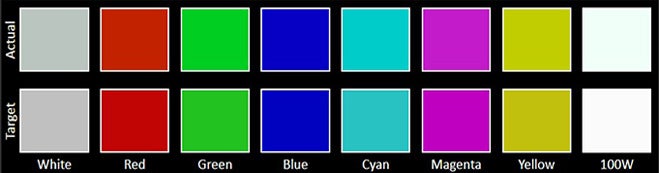
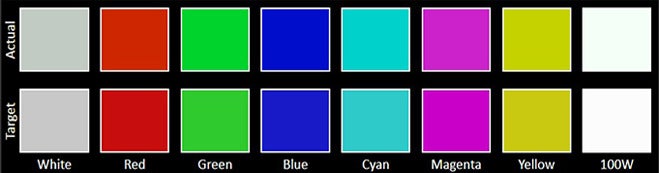


Here are our lab test results which clearly show that the Galaxy S26 Ultra is the phone with higher peak brightness, albeit by a little.
You'll definitely benefit from that slight brightness upgrade when you use the phone in bright daylight conditions.
Q: Can you enable the privacy display only for some apps, for example when I open instagram I want privacy display to turn on for a while. Second, can you still choose what device to record audio from when recording video? Oh, and is it bad if you insert the S Pen the wrong way?
A: Yes, you can absolutely only enable Privacy Display for select apps only; that's the whole point of it. You can select what apps should be protected with Privacy Display by heading to the respective menu in Settings > Display.
Aside from that, you can also set it to protect sensitive data like lock screen PINs, patterns, passwords, and incoming notifications, too. Moreover, you can also pick between a standard and hardened Privacy Display intensity. The hardened variant might affect normal viewing of the device, so it’s not recommended to keep it enabled all the time.
As far as inserting the S Pen the wrong way, no worries –– you can't really click it into place if you put it the wrong way in. It simply would stick out, but you can't damage the innards of the device.
Q: Privacy screen - how bad does the screen look when this feature is on? What about moving objects in low light?
A: The screen doesn't look bad, just different. Colors are less saturated and the overall brightness suffers, which is expected from the narrow beam pixels that emit light when Privacy Display is on. It's definitely not a feature you should leave on all the time, but just for sensitive apps. And, as you might imagine, the viewing angles are slightly worse.
As far as inserting the S Pen the wrong way, no worries –– you can't really click it into place if you put it the wrong way in. It simply would stick out, but you can't damage the innards of the device.
Q: Privacy screen - how bad does the screen look when this feature is on? What about moving objects in low light?
A: The screen doesn't look bad, just different. Colors are less saturated and the overall brightness suffers, which is expected from the narrow beam pixels that emit light when Privacy Display is on. It's definitely not a feature you should leave on all the time, but just for sensitive apps. And, as you might imagine, the viewing angles are slightly worse.
Battery and charging
Q: Battery life seems much improved. Honestly the 1st smartphone I've owned that I don't have to feel like, I have to be near some sort of charger. Anyone having similar experience?
A: We do indeed notice a serious bump in the measured battery life, especially in the PhoneArena video streaming test, which cycles through a playlist of videos with the screen set at 200 nits of brightness. The Galaxy S26 Ultra achieves nearly 10 hours in this test, whereas the Galaxy S25 Ultra achieved around 9 hours.
That said, we notice a better gaming result on the Galaxy S25 Ultra, where it achieved more than 14 hours, while the Galaxy S26 Ultra achieved nearly a dozen hours. I think there's a deliberate reason for that slight inefficiency: in real-life gaming tests, I noticed that the Galaxy S26 Ultra achieves significantly higher gameplay stability in comparison with the Galaxy S25 Ultra, with noticeably higher 5% lows. My article on the topic clearly demonstrates the dominance of the Galaxy S26 Ultra in terms of gaming.
Q: How fast does the Galaxy S26 Ultra charge?
A: The upgrade to 60W wired charging has proven to be quite beneficial to the Galaxy S26 Ultra, which now charges much faster than the preceding models.
In our tests, the phone charges fully in just 49 minutes, but a 30-minute charge gets you a very decent chunk of nearly 80% charge, which should be more than enough to last you a full day. For regular daily usage, charging at up to around 80% is actually recommended for battery health reasons. This means that topping up the device for half an hour daily should be more than enough for most Galaxy S26 Ultra users out there.
Our tests also prove that the Galaxy S26 Ultra charges much faster than the Galaxy S25 Ultra in both our full and 30-minute charge tests. At the end of the day, the newer device is saving you time by charging faster.
In our review, the Galaxy S26 Ultra achieved an excellent score, beating the average review score in almost all categories.
A: The upgrade to 60W wired charging has proven to be quite beneficial to the Galaxy S26 Ultra, which now charges much faster than the preceding models.
In our tests, the phone charges fully in just 49 minutes, but a 30-minute charge gets you a very decent chunk of nearly 80% charge, which should be more than enough to last you a full day. For regular daily usage, charging at up to around 80% is actually recommended for battery health reasons. This means that topping up the device for half an hour daily should be more than enough for most Galaxy S26 Ultra users out there.
Our tests also prove that the Galaxy S26 Ultra charges much faster than the Galaxy S25 Ultra in both our full and 30-minute charge tests. At the end of the day, the newer device is saving you time by charging faster.
Conclusion
In our review, the Galaxy S26 Ultra achieved an excellent score, beating the average review score in almost all categories.
The most notable improvements over the Galaxy S25 Ultra’s scores from a year prior are in terms of raw performance and charging speeds, where the Galaxy S26 Ultra scores significant upgrades.
At the same time, the photo and video scores remain unchanged, which is a testament to how well the Galaxy S25 Ultra fared in those same tests, combined with the Galaxy S26 Ultra’s continued excellence in video and photo versatility.
[1] Privacy Display: Requires manual activation in settings to function. Privacy Display feature is not AI-powered.
[2] Nightography Video: Results may vary depending on light condition, subject and/or shooting conditions.
At the same time, the photo and video scores remain unchanged, which is a testament to how well the Galaxy S25 Ultra fared in those same tests, combined with the Galaxy S26 Ultra’s continued excellence in video and photo versatility.
[1] Privacy Display: Requires manual activation in settings to function. Privacy Display feature is not AI-powered.
[2] Nightography Video: Results may vary depending on light condition, subject and/or shooting conditions.


Popular stories

Latest News

Things that are NOT allowed:
To help keep our community safe and free from spam, we apply temporary limits to newly created accounts: