Galaxy device users can check out these changes made to the Samsung Weather app
The app, pre-installed on Galaxy phones, tablets, and watches, has some changes that you should see.

New look for the Samsung Weather app. | Image by PhoneArena
One of the most competitive categories in app stores belongs to weather apps. You have your well-known multi-platform superstars such as The Weather Channel and AccuWeather. You have weather apps available from the local television stations in your area, and you have weather apps offered by the manufacturer of your phone.
Samsung makes some UI changes to its pre-installed Weather app
For example, Pixel users have the Pixel Weather app. Apple iPhone users can use the Apple Weather app, which has been pre-installed on every iPhone since the beginning. Samsung Galaxy phone owners have used the Samsung Weather app, and it is the latter that has just made some changes to its UI.
Samsung has updated its weather app to version v1.7.30.8, bringing some changes to certain elements of the app such as the icons used to report the level of pollen in the air. Instead of using a leaf icon and color to indicate how much pollen from trees, grass, and ragweed is in the air, there are now individual tree, grass, and ragweed icons with the level of pollen underneath each icon.
Some changes have been made to the app's radar component
I always like my weather apps to have a radar feature and most good ones do, including Samsung Weather. The new radar page includes more icons on the bottom of the page allowing users to see a six-hour forecast, the radar, clouds, and temperatures.
Do you use a weather app often?
28 Votes
Yes. I need to know what the weather will be in my area.
96.43%
No. I find out using other means.
3.57%
No, I don't care what the weather is.
0%
The Wind icon looks a little more complex, but instead of making you figure out whether the wind is coming from the south-southwest, the new compass icon will actually show you SSW. This way you don't have to figure out that showing the compass pointing at NNE means that the wind is blowing from the SSW.
These are the weather apps I have installed on my Android phone
The Pressure icon seems a little harder to read after the update, although the information is the same. The font used is a little smaller, which might make it harder to read for those whose vision is not quite what it used to be.
This also applies to information about the Moon. Not only are Moonrise and Moonset times smaller, but instead of labeling what each time indicates, the app shows a hard-to-read icon instead. The Moonrise and Moonset times are now shown side-by-side helping the information take up less space on the screen.
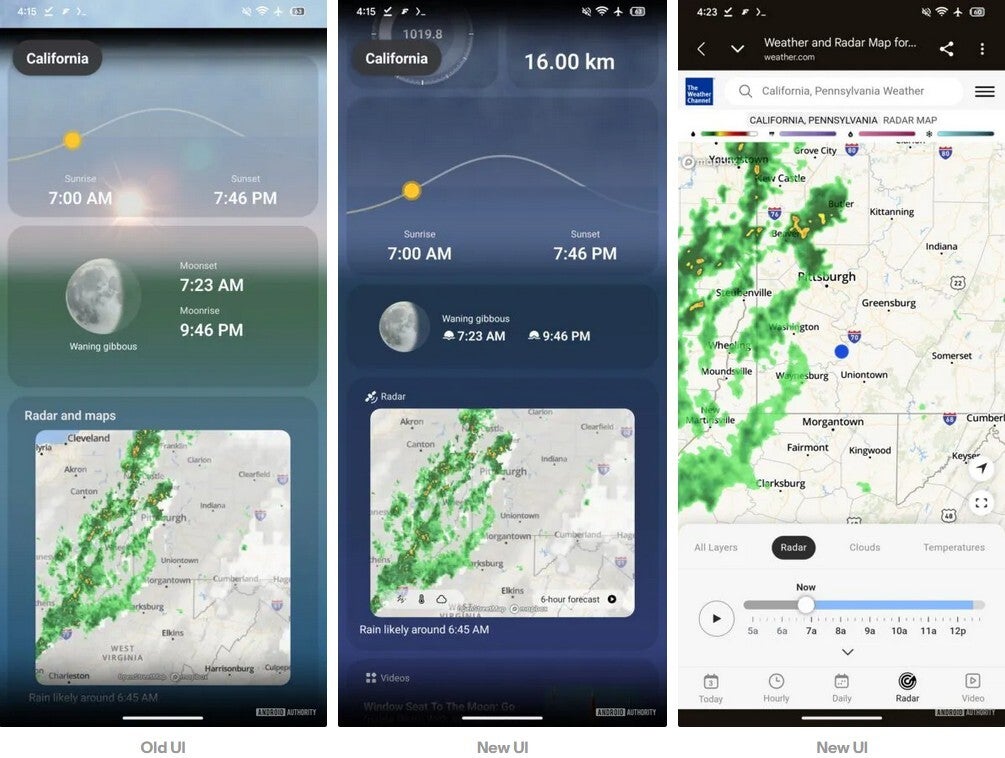
Previous UI on the left, updated UI in the middle and right for the Samsung Weather app. | Image by Android Authority
Looking at my Pixel 6 Pro, the weather apps I have installed include The Weather Channel (Android, iOS) and AccuWeather (Android, iOS), the two most popular weather titles in the Play Store. I also have the Pixel Weather app (Android), and Boston 25 Weather (Android) installed.
You might wonder why I would have so many weather apps installed, but everyone should include a local weather app along with one of the big names. You might want to look for a hyper-local weather app for a forecast that might be more accurate when it comes to precipitation.
Don't forget to add a widget or two
Most weather apps have a widget that can be added to your phone's home screen and that includes the Samsung Weather app. The obvious advantage is that you can get a quick glimpse of your current weather information without having to open the app.
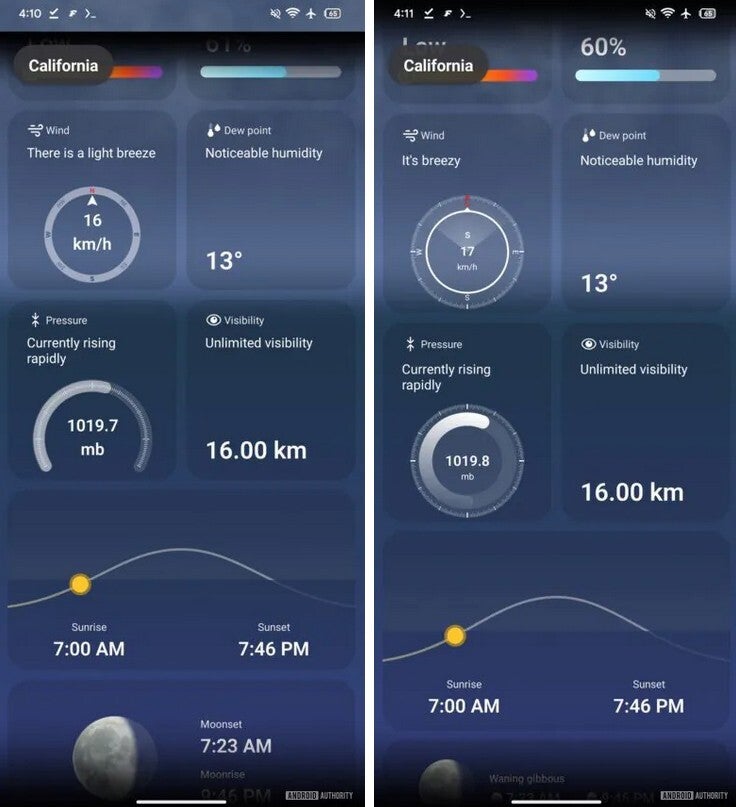
Old UI on left, new UI on right for the Samsung Weather app. | Image by Android Authority
Depending on the widgets available, you might be able to choose one that will just show you the temperature, one that shows both the current temperature and current conditions, or one that includes a forecast. Regardless of which one you ultimately select, widgets do save time.
The Samsung Weather app is not available from the Google Play Store and it is pre-installed on Galaxy phones, tablets, and watches. If you've accidentally removed the app, you can reinstall it from the Galaxy Store. The latter also contains an app called The Weather Channel for Samsung, which is the source of the data found on the Samsung Weather app.


Popular stories

Latest News
Things that are NOT allowed:
To help keep our community safe and free from spam, we apply temporary limits to newly created accounts: