Samsung just solved one of the most annoying parts of having an Android in an iPhone world
A massive update is bridging the gap between two major ecosystems..
We may earn a commission if you make a purchase from the links on this page.
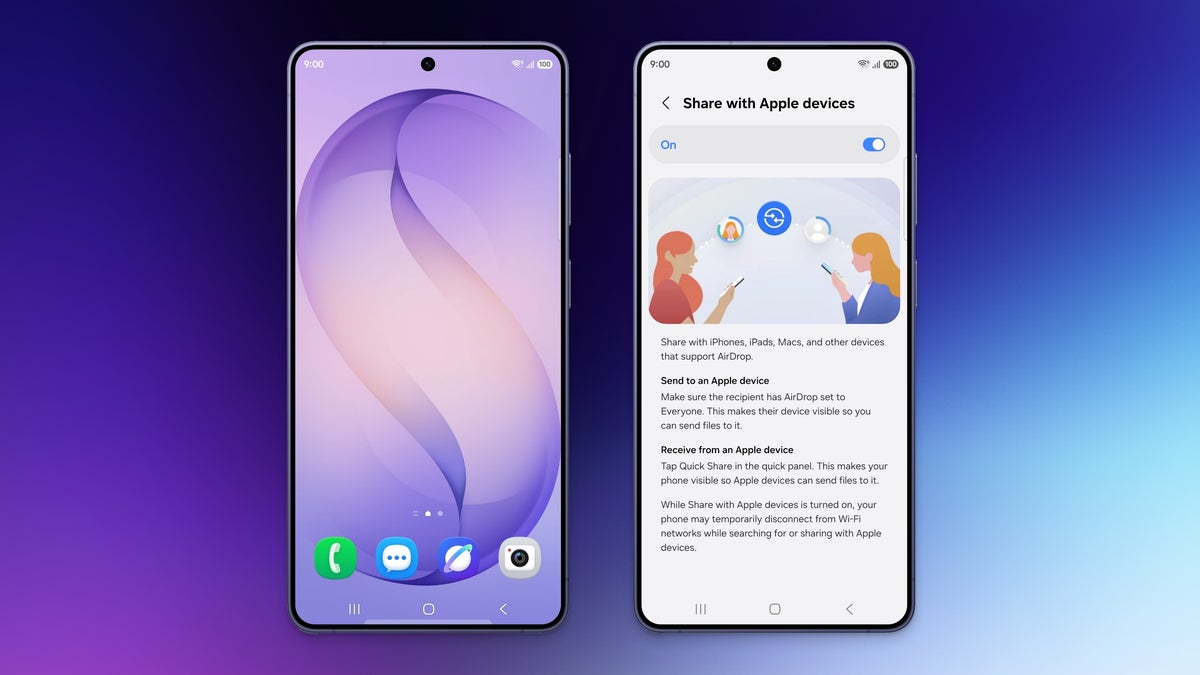
Samsung's new "Share with Apple Devices" feature | Image by Samsung (Collaged by PhoneArena)
Sending a simple photo or document to a friend sitting right next to you should be the easiest thing in the world. Yet, when you and your friend happen to be on opposite sides of the smartphone world, this simple task usually becomes a frustrating mess of compressed text messages. Fortunately, the wall between these two gigantic worlds is at last beginning to break apart.
The lack of being able to share files between the iPhone and the Galaxy device has been a major issue. Apple is very protective of their own ecosystem, so AirDrop is a major selling point for iPhone users. By adding AirDrop functionality to Quick Share, Samsung is removing a major headache for its users everywhere — following Google's efforts to do the same with Pixel devices.
This is fantastic for people looking to share high-quality media with others without having to worry about compression. If you have to share things with people on a different operating system, this feature will definitely make a huge difference for your productivity.
We have been keeping track of the rumors about this feature being available on the Galaxy S26. However, seeing it officially announced now is fantastic. As a person who likes to switch between different devices, this feature will be used daily.
It is a shame it is only available on the S26 line of devices, for now at least. While there is no real timeline for the older Galaxy devices (which we are eagerly awaiting), it is hoped Samsung will be adding it in the near future.
Bridging the smartphone divide
In a newly released post, Samsung officially announced that they are updating their Quick Share feature to work with Apple’s AirDrop. This is great news, as transferring files between the two is about to become a whole lot easier. Delivering this is part of Samsung's effort to make their products more compatible with the competition.
If you are eager to take this highly anticipated feature for a spin, you can expect it to officially roll out starting tomorrow (March 23rd) in Korea and later in the week for those in the US. Though this highly anticipated feature is currently exclusive to the brand-new Galaxy S26 series, we expect that Samsung will eventually roll out the update to other Galaxy devices in the near future.
A major win for everyday users
Steps to get Airdrop working on the Samsung Galaxy S26 series | Images by Samsung
The lack of being able to share files between the iPhone and the Galaxy device has been a major issue. Apple is very protective of their own ecosystem, so AirDrop is a major selling point for iPhone users. By adding AirDrop functionality to Quick Share, Samsung is removing a major headache for its users everywhere — following Google's efforts to do the same with Pixel devices.
This is fantastic for people looking to share high-quality media with others without having to worry about compression. If you have to share things with people on a different operating system, this feature will definitely make a huge difference for your productivity.
How do you currently send large files to friends with a different phone brand?
84 Votes
I rely on cloud storage links like Google Drive or Dropbox
21.43%
Through messaging apps and accept the quality loss
39.29%
I use third-party file sharing apps
25%
I usually just give up and email it
14.29%
Finally, a feature we actually asked for
We have been keeping track of the rumors about this feature being available on the Galaxy S26. However, seeing it officially announced now is fantastic. As a person who likes to switch between different devices, this feature will be used daily.
It is a shame it is only available on the S26 line of devices, for now at least. While there is no real timeline for the older Galaxy devices (which we are eagerly awaiting), it is hoped Samsung will be adding it in the near future.


Popular stories



Latest News




![Another batch of Galaxy S26 series users in the US are getting a nice surprise today [UPDATED]](https://m-cdn.phonearena.com/images/article/183643-wide-two_350/Another-batch-of-Galaxy-S26-series-users-in-the-US-are-getting-a-nice-surprise-today-UPDATED.webp)
Things that are NOT allowed:
To help keep our community safe and free from spam, we apply temporary limits to newly created accounts: