It's a new month, which means it's time for a new update for Pixel smartphones. Google released the May 2026 security patch for eligible Pixel devices last night, and it includes some notable fixes. Here's everything the tech giant has addressed in the latest update.
Pixel May 2026 update
The latest update doesn't introduce any new features for Pixel phones. It's essentially a software patch that resolves the following four highly reported issues.
Slow wireless charging: Multiple reports have surfaced online of users complaining that their Pixel phones take a very long time to charge once they reach a certain charge level. The problem was particularly common when charging the device wirelessly. Google has apparently fixed this issue in the latest update.
Camera freezing: I spotted a few reports on Reddit where users complained that the camera app on their Pixel device was freezing out of nowhere. This issue has been resolved according to the release notes of the May OTA update.
Display-related problems: The update also resolved the bug that was causing a white flicker to appear on certain Pixel devices. Additionally, it patches the issue that was making the phone's display appear "fuzzy or frozen."
Keyboard or input freezing: One of the troubles I was personally facing on my Pixel 10 was that its keyboard suddenly stopped working for a few seconds. This has also been addressed in the update.
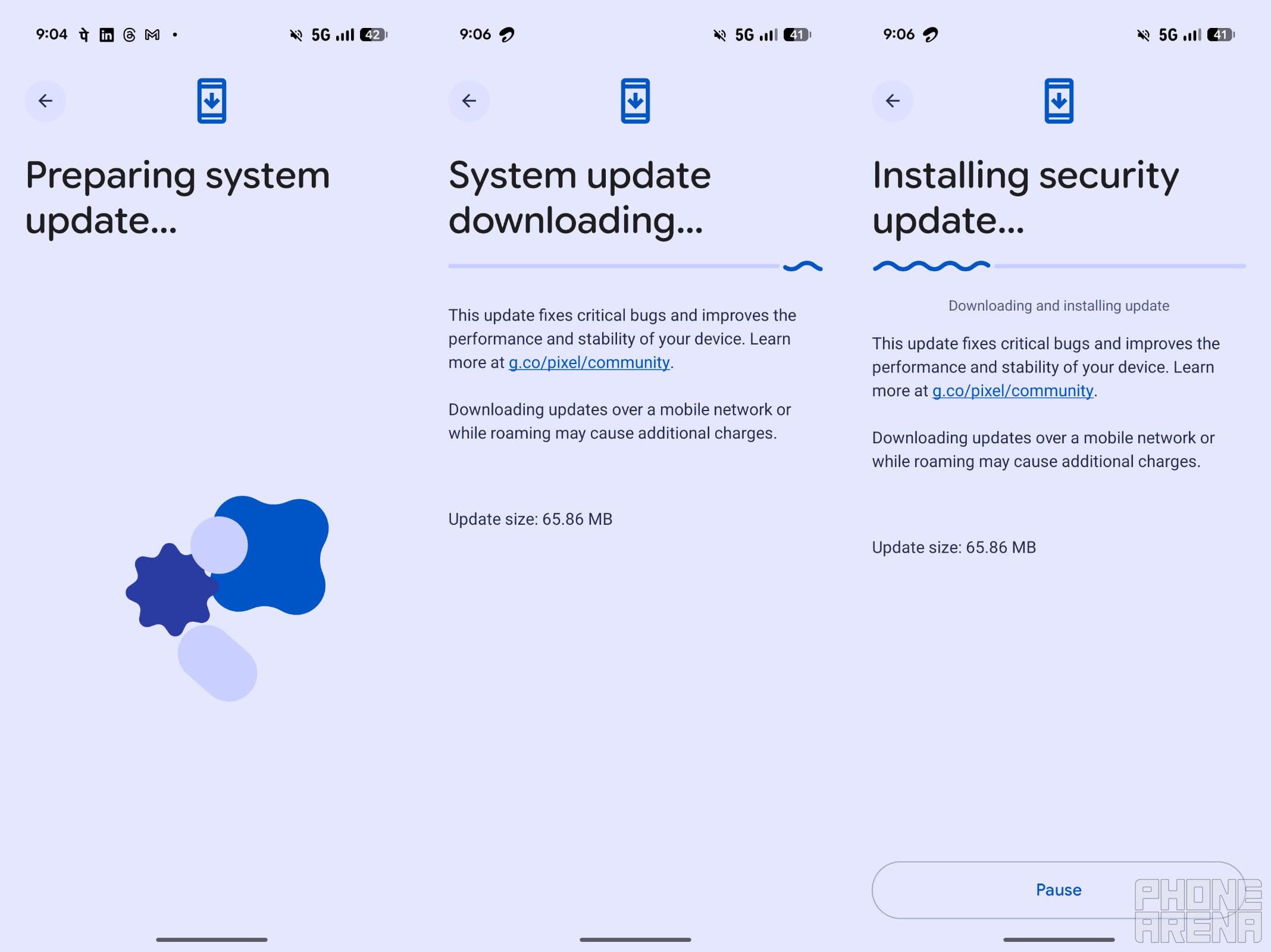
Steps to install Pixel update. | Image by PhoneArena
The process to download and install the May 2026 security patch for Android 16 QPR3 is quite straightforward. To begin with, you need to open the Settings app on your eligible Google phone. After that, you need to navigate to System > Software Updates > System Update.
Hit the Check for Update button. After that, follow the on-screen instructions to complete the installation process of the latest update.
Did the latest Pixel update fix any problems you were facing?
107 Votes
It fixed the screen freezing issue for me.
0.93%
It resolved the slow charging problem for me.
1.87%
My Pixel camera is no longer freezing after the update.
2.8%
My keyboard is finally fixed.
3.74%
Battery drain is the biggest issue, and it still remains.
90.65%
The Pixel's biggest issue remains unsolved
If you've been following our recent Pixel coverage, you might be aware that there's a widespread battery drainage issue in Google phones. Users started experiencing it after downloading the March Feature Drop. Following plenty of online complaints, it was expected that the tech giant would address this in the April update, but that didn't happen.
Recommended For You
So, attention shifted to the May update, and I was also quite certain that Google would finally roll out a fix in this month's security patch, especially considering how widespread the problem is. Our recent poll related to this story also reveals that nearly 45% of the 1,758 respondents are noticing that their devices are consuming too much battery.
A Reddit user also shared that a Google official told them the company is looking to resolve this as soon as possible. Shockingly, there is no fix for this issue in the latest update either. It is not even the case that the exact cause of the battery drain on certain Pixel phones is unknown.
A bug has reportedly been introduced with the March update that prevents the smartphones' CPUs from entering the suspended state. This keeps your Pixel smartphone in an idle state even when you're not using it, ultimately causing battery drain.
Let's shift our focus to the June update
We now have no option but to shift our hopes to the June update and hope that it finally addresses the problem. As expected, affected users are furious that the issue hasn't been addressed yet, and they're showing their anger through comments on the Google Issue Tracker. What's even more surprising to me is that the patch doesn't contain a solution for the bootloader bug either, even though the company has reportedly found a fix for it.
Get iPhone 18 Pro with Visible, get $480 off!
$719
/mo
$1199
$480 off (40%)
On the Visible+ Pro plan, you get access to 5G Ultra Wideband data on Verizon's fastest network. Along with unlimited roaming across Mexico and Canada, 2 days of Global Pass per month, 3x hotspot speeds, 4K streaming, and Smartwatch service.
Aman Kumar is a news writer at PhoneArena covering Google Pixel phones, Android features, AI-powered smartphone tools, and mobile tech news. Before joining PhoneArena, he spent over five years writing about consumer technology for publications like MakeUseOf, How-To Geek, and Guiding Tech. His current daily drivers are the Pixel 10 and Samsung Galaxy S26 Plus, while his red iPhone SE (2nd gen) remains a personal favorite. Aman also appreciates bold smartphone experiments and still considers the Nokia N-Gage one of the industry’s most iconic designs.
A discussion is a place, where people can voice their opinion, no matter if it
is positive, neutral or negative. However, when posting, one must stay true to the topic, and not just share some
random thoughts, which are not directly related to the matter.
Things that are NOT allowed:
Off-topic talk - you must stick to the subject of discussion
Offensive, hate speech - if you want to say something, say it politely
Spam/Advertisements - these posts are deleted
Multiple accounts - one person can have only one account
Impersonations and offensive nicknames - these accounts get banned
To help keep our community safe and free from spam, we apply temporary limits to newly created accounts:
New accounts created within the last 24 hours may experience restrictions on how frequently they can
post or comment.
These limits are in place as a precaution and will automatically lift.
Moderation is done by humans. We try to be as objective as possible and moderate with zero bias. If you think a
post should be moderated - please, report it.
Have a question about the rules or why you have been moderated/limited/banned? Please,
contact us.













Things that are NOT allowed:
To help keep our community safe and free from spam, we apply temporary limits to newly created accounts: