Just the other day Google released Android 16 QPR3 Beta 1 kicking off the Beta updates related to the March Pixel Feature Drop. The first Beta release included several features including the ability to remove the At a Glance widget from the screen. Personally, I love At a Glance, which shows you various subject matters including info about the Weather, active timers and alarms, commuting times, earthquake alerts, status of your upcoming flight including gate changes if warranted, ETA of food delivery orders, and much more.
Google delivers an update to the Pixel 10 series GPU driver
The update also gives you more control over the brightness of the flashlight on your Pixel 6 or later, allows you to change the order of the buttons used for 3-button navigation, and alerts you to the apps that are using your Pixel's camera, microphone, and location data. And the Android 16 QPR3 Beta 1 release also brings the new driver for the Pixel 10 series that was promised by Google for the Tensor G5’s PowerVR GPU.
Will you join the Android 16 QPR3 Beta program?
62 Votes
Hell yeah. I hate that bodyless face.
38.71%
No way. I never install Beta software on my phone.
61.29%
Some Pixel 10 users have already said that they have seen improvements on their Pixel 10, Pixel 10 Pro, Pixel 10 Pro XL, and Pixel 10 Pro Fold. The update bumped the version number of the driver to 25.1, However, because the update to the driver came in a software release that included an update to the Android system, performance improvements might also be the result of the system update.
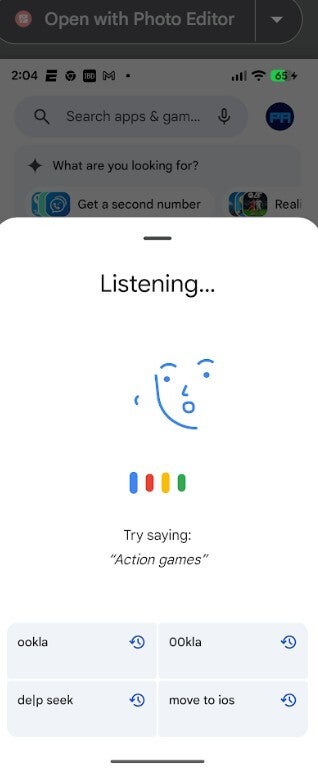
The new UI for the Gemini when you tap the microphone icon on a Pixel 6 or later. | Image credit-PhoneArena
Only subscribers to the Android 16 QPR3 Beta with a Pixel 10 series model are seeing the update right now. As a result, the number of Pixel 10 users reporting improvements in their phones' performance based on the receipt of the new driver are limited. That will change, of course, once Google disseminates the stable version of Android 16 QPR3 to compatible Pixel models.
The update to the GPU driver should bring these improvements
Improvements that the new GPU driver might bring to Pixel 10 series users include:
Smoother gaming for graphics-intensive games that Pixel 10 series users previously complained about. This includes titles like Genshin Impact.
Efficiency improvements for shader compilation, cache handling, and memory management.
Support for the Vulkan 1.4 API and expanded OpenCL extensions which means fewer app crashes in graphics heavy games.
A more efficient GPU could deliver better battery life during power hungry tasks.
Google has been phasing out Google Assistant in favor of Gemini, a move that I'm very much in favor of. Using Gemini to answer your queries sometimes feels like using a bazooka to kill a mosquito, but the replies go well beyond anything that Google Assistant used to serve up. When using Google Assistant on Pixel phones by verbally asking your question or task, users would press the microphone icon in the search bar on the bottom of the screen and would see a strange looking animated face seem to move its mouth as though it was asking your question or saying the task you needed done.
Google finally removes that silly "bodyless face" on Pixel models
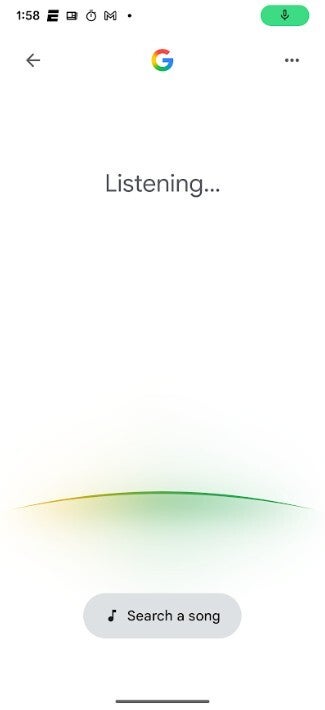
This was a silly looking UI and back in November we told you that a change was coming. This change is part of an update to the Google app which comes with Android 16 QPR3 Beta 1. The new UI shows an arc at the bottom of the screen that is constantly changing colors. As you might surmise, the colors shown are Google's colors of red, yellow, green, and blue.
Recommended For You
The Ugly bodyless face Google got rid of with the latest Android 16 QPR3 Beta 1 update. | Image credit-PhoneArena
If you're sick enough of that bodyless face that you want to install Android 16 QPR3 Beta 1 on your Pixel 6 or later, you should backup your phone and go to the Android Beta Program app by tapping on this link. After you're sent to the website, press the box that says, "View your eligible devices." You will be taken to a page with a picture of your particular Pixel model. Directly underneath it is a box that you can tap to opt-in to join the Android 16 QPR3 Beta. You will shortly receive the latest Android 16 QPR3 Beta, which is now number 1. Go to Settings > System > Software updates > System update to download and install it.
Six-month unlimited plan is now 57% off
$90
$210
$120 off (57%)
Mint Mobile is now allowing you to get whichever plan you like for either three, six, or 12 months for just $15/mo. If you go for the six-month unlimited service, for instance, you'll now have to pay just $90 upfront instead of $210.
Alan, an ardent smartphone enthusiast and a veteran writer at PhoneArena since 2009, has witnessed and chronicled the transformative years of mobile technology. Owning iconic phones from the original iPhone to the iPhone 15 Pro Max, he has seen smartphones evolve into a global phenomenon. Beyond smartphones, Alan has covered the emergence of tablets, smartwatches, and smart speakers.
A discussion is a place, where people can voice their opinion, no matter if it
is positive, neutral or negative. However, when posting, one must stay true to the topic, and not just share some
random thoughts, which are not directly related to the matter.
Things that are NOT allowed:
Off-topic talk - you must stick to the subject of discussion
Offensive, hate speech - if you want to say something, say it politely
Spam/Advertisements - these posts are deleted
Multiple accounts - one person can have only one account
Impersonations and offensive nicknames - these accounts get banned
To help keep our community safe and free from spam, we apply temporary limits to newly created accounts:
New accounts created within the last 24 hours may experience restrictions on how frequently they can
post or comment.
These limits are in place as a precaution and will automatically lift.
Moderation is done by humans. We try to be as objective as possible and moderate with zero bias. If you think a
post should be moderated - please, report it.
Have a question about the rules or why you have been moderated/limited/banned? Please,
contact us.












Things that are NOT allowed:
To help keep our community safe and free from spam, we apply temporary limits to newly created accounts: