There's a widespread bug in the Gmail app on Android devices that causes a wide range of issues, several sources report.
The Gmail app bug and reported issues
The issues range from flickering screens on some tablets to disappearing text and even blank pages. "When I try to open an email, it flickers and makes it unreadable. I have used the force stop, I have cleared the cache, and I have restarted my tablet. I have also updated. Nothing has worked," one user wrote on Google support forums.
Another tablet user writes: "When I open my emails on my tablet, they flicker in and out before going blank. I can read my emails on my phone with no problem."
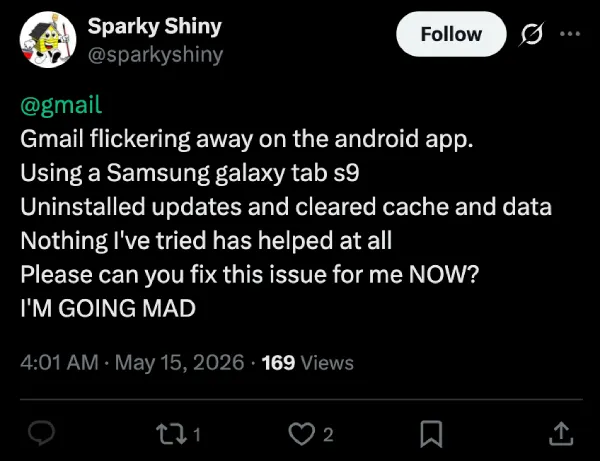
Galaxy Tab S9 users also report issues | Image by X
It also appears that the issue is at least four days old, as one user on X posted: "@gmail when will the Android work again on folding phones like my @SamsungMobileUS #GalaxyZFold3?? Day 4 now of this flickering issue on the inner screen is unacceptable!"
Have you experienced any Gmail issues on your mobile device?
41 Votes
Gmail app bugs and affected devices
Reports suggest that the issue is mainly spread on Samsung devices, mainly tablets, but also some foldables, such as the Galaxy Z Fold 3.
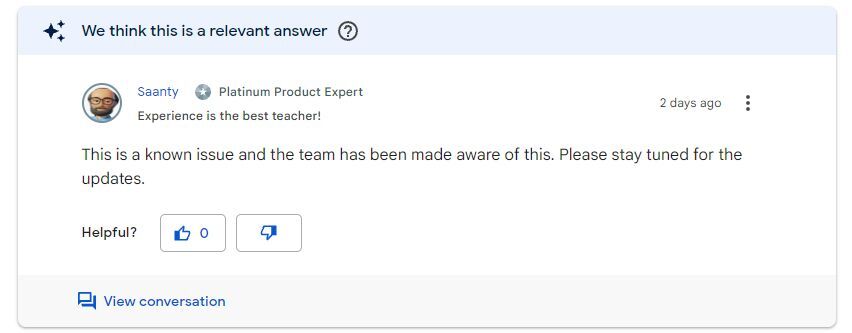
Google is apparently working on a fix | Image by Gmail Help Center
According to one of the experts, the issue is caused by Android System WebView on Samsung tablets and foldables. The issue has been reported to Google, but there's no official statement or a fix at the moment.
Recommended For You
How to deal with flickering mail on Samsung tablets and foldables?
Even though there's no official fix currently, there are workarounds you can try if you're affected by this bug.
You can try switching from portrait mode to landscape mode and back again on your tablet or foldable. This involves simply enabling the auto-rotate feature and physically tilting your tablet or foldable to switch between the two modes.
Additionally, you can clear the cache for Android System WebView and also uninstall all updates, as one of them is potentially causing the issues.
The reports are piling up, as we're all waiting for a fix. Have you been affected by this annoying bug? Share your experience in the comments below.
Mint Mobile's 6-month plans now cost $10/mo
$10
/mo
$35
$25 off (71%)
Mint Mobile is celebrating its 10-year anniversary with a special offer on its six-month subscription plans. For a limited time, you can get your preferred tier (6GB, 17GB, 23GB or unlimited) for just $10/mo. That saves you between 50% and 71% on the carrier's mobile plans, making it way easier to recommend.
Mariyan, a tech enthusiast with a background in Nuclear Physics and Journalism, brings a unique perspective to PhoneArena. His childhood curiosity for gadgets evolved into a professional passion for technology, leading him to the role of Editor-in-Chief at PCWorld Bulgaria before joining PhoneArena. Mariyan's interests range from mainstream Android and iPhone debates to fringe technologies like graphene batteries and nanotechnology. Off-duty, he enjoys playing his electric guitar, practicing Japanese, and revisiting his love for video games and Haruki Murakami's works.
A discussion is a place, where people can voice their opinion, no matter if it
is positive, neutral or negative. However, when posting, one must stay true to the topic, and not just share some
random thoughts, which are not directly related to the matter.
Things that are NOT allowed:
Off-topic talk - you must stick to the subject of discussion
Offensive, hate speech - if you want to say something, say it politely
Spam/Advertisements - these posts are deleted
Multiple accounts - one person can have only one account
Impersonations and offensive nicknames - these accounts get banned
To help keep our community safe and free from spam, we apply temporary limits to newly created accounts:
New accounts created within the last 24 hours may experience restrictions on how frequently they can
post or comment.
These limits are in place as a precaution and will automatically lift.
Moderation is done by humans. We try to be as objective as possible and moderate with zero bias. If you think a
post should be moderated - please, report it.
Have a question about the rules or why you have been moderated/limited/banned? Please,
contact us.








Things that are NOT allowed:
To help keep our community safe and free from spam, we apply temporary limits to newly created accounts: