Late last month we told you that the iOS 26.2 update disseminated by Apple contained patches to fix two serious software flaws that Apple said had been already exploited. As we explained just days before 2025 ended and 2026 started, both flaws had to do with Apple's WebKit browser engine. One vulnerability, CVE-2025-43529, tricks the browser into mishandling memory allowing attackers to run their own code or commands on a device. This is an issue known as arbitrary code execution.
Some iPhone users still are vulnerable to having two WebKit flaws exploited
The second flaw, CVE-2025-14174, was discovered jointly by Apple and by Google’s Threat Analysis Group. Both issues were patched by using improved memory management and better validation checks. But a new report from Forbes reveals that many iPhone users may not have had the flaws patched and are still vulnerable to attack. That's because the patches were included in the update to iOS 26.2 and as we told you recently, at the end of 2025 less than 60% of iPhone users have iOS 26 installed on their iPhones.
Forbes' report has even worse numbers as the data it shared shows that only 50% of those eligible to install iOS 26 have done so, leaving those iPhone units still on iOS 18 and vulnerable to a malicious attack. Typically, iPhone users update their handsets quickly. However, not everyone loves the Liquid Glass UI that comes with iOS 26 and even though its effects can be sharply reduced, many would prefer just to avoid all UI changes and stick with iOS 18.
Recommended For You
The other issue that might keep iPhone users from updating from iOS 18 to iOS 26 is that the latter allows users to opt-in on Apple's AI Initiative Apple Intelligence. I get the feeling that some uninformed iPhone users believe that updating to iOS 26 will automatically enable Apple Intelligence although this is not the case. Those who do install iOS 26 still have to opt-in to Apple Intelligence due to certain privacy regulations.
Don't want Apple Intelligence? Update to iOS 26 but don't opt-in to Apple's AI initiative
The main concern here has nothing to do with AI, Liquid Glass, or privacy regulations. Those who do not install iOS 26 cannot patch the two WebKit flaws. I am here, telling you now that you shouldn't take an unnecessary risk with your iPhone, especially in light of warnings that spyware attacks against unpatched units will increase. Here's the thing. If you haven't installed iOS 26 because you hate AI or think that Apple Intelligence is a waste of time, I'm not going to tell you that you are wrong.
To make sure that you have Apple Intelligence disabled, go to Settings > Apple Intelligence & Siri. Make sure that the top toggle labeled "Apple Intelligence" is toggled off. If AI is why you haven't updated top iOS 26, go ahead and do so. Just make sure the aforementioend toggle is off after you install the update.
You can reduce the Liquid Glass effect on your iPhone after updating to iOS 26
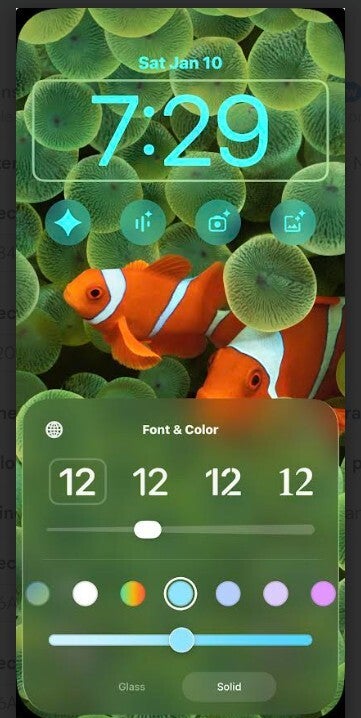
If Liquid Glass is the reason why you haven't updated your iPhone to iOS 26 yet, in iOS 26.1 you can reduce the "glass" look on your Dock, folders, and Control Center by going to Settings > Accessibility > Display & Text Size. Turn the Reduce Transparency toggle on. To get rid of the glassy look of the lock screen clock, you need to follow these directions:
Long-press on an empty space on your lock screen
Tap on Customize, then tap on the Lock Screen preview, and then on the clock.
At the bottom of the screen where there are two "pills" to choose from, select "Solid" instead of "Glass."
Select the pill labeled Solid on the bottom right to reduce the glass effect on your lock screen clock. | Image credit-PhoneArena
If you have iOS 26.1 or later, there is another toggle you can use to reduce how bright Liquid Glass looks. Go to Settings > Display & Brightness > Liquid Glass. Select Tinted or Clear. Lastly, Liquid Glass relies on the iPhone's gyroscope to have the reflections shift as you move the device. You can disable this by following these directions: Settings > Accessibility > Motion.Toggle Reduce Motion to on.
You will never get back the iOS 18 look no matter what you do once you've installed iOS 26, but do you really want to leave your iPhone vulnerable to a malicious attack? Perhaps the closest thing to turning off Liquid Glass (there is no off switch for it) is to toggle on the Reduce Transparency toggle in Accessibility (as detailed three paragraphs up) and the Reduce Motion Accessibility toggle also found in Accessibility (and detailed in the paragraph above this one).
Don't miss out on protecting your iPhone to iOS 26 because of some fears that you really shouldn't worry about.
Trade in your old phone for cash at ecoATM!
Recycle your used phone and get instant cash. Find out how at ecoATM!
Alan, an ardent smartphone enthusiast and a veteran writer at PhoneArena since 2009, has witnessed and chronicled the transformative years of mobile technology. Owning iconic phones from the original iPhone to the iPhone 15 Pro Max, he has seen smartphones evolve into a global phenomenon. Beyond smartphones, Alan has covered the emergence of tablets, smartwatches, and smart speakers.
A discussion is a place, where people can voice their opinion, no matter if it
is positive, neutral or negative. However, when posting, one must stay true to the topic, and not just share some
random thoughts, which are not directly related to the matter.
Things that are NOT allowed:
Off-topic talk - you must stick to the subject of discussion
Offensive, hate speech - if you want to say something, say it politely
Spam/Advertisements - these posts are deleted
Multiple accounts - one person can have only one account
Impersonations and offensive nicknames - these accounts get banned
To help keep our community safe and free from spam, we apply temporary limits to newly created accounts:
New accounts created within the last 24 hours may experience restrictions on how frequently they can
post or comment.
These limits are in place as a precaution and will automatically lift.
Moderation is done by humans. We try to be as objective as possible and moderate with zero bias. If you think a
post should be moderated - please, report it.
Have a question about the rules or why you have been moderated/limited/banned? Please,
contact us.












Things that are NOT allowed:
To help keep our community safe and free from spam, we apply temporary limits to newly created accounts: