A zero-day vulnerability is a software flaw known to many except those that are responsible for patching it. Recently, Apple was forced to release two emergency security updates to fix these flaws that were already exploited in what Apple described as an "extremely sophisticated attack." These attacks were narrowly aimed at specific individuals, associating them with spyware. Broader attacks would be considered attempts to steal users' passwords allowing the attackers to break into financial apps to steal money.
Two WebKit vulnerabilities have already been exploited
Both flaws affected the WebKit iOS browser engine, which is used to power the Safar default browser on the iPhone, and other browsers than tun on iOS. As a result, an iPhone user could run into trouble by simply visiting a malicious website; that could be enough to trigger an attack. The two software vulnerabilities are CVE-2025-43529 and CVE-2025-14174. Both of these flaws were exploited in the same real-world attack.
The CVE (Common Vulnerabilities and Exposures) numbers were created as a way to make sure that when it comes to a particular flaw, everyone is talking about the same one at the same time. CVE-2025-43529 is a flaw in WebKit that can allow attackers to run their own code or commands on a device, an issue known as arbitrary code execution. This is done by tricking the browser into mishandling memory.
Apple patches the software flaw across its ecosystem
The second flaw, CVE-2025-14174, also related to the WebKit browser engine, was discovered jointly by Apple and by Google’s Threat Analysis Group. The flaws have been taken care of by using improved memory management and better validation checks. Both Apple and Google were sure to limit the amount of information it relayed to the press to make sure that the attackers could not benefit from knowing any advanced technical details.
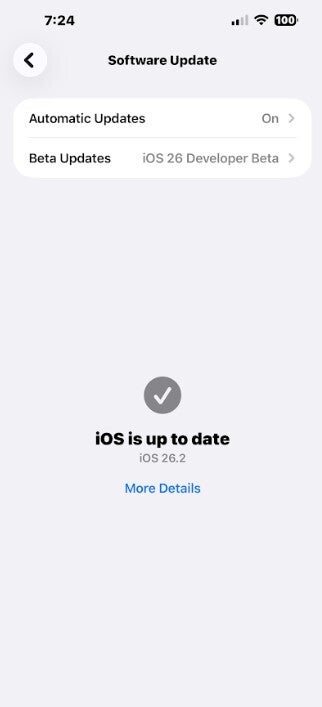
Have your iPhone set for automatic updates so you'll always have the latest version of iOS installed automatically. | Image credit-PhoneArena
Apple has patched the software flaws across its entire ecosystem including iOS 26.2 and iPadOS 26.2, iOS 18.7.3 and iPadOS 18.7.3, macOS Tahoe 26.2, tvOS 26.2, watchOS 26.2, visionOS 26.2 and Safari 26.2. Apple requires all browsers on iOS to use WebKit which means that even the Chrome Browser app running on the iPhone was impacted by these software flaws.
How you can avoid becoming a victim of WebKit vulnerabilities
Here are some things you can do to protect yourself from zero-day attacks:
Install updates as soon as they drop-this is important since zero-day attacks hope to catch victims unaware, off balance, and in a vulnerable spot. More importantly, these attacks depend heavily on the victim running outdated software. Make it an automatic response. Receive an update? Install it now. Enable automatic updates for all of your Apple devices. This way, if you miss the news about a sent update, it will be installed automatically.
Recommended For You
Be careful about tapping on links. Since WebKit exploits typically require that you visit a malicious website, do not tap on random links you might receive via a text message unless it's from a message you were expecting. You can also protect yourself by installing anti-virus software that can alert you to ransomware scams and phishing emails.
Have you ever activated Lockdown Mode on your iPhone?
20 Votes
Yes.
10%
No.
90%
Use Apple's Lockdown Mode if you feel threatened by a zero-day attack. Go to Settings > Privacy & Security > Lockdown Mode. Tap on Lockdown Mode. Go over the details and tap on Turn On. Then restart the device. Lockdown Mode will block most message attachments which is where many malicious links are found. This is the nuclear option if your iPhone is 100% under attack. Incoming FaceTime callers from new video callers are blocked. Lockdown Mode also blocks all data connections via the charging port when the phone is locked, and location data (EXIF) is removed from shared photos.
Watch for strange behavior on your device. Sudden battery draining and device overheating along with Safari randomly shutting down are signs that your device could be compromised.
Make sure to install any updates immediately. Lastly, you might want to reduce the personal data and information about you that is online. That is the kind of information that increases your visibility and makes it more likely that you will be a victim.
Trade in your old phone for cash at ecoATM!
Recycle your used phone and get instant cash. Find out how at ecoATM!
Alan, an ardent smartphone enthusiast and a veteran writer at PhoneArena since 2009, has witnessed and chronicled the transformative years of mobile technology. Owning iconic phones from the original iPhone to the iPhone 15 Pro Max, he has seen smartphones evolve into a global phenomenon. Beyond smartphones, Alan has covered the emergence of tablets, smartwatches, and smart speakers.
A discussion is a place, where people can voice their opinion, no matter if it
is positive, neutral or negative. However, when posting, one must stay true to the topic, and not just share some
random thoughts, which are not directly related to the matter.
Things that are NOT allowed:
Off-topic talk - you must stick to the subject of discussion
Offensive, hate speech - if you want to say something, say it politely
Spam/Advertisements - these posts are deleted
Multiple accounts - one person can have only one account
Impersonations and offensive nicknames - these accounts get banned
To help keep our community safe and free from spam, we apply temporary limits to newly created accounts:
New accounts created within the last 24 hours may experience restrictions on how frequently they can
post or comment.
These limits are in place as a precaution and will automatically lift.
Moderation is done by humans. We try to be as objective as possible and moderate with zero bias. If you think a
post should be moderated - please, report it.
Have a question about the rules or why you have been moderated/limited/banned? Please,
contact us.










![Another batch of Galaxy S26 series users in the US are getting a nice surprise today [UPDATED]](https://m-cdn.phonearena.com/images/article/183643-wide-two_350/Another-batch-of-Galaxy-S26-series-users-in-the-US-are-getting-a-nice-surprise-today-UPDATED.webp)
Things that are NOT allowed:
To help keep our community safe and free from spam, we apply temporary limits to newly created accounts: