Here's how to lock and put any Android device to sleep with a double tap (no root required!)
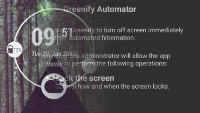
While the likes of the various double-tap-to-wake and double-tap-to-sleep gestures that can be found in a large number of smartphones are, all in all, yesterday's news, there is still a whole cornucopia of devices that are devoid of these features.
What a pity! Although some may argue that these are not handy at all and add nothing positive to the user experience interface, we can't deny that these can potentially be among the show-stopping features of your brand new smartphone - after all, the iPhones can't do that just yet.
But what if your manufacturer has decided that the users of its brand new product deserve no such thing, be it double tap to wake the device or put it to sleep? Well, you have several options before you. The more advanced requires you to search high and low for a custom kernel for your rooted device that supports said gesture features and flash it. Although you'd be safe if you follow the instructions, there's always a pretty big risk that something will go wrong. Are you willing to take the chance?
Well, there are much easier ways to implement one of the aforementioned gesture features, which is completely safe, requires no rooted device, and, as an added bonus, will even save you some battery juice!
Got your attention? Here follows the guide you've been looking for!
Got your attention? Here follows the guide you've been looking for!
How to put any Android device to sleep with a double tap

Follow us on Google News

Popular stories






Latest News





Things that are NOT allowed:
To help keep our community safe and free from spam, we apply temporary limits to newly created accounts: