Sony Xperia T2 Ultra Review
Introduction
Last year marked the time when phablets ganged up on the 6” display diagonal barrier, and the barren at the time market niche, suddenly started teeming with competition from every major manufacturer, like Samsung, HTC, LG and Nokia. Sony outed the jaw-dropping 6.4” Z Ultra phablet then, cramming top-shelf specs in an ultrathin, waterproof body.
This year, Sony is on a quest to conquer the midrange in the category, with the Xperia T2 Ultra - a 6” handset with a more affordable price tag that features a 720p screen, and a Snapdragon 400 processor, but sweetens the pot with a 13 MP camera, and a large battery. Can this price-to-specs combination make the T2 Ultra take the phablet universe by storm? Let's find out...
- In-ear stereo headphones
- microUSB cable
- Wall charger
- Warranty and information leaflets
Design
There's no going around how big the T2 Ultra is – it is a 6” phablet. Thankfully, it's also thin and light.
There's no escaping the fact that the T2 Ultra is a giant handset, like the rest of its fellow 6-inchers. It is about the size of the HTC One max, and is taller, but less wide than the Lumia 1520. These phones' dimensions make the 5.9” G Pro 2 appear acceptable, for instance, and LG's phone is by no means something to carry around comfortably. Sony, however, made the phablet the slimmest of them all, at 0.3” (7.65mm), and comparatively light for such a big device, at 6 oz (172g), so at least lugging it around won't be a literal burden. You can forget about one-handed operation, though, this thing has to be held and managed with both palms the vast majority of the time spent with it.

6.5 x 3.3 x 0.3 inches
165.2 x 83.8 x 7.65 mm
6.07 oz (172 g)

7.06 x 3.63 x 0.26 inches
179.4 x 92.2 x 6.5 mm
7.48 oz (212 g)

6.48 x 3.25 x 0.41 inches
164.5 x 82.5 x 10.29 mm
7.65 oz (217 g)

6.22 x 3.22 x 0.33 inches
157.9 x 81.9 x 8.3 mm
6.07 oz (172 g)

6.5 x 3.3 x 0.3 inches
165.2 x 83.8 x 7.65 mm
6.07 oz (172 g)

7.06 x 3.63 x 0.26 inches
179.4 x 92.2 x 6.5 mm
7.48 oz (212 g)

6.48 x 3.25 x 0.41 inches
164.5 x 82.5 x 10.29 mm
7.65 oz (217 g)

6.22 x 3.22 x 0.33 inches
157.9 x 81.9 x 8.3 mm
6.07 oz (172 g)
Compare these and other phones using our Size Comparison tool.
Display
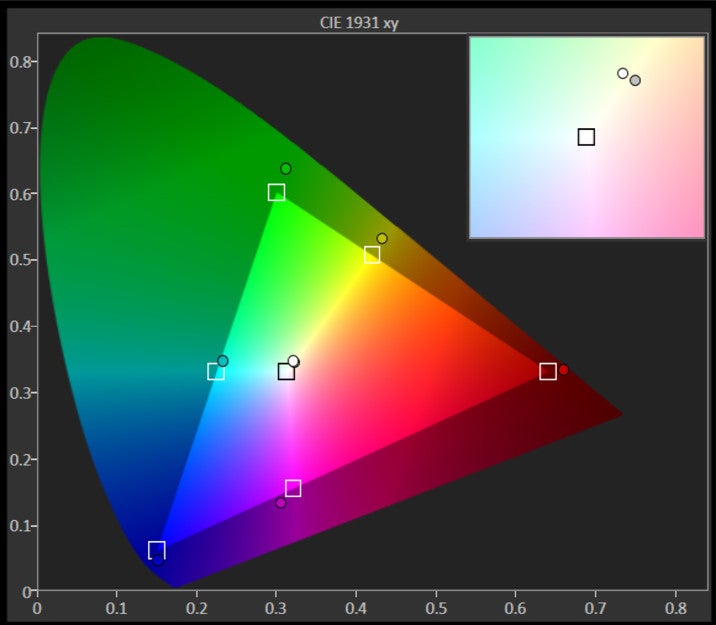
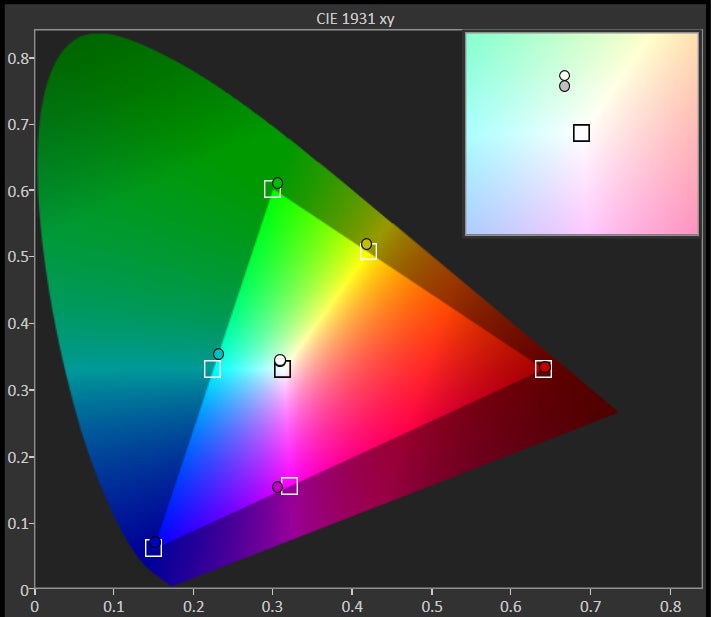
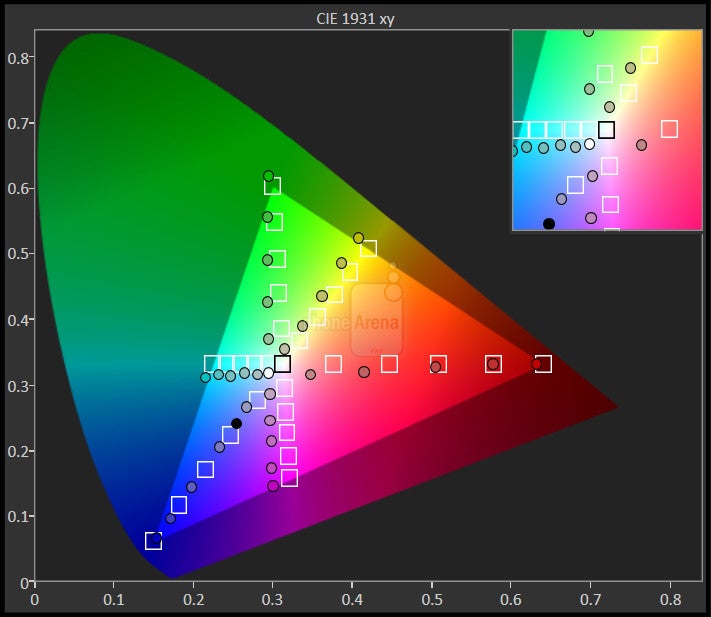
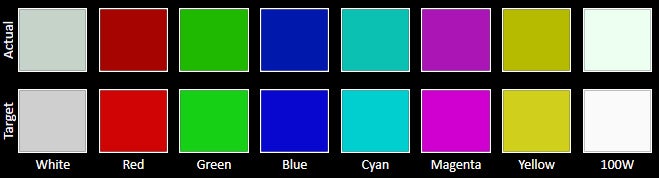
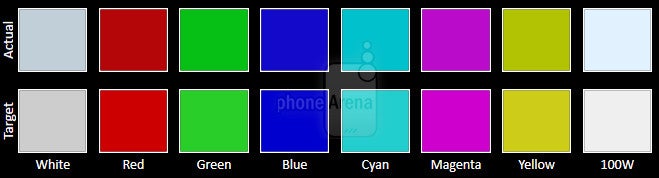
What the 6” screen lacks in pixel density, it somewhat makes up for in color presentation, brightness, and viewing angles.
The screen is where it's at with those 6-inchers, but the 720x1280 pixels of resolution on the Triluminos display of the T2 Ultra would be disappointing for some. The panel is with a 245 ppi pixel density, which would be deemed decent just a year ago, but now is somewhat aging. Small detail and zoomed-out text in the browser appear jagged, and not as discernible as on a 1080p display. It's not that bad, though, as you'd be looking at the T2 Ultra further afar from your eyes than, say, you would do with a 5-incher, so for the general user this resolution would be fine – if not with small text, then with pictures and video.







Interface and functionality
Sony's Xperia UI is one of the more basic Android overlays, but on the T2 Ultra it has features for easier one-handed operation, along with some multitasking options.
As any other popular Android smartphone manufacturer, Sony has its own, custom Xperia UI user interface, running on a version-old Android 4.3 Jelly Bean. It doesn't go as far in repainting Android, as HTC Sense, or Samsung's TouchWiz, but is an OK overlay. In order to achieve differentiation, Sony bets on a few branded apps, like the Walkman music player, or the Timescape social aggregator widget, and that's about it. All of the essential apps like Phone, Contacts, Messaging and so on have been customized, too. They are quite simplistic and straightforward, which isn't a bad thing.
As any self-respecting phablet maker, Sony has also added interface options that help you use the T2 Ultra with one hand. These include the usual “scooching” of the keyboard, dialer or calculator left or right, so you can supposedly reach them with your thumb only, when holding the phone with one palm. Moreover, Sony lets you pull down the status bar by double-tapping the on-screen home button, and thus read your notifications there without having to prop the phone with the other hand, and then scroll the bar downwards. It helps, but the effort you make for simply balancing the phablet with one hand is still significant.
Processor and memory
A midrange Snapdragon processor makes for an adequate, but not silky smooth performance.
A 1.4 GHz quad-core Snapdragon 400 CPU is what powers the T2 Ultra, with an Adreno 305 graphics crunching unit. This chipset occupies the lower midrange realm of Qualcomm's mobile silicon line, so don't expect any performance wonders, moreso when Sony has paired it with 1 GB of RAM. This combination simply does the job - the interface behavior is adequate, without choppy movements or annoying lag, but it's not buttery smooth either. The T2 Ultra comes with 8 GB of internal storage, of which only about 4 GB are user-available, but you have a microSD card slot on the left for memory expansion, covered with a protective flap.
Internet and connectivity
The T2 Ultra flaunts a dual SIM Active option and Asian LTE bands, which sounds like a recipe for success there.
Sony uses Android's default Chrome browser on the T2 Ultra, whose performance is adequate when it comes to panning, scrolling or zooming. The pixel density is a minor annoyance, compared with all those 1080p displays, as the text here looks less detailed and legible when zoomed out, and a tad jagged even when zoomed in.
The phone offers up to 42 Mbps HSPA+ download speeds, but its modem doesn't have support for the 1700/2100 MHz AWS spectrum of T-Mobile in the US, for instance. In addition, we get hexaband 4G LTE connectivity, which again eschews American carriers for European/Asian frequencies, as that's the dual SIM phone's target market. We get a dedicated SIM card management app, which lets you assign a primary one, rename the two cards, or set roaming and data download preferences for each. The T2 Ultra is a dual SIM active device, meaning that it comes with two transceivers, letting you receive calls on both SIM cards. The handset offers a full set - Wi-Fi, Wi-Fi Direct, Bluetooth 4.0, A-GPS, and DLNA connectivity, throwing in NFC, and even FM radio with RDS for a good measure. Wired connectivity is supplied via the MHL port at the right side of the handset for TV-out purposes.
Camera
A very good 13 MP camera ups the ante in the phablet realm.
The 13 MP camera on the back of the T2 Ultra consists of Sony's Exmor RS sensor, with a 1/3.06” size and 1.12 micron pixels, coupled with lens that offer f/2.2 aperture. It is managed by all the bells and whistles you'd expect from Sony's Xperia UI camera app, like a Scene Recognition mode, that can fire 36 different scene presets automatically, including decisions on whether to shoot in an HDR mode or not, depending on the scene in front of the lens. We also get Augmented Reality overlays, and a bunch of manual scene modes like Panorama. By default the phablet shoots in a wide 16:9 aspect ratio, which is about 9 MP, so if you want to use the full 13 MP resolution of the camera, you have to change it to 4:3 manually from the app settings. The phone focuses and snaps quickly, for about a second, while the shot-to-shot times are average - about three to five seconds, depending on the scene, and whether the HDR mode is on or not. The Superior Auto mode gets the correct scene settings most of the time.
Sample images
We get smooth 30fps 1080p video recording from the T2 Ultra's camera. The device is quick to adjust the exposure when you are panning around with it, and doesn't skip frames or insert artifacts. The sound recorded with the video is strong and clean, too.
Sample Videos
Multimedia
Sony uses its Album app in place of a stock gallery, and offers plenty of picture editing modes that can be used from within the app's interface. Your video collection goes in the Movies app, which also boasts a pretty interface with footage previews. There is an interesting Track ID TV mode, which serves as Shazam for video, pulling out information about the movie currently on TV based on the sound recorded from it.
The default video player runs every popular format you throw at it, including DivX/Xvid/MKV files, up to 1080p in resolution. It also sports plenty of settings, like a loop mode, or subtitles support. The footage looks pretty on the large, bright display, too.
Call quality
We are glad to report that the T2 Ultra doesn't disappoint in terms of call quality. Its earpiece is very strong and sounds rather clean, with no audible distortions, even at the highest volume. We were notified from the other end of the line that they could hear us loud and clear, too, while the two noise-cancellation mics removed the surrounding fluff, and relayed only our voice to the other side.
Battery
The T2 Ultra is the longest-lasting mobile device we've ever tested, with the record 10+ hours of screen-on time – need we say more?
So far so good, but the best thing about the Xperia T2 Ultra is the battery life it scores from the 3000 mAh juicer. Sony is renowned for the well-balanced battery consumption of its midrangers, which consistently score towards the top percentile in our battery test, but it outdid itseld with the phablet. The company promises the whopping 24 hours of talk time in 3G mode for the T2 Ultra, and almost a month and a half on standby, as well as 10 hours of HD video playback on a charge. Those numbers are way above the average, and should come as a hint that the T2 Ultra phablet performed very well on our own grueling battery test, too. In fact, we logged even more screen-on time than Sony cites, at 10 hours and 16 minutes, making the T2 Ultra the device with the longest battery life we've ever tested, tablets included. That's a great feature to have on a dual SIM Active handset, which sucks more juice out of the battery to maintain two networks at once, so if you are looking for a phablet that will last you two or three days with average usage, the T2 Ultra it is.
Conclusion
In the end, we have to say that Sony did an excellent job with the Xperia T2 Ultra. Granted, it is a big handset, but you can't expect anything less from a 6” phablet, plus it's very thin and light for the screen size. We could also expect a bit more from the display's pixel density, but it's a worthy tradeoff for the phone's price and performance. When we stack the longest battery life we've ever measured, with the very good pictures and videos produced by the phablet's 13 MP camera, and the dual SIM Active functionality, we can pronounce the T2 Ultra as one of the best phablets in the midrange category.
Software version: 19.0.D.0.253



Popular stories






Latest News






Things that are NOT allowed:
To help keep our community safe and free from spam, we apply temporary limits to newly created accounts: