Google announces a quick and easy shortcut for the Photos app in Android and iOS
To enable Face Groups, open the Google Photos app in Android or iOS. Tap your profile icon in the right corner and then tap on Photos settings > Privacy, and toggle Face Groups on. You can also enable "Show pets with people" if you want pets grouped in with family members. Tap on the photo of your face if prompted to in order for Face Groups to include more personalization.
Google has announced today that Face Groups is now more integrated with the search function on the Google Photos app, both on iOS and Android. In a Google Photos support page, the Alphabet subsidiary says that it heard your request for an easier way to find photos and videos of the important people in your life in the Google Photos app. As Google says, "Now, we’re adding shortcuts to your face groups into classic search and Ask Photos on Android, iPhone, and iPad.
The Face Groups row containing a total of five people or pets. Image credit-PhoneArena
With this update, you can locate your top face groups and find the photos that you’re looking for more easily. You can only see faces shortcuts when the Face Groups feature is toggled on and we explained how to do that at the start of this article.
Find all of the photos and videos you have of certain people and pets in the Google Photos app
Assuming you have Face Groups enabled, open the Google Photos app on Android or iOS. Tap the Search bar or the Ask tab (followed by the Search bar) and you'll see a line of five faces. Tap on any of those faces to see all of the photos and videos you have of that person or pet. You'll also see the actual number of pictures and videos you have of that person or pet on the Google Photos app..
Recommended For You
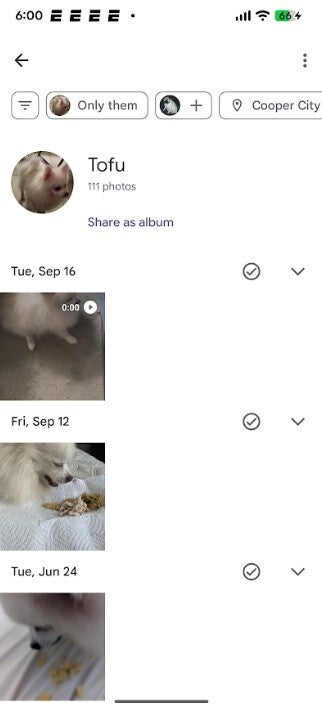
Tap on one of the faces in the row and you'll see all of the photos and images you have of that person or pet in the Google Photos app. | Image credit-PhoneArena
How to download and install the Google Photos app on your device
Near the top of the page is a tab that will allow you to filter photographs and videos to eliminate those with other pets or people in it. One tab will allow you to add a specific person or pet, and another will show images and videos taken in a specific location.
Will you use this new Google Photos feature?
5 Votes
Yes. It is useful and works quickly.
80%
No. I can't see myself needing this feature.
20%
The Google Photos app is pre-installed on nearly all Android phones. If you don't have it on your Android phone, you can install it from the Google Play Store by tapping on this link. If you need to download and install Google Photos on your iPhone, press on this link.
Get iPhone 18 Pro with Visible, get $480 off!
$719
/mo
$1199
$480 off (40%)
On the Visible+ Pro plan, you get access to 5G Ultra Wideband data on Verizon's fastest network. Along with unlimited roaming across Mexico and Canada, 2 days of Global Pass per month, 3x hotspot speeds, 4K streaming, and Smartwatch service.
Alan, an ardent smartphone enthusiast and a veteran writer at PhoneArena since 2009, has witnessed and chronicled the transformative years of mobile technology. Owning iconic phones from the original iPhone to the iPhone 15 Pro Max, he has seen smartphones evolve into a global phenomenon. Beyond smartphones, Alan has covered the emergence of tablets, smartwatches, and smart speakers.
A discussion is a place, where people can voice their opinion, no matter if it
is positive, neutral or negative. However, when posting, one must stay true to the topic, and not just share some
random thoughts, which are not directly related to the matter.
Things that are NOT allowed:
Off-topic talk - you must stick to the subject of discussion
Offensive, hate speech - if you want to say something, say it politely
Spam/Advertisements - these posts are deleted
Multiple accounts - one person can have only one account
Impersonations and offensive nicknames - these accounts get banned
To help keep our community safe and free from spam, we apply temporary limits to newly created accounts:
New accounts created within the last 24 hours may experience restrictions on how frequently they can
post or comment.
These limits are in place as a precaution and will automatically lift.
Moderation is done by humans. We try to be as objective as possible and moderate with zero bias. If you think a
post should be moderated - please, report it.
Have a question about the rules or why you have been moderated/limited/banned? Please,
contact us.












Things that are NOT allowed:
To help keep our community safe and free from spam, we apply temporary limits to newly created accounts: