Google is always working on the Google Maps app, it seems. You can now talk to the app using a conversational tone. For example, instead of asking Google Maps to "find Gas Stations," you can now say something along the lines of "Is there a budget-friendly restaurant with vegan options along my route, something within a couple miles? … What's parking like there?" You can follow up by saying, "OK, let’s go there" and the app will start giving you turn-by-turn directions.
Gemini integration allows you, without leaving the Google Maps navigation screen, to ask for an event to be added to your Google Calendar app. You can also have Gemini bring you up to date with the latest news.
Google Maps finally makes it easier to know where to make a turn
Another much needed update to Google Maps uses landmarks to help you know when to make a turn. I've been complaining about the way Google Maps would say "turn left in three-quarters of a mile." Who could figure out when they have come close to that distance? Apple Maps gives a better description by saying something like, "turn left at the next stop sign." Google Maps started following Apple Maps by giving similar directions and has even taken it to another level.
Apple iPhone users, which mapping app do you favor?
536 Votes
Apple Maps, of course.
11.19%
Google Maps, naturally.
57.09%
I don't use an iPhone.
31.72%
Recently you might have heard Google Maps mention a local landmark to help with your navigation before you have to make a turn. The app will mention landmarks that are easy for you to spot while you drive. These locations include restaurants, gas stations, and well-known buildings. Google Maps will give you directions like "turn right after the Thai Siam Restaurant," and the eatery will be highlighted on the map as you get close to it.
Recommended For You
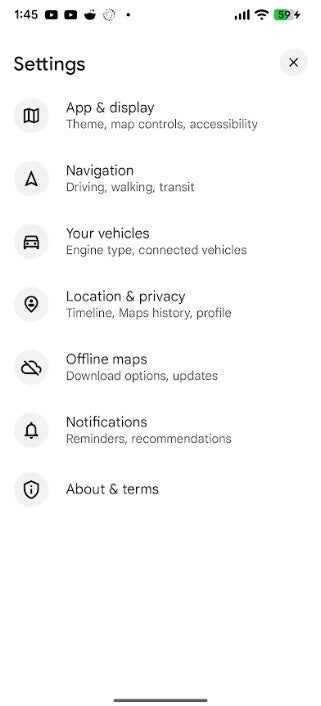
New Settings menu for Android version of Google Maps. | Image credit-PhoneArena
Google explains how Gemini picks the landmarks to use. The latter analyzes Google Maps' "fresh, comprehensive information about 250 million places and cross-referencing it with Street View images to curate the most useful landmarks visible from the street, so guidance is accurate and helpful." I've already heard this used on the iOS version of Google Maps on my iPhone 15 Pro Max. However, the restaurant mentioned as a landmark was not that easy to find.
Both the iOS and Android versions of Google Maps have a streamlined Settings menu
About & terms-Google Maps version, licenses, legal notices, etc.
To get to the Google Maps Settings menu, open the app and on the right of the search bar at the top of the screen, tap on the profile picture. From there, tap on settings. The new Google Maps Settings menu already appears on the Google Maps for Android app installed on my Pixel 6 Pro running the latest Android 16 QPR3 Beta 3 update. It also shows up on the Google Maps for iOS app loaded on my iPhone 15 Pro Max running the latest iOS 26.3 Beta.
The new Google Maps Setting menu appears on this version of the app after a server-side update
Regardless that the updated version of the app has appeared on both of my phones, it is supposed to appear on stable version 25.49 of the Google Maps app on both platforms following a server-side update. By the way, Google Maps is the default navigation app on Android, but not on iOS. If you want Google Maps on your iPhone, you can install it from the Apple App Store by tapping on this link.
You can be pretty sure that Google will continue working on Google Maps. Interestingly, data shows that in the U.S. iPhone users prefer Apple Maps over Google Maps by a 55% to 45% split. However, the story is different globally where Google Maps has a huge lead over Apple Maps in showing information about businesses and, more importantly, transit information.
Mint Mobile's 6-month plans now cost $10/mo
$10
/mo
$35
$25 off (71%)
Mint Mobile is celebrating its 10-year anniversary with a special offer on its six-month subscription plans. For a limited time, you can get your preferred tier (6GB, 17GB, 23GB or unlimited) for just $10/mo. That saves you between 50% and 71% on the carrier's mobile plans, making it way easier to recommend.
Alan, an ardent smartphone enthusiast and a veteran writer at PhoneArena since 2009, has witnessed and chronicled the transformative years of mobile technology. Owning iconic phones from the original iPhone to the iPhone 15 Pro Max, he has seen smartphones evolve into a global phenomenon. Beyond smartphones, Alan has covered the emergence of tablets, smartwatches, and smart speakers.
A discussion is a place, where people can voice their opinion, no matter if it
is positive, neutral or negative. However, when posting, one must stay true to the topic, and not just share some
random thoughts, which are not directly related to the matter.
Things that are NOT allowed:
Off-topic talk - you must stick to the subject of discussion
Offensive, hate speech - if you want to say something, say it politely
Spam/Advertisements - these posts are deleted
Multiple accounts - one person can have only one account
Impersonations and offensive nicknames - these accounts get banned
To help keep our community safe and free from spam, we apply temporary limits to newly created accounts:
New accounts created within the last 24 hours may experience restrictions on how frequently they can
post or comment.
These limits are in place as a precaution and will automatically lift.
Moderation is done by humans. We try to be as objective as possible and moderate with zero bias. If you think a
post should be moderated - please, report it.
Have a question about the rules or why you have been moderated/limited/banned? Please,
contact us.









Things that are NOT allowed:
To help keep our community safe and free from spam, we apply temporary limits to newly created accounts: