Imagine that you are surfing the internet when suddenly, out of nowhere, a pop-up window appears and tells you that your phone is infested with viruses. Well, obviously, the first thing that comes to mind is how to fix it. You click on the button, and then follow a few more steps that look exactly like the official Google Play system updates that come out every month. And then, voila! You have saved your phone. Or so you think. What if, in reality, you have just invited a digital thief into your living room?
A smart and devious trick that’s been hiding in plain sight
A new report has been issued by a group of researchers who have managed to track down a new and devious trick that has been targeting Android users via a platform that most people would trust: Hugging Face. For the uninitiated, Hugging Face is like the "hub" of AI and tech-related software and data, a place where tech enthusiasts and programmers go to share their genuine tech-related stuff. However, now hackers are using this reputable name to distribute their malware and malicious software.
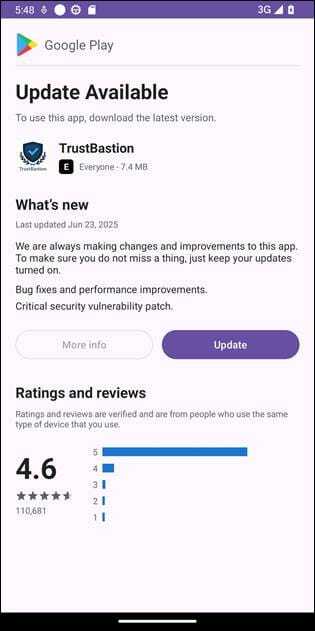
The malware in question is an app named TrustBastion, and it’s what’s known as "scareware," which scares people into thinking that their phone is in danger. Once it’s been installed, it then demands that the user "update" their software immediately.
Recommended For You
Typically, traffic from low-trust domains gets flagged immediately, which is why attackers often will try to use well-established domains that don’t raise suspicions...Analysis of the Hugging Face repository revealed a high volume of commits over a short period of time. New payloads were generated roughly every 15 minutes. At the time of investigation, the repository was approximately 29 days old and had accumulated more than 6000 commits.
— Bitfender, January 29, 2026
Why this is a big deal for Android users
Example of the TrustBastion prompt. | Image credit — Bitfender
This is a big deal because it indicates that hackers are getting more and more sophisticated at what’s known as "social engineering." They are now using Hugging Face, so it looks like normal traffic and doesn’t arouse any suspicions.
As mentioned in the report, this is not a one-time effort by the hackers. They were also uploading new versions of this malware every 15 minutes to stay ahead of antivirus software. While the initial sources of this malware have been removed, this is simply a case of popping up again with different icons but with the same malicious code.
This is particularly frightening for non-techie folks because once this malware is installed, it asks for "Accessibility Services." While this is a feature meant for people with disabilities, it allows hackers to gain full access to see what you’re seeing on your screen, record all of your taps, and even steal your login credentials for apps like Alipay or WeChat.
How do you usually handle unexpected security alerts on your phone?
44 Votes
I immediately close the browser tab or app.
52.27%
I use a trusted antivirus app to run a manual scan.
9.09%
I check my phone's official settings for any real updates.
31.82%
I sometimes get worried and click to see what it says.
6.82%
What you should know
To be honest with you, it is getting harder and harder to distinguish what is real and what is a scam these days. I think my best advice is to never trust a pop-up that tells you that your phone is infected while simply browsing a web page.
I would recommend only getting apps from the official Google Play Store. While nothing is ever 100% secure, I think this is a much safer approach than clicking a link from a "Phone Security" app that you have never even heard of. If you do get prompted for an update from a new app that looks like a legitimate update window for a new app, I think it is best to close that app and check your actual phone settings instead. Be careful and protect yourselves!
On the Visible+ Pro plan, you get access to 5G Ultra Wideband data on Verizon's fastest network. Along with unlimited roaming across Mexico and Canada, 2 days of Global Pass per month, 3x hotspot speeds, 4K streaming, and Smartwatch service.
Johanna Romero is a Senior News Writer at PhoneArena, covering mobile technology news across Android, iOS, wearables, and the Google ecosystem she knows best. Drawing on 15 years in IT and tech support from 2007 to 2022, she brings a user-friendly eye for the practical features and lesser-known tricks readers care about. Google named her an official #TeamPixel member in 2022, and she also reviews the latest devices on her YouTube channel, JoJo the Techie.
A discussion is a place, where people can voice their opinion, no matter if it
is positive, neutral or negative. However, when posting, one must stay true to the topic, and not just share some
random thoughts, which are not directly related to the matter.
Things that are NOT allowed:
Off-topic talk - you must stick to the subject of discussion
Offensive, hate speech - if you want to say something, say it politely
Spam/Advertisements - these posts are deleted
Multiple accounts - one person can have only one account
Impersonations and offensive nicknames - these accounts get banned
To help keep our community safe and free from spam, we apply temporary limits to newly created accounts:
New accounts created within the last 24 hours may experience restrictions on how frequently they can
post or comment.
These limits are in place as a precaution and will automatically lift.
Moderation is done by humans. We try to be as objective as possible and moderate with zero bias. If you think a
post should be moderated - please, report it.
Have a question about the rules or why you have been moderated/limited/banned? Please,
contact us.













Things that are NOT allowed:
To help keep our community safe and free from spam, we apply temporary limits to newly created accounts: