Google Wallet is probably one of the most popular Google apps available for your Android smartphone. It has received some really cool and useful upgrades from time to time. The latest feature that's being added to it will let you track your current flight.
It was teased months ago
During I/O 2025, Google announced that the Live Update feature would arrive in Google Maps and a few other travel-related apps, such as Uber Eats and Waymo. However, it was later teased in the Google Wallet app as well.
Google mentioned this change in the release notes for Google Play services v25.42. However, it provided no specific timeline for when the feature would become publicly available. It is now apparently available on every device running Android 16 or the Android 17 beta.
Get your flight info right on your screen
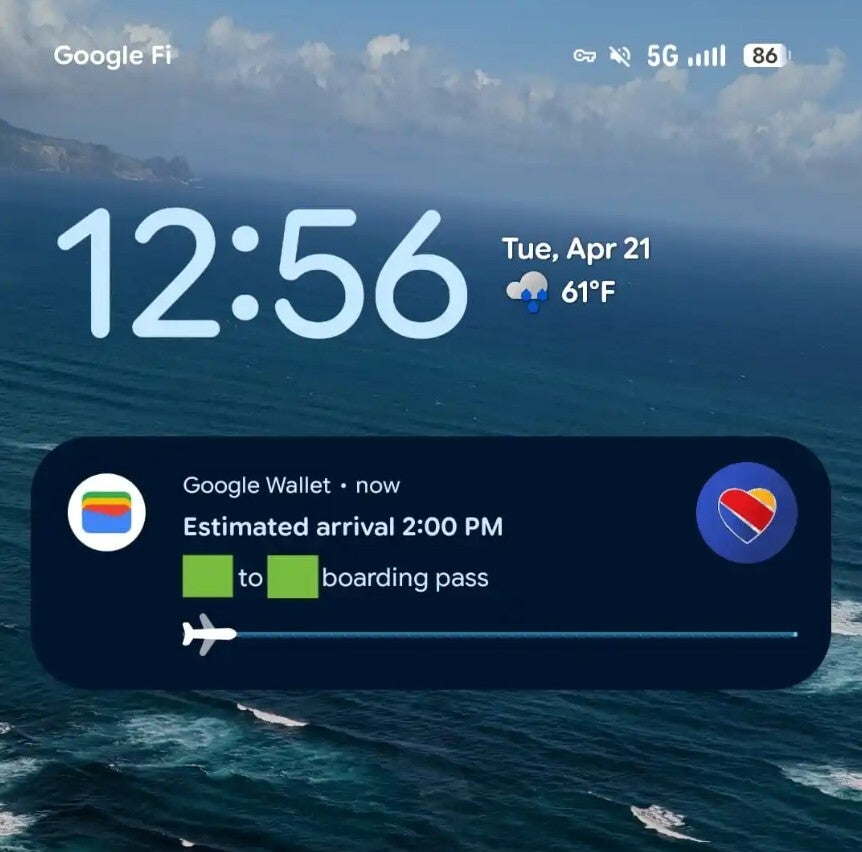
Google Flight showing live flight status. | Image by 9to5Google
Once you have added your boarding pass to Google Wallet, you'll see your flight's full travel status on your lock screen. The app uses a persistent notification and progress bar to display flight details.
The feature activates just moments after your flight takes off. At the lock screen, you'll see flight details, including the ETA and departure/arrival locations. The same information appears on the Always-On Display as well if you've enabled it on your device.
If you tap the progress bar, you'll be redirected to the ticket page. The page also contains a link to Google Flights at the bottom, and tapping it opens the page in your web browser.
It complements other Google features as well
The Live Update capability in Google Wallet works alongside the app's other existing features. For instance, it complements Wallet's ability to scan your Gmail for upcoming flight tickets and send a reminder to check in before the departure time.
Recommended For You
Additionally, adding your boarding pass to Google Wallet gives you the benefit of receiving timely notifications whenever there are changes to the boarding time. The app also gives you easy access to a QR code that you can use in certain cases at the boarding gate. The availability of all these features eliminates the need for having a dedicated airline app installed on your device.
Have you started using Google Wallet more than ever without realizing it?
9 Votes
It's creeping up there, and I don't appreciate it.
33.33%
It's getting close to becoming the most-used app.
22.22%
It's still just a backup for me.
44.44%
Apple Maps has this feature as well
It's not as if the option to track your current flight status on the lock screen through the Wallet app is a Google Wallet exclusive. Apple Wallet supports this too. In fact, Apple Wallet lets you share your boarding pass Live Activities with friends or family so they can track flights from home.
All that said, you can use Google Wallet's Live Update feature to track the progress of your train rides as well, similar to flights. If you don't see this feature working on your Android smartphone, open the Google Play Store and ensure you have the latest version of Google Wallet installed on your device. You can also consider updating Google Play services.
Six-month unlimited plan is now 57% off
$90
$210
$120 off (57%)
Mint Mobile is now allowing you to get whichever plan you like for either three, six, or 12 months for just $15/mo. If you go for the six-month unlimited service, for instance, you'll now have to pay just $90 upfront instead of $210.
Aman Kumar is a news writer at PhoneArena covering Google Pixel phones, Android features, AI-powered smartphone tools, and mobile tech news. Before joining PhoneArena, he spent over five years writing about consumer technology for publications like MakeUseOf, How-To Geek, and Guiding Tech. His current daily drivers are the Pixel 10 and Samsung Galaxy S26 Plus, while his red iPhone SE (2nd gen) remains a personal favorite. Aman also appreciates bold smartphone experiments and still considers the Nokia N-Gage one of the industry’s most iconic designs.
A discussion is a place, where people can voice their opinion, no matter if it
is positive, neutral or negative. However, when posting, one must stay true to the topic, and not just share some
random thoughts, which are not directly related to the matter.
Things that are NOT allowed:
Off-topic talk - you must stick to the subject of discussion
Offensive, hate speech - if you want to say something, say it politely
Spam/Advertisements - these posts are deleted
Multiple accounts - one person can have only one account
Impersonations and offensive nicknames - these accounts get banned
To help keep our community safe and free from spam, we apply temporary limits to newly created accounts:
New accounts created within the last 24 hours may experience restrictions on how frequently they can
post or comment.
These limits are in place as a precaution and will automatically lift.
Moderation is done by humans. We try to be as objective as possible and moderate with zero bias. If you think a
post should be moderated - please, report it.
Have a question about the rules or why you have been moderated/limited/banned? Please,
contact us.













Things that are NOT allowed:
To help keep our community safe and free from spam, we apply temporary limits to newly created accounts: