Apple has just announced the latest software chapter for the iPhone, iOS 27, at this year’s WWDC’26 developer summit.
This is actually expected to be Tim Cook’s last keynote as an Apple CEO as John Ternus takes over September 1 and will most certainly headline the iPhone 18 Pro announcement event.
After last year’s iOS 26 shook up the very foundations of iOS with the major Liquid Glass redesign, iOS 27 aims to smooth out some of the rougher edges and ameliorate the user experience for hundreds of millions of iPhone users.
Without further ado, here's what’s new in iOS 27 and how Apple envisions the immediate future of its operating system.
iOS 27 eligible devices and release date
iOS 27 will be available to all iPhones that were compatible with iOS 26. This means iPhone 11 and newer will be able to get the update this September when it launches officially.
Here's a list of all iPhones that will get iOS 27:
iPhone 13 Pro Max, iPhone 13 Pro, iPhone 13, iPhone 13 mini
September 24, 2021
Yes
iPhone 12 Pro Max, iPhone 12 Pro, iPhone 12, iPhone 12 mini
October 23, 2020
Yes
iPhone SE 2nd Gen
April 24, 2020
Yes
iPhone 11 Pro Max, iPhone 11 Pro, iPhone 11
September 20, 2019
Yes
*-rumored model
Recommended For You
As is typical for new iOS releases, these will launch in the fall along with Apple's next generation of iPhones. This year, we expect the iPhone 18 Pro and iPhone 18 Pro Max, as well as the foldable iPhone (likely called iPhone Ultra) to be unveiled in September.
Liquid Glass gets a slider
iOS 27 isn't scoring any major visual changes given just how profoundly different iOS 26 was from a design perspective.
However, with iOS 27, Apple introduces a new slider that will allow users to fine-tune the appearance of Liquid Glass from fully transparent to completely opaque. This way, Apple softly admits defeat and gives users choice in how their interface looks and puts the rocky Liquid Glass launch behind its back.
Siri + Apple Intelligence = Siri AI
A modern new Siri AI app
A smarter Siri has consistently been one of the top-requested features for iOS for as long as I can remember, and with iOS 27, the genie has finally granted that wish.
With iOS 27, Siri ceases to be just an overlay over your interface but evolves to a new app available on your iPhone, one similar to the ChatGPTs, Claudes, and Geminis of the world. It will also live in the Dynamic Island itself as well. Thanks to this major change to how Siri is accessed and interacted with, iPhone users will now be able to make back-and-forth conversations with the assistant, similarly to how you can interact with most AI chatbots out there.
There's a conversation history that can be set to expire after a set amount of time for privacy reasons. Just like in previous iOS versions, you will be able to interact with this refreshed Siri assistant either via voice or via text, and it will respond accordingly back to you.
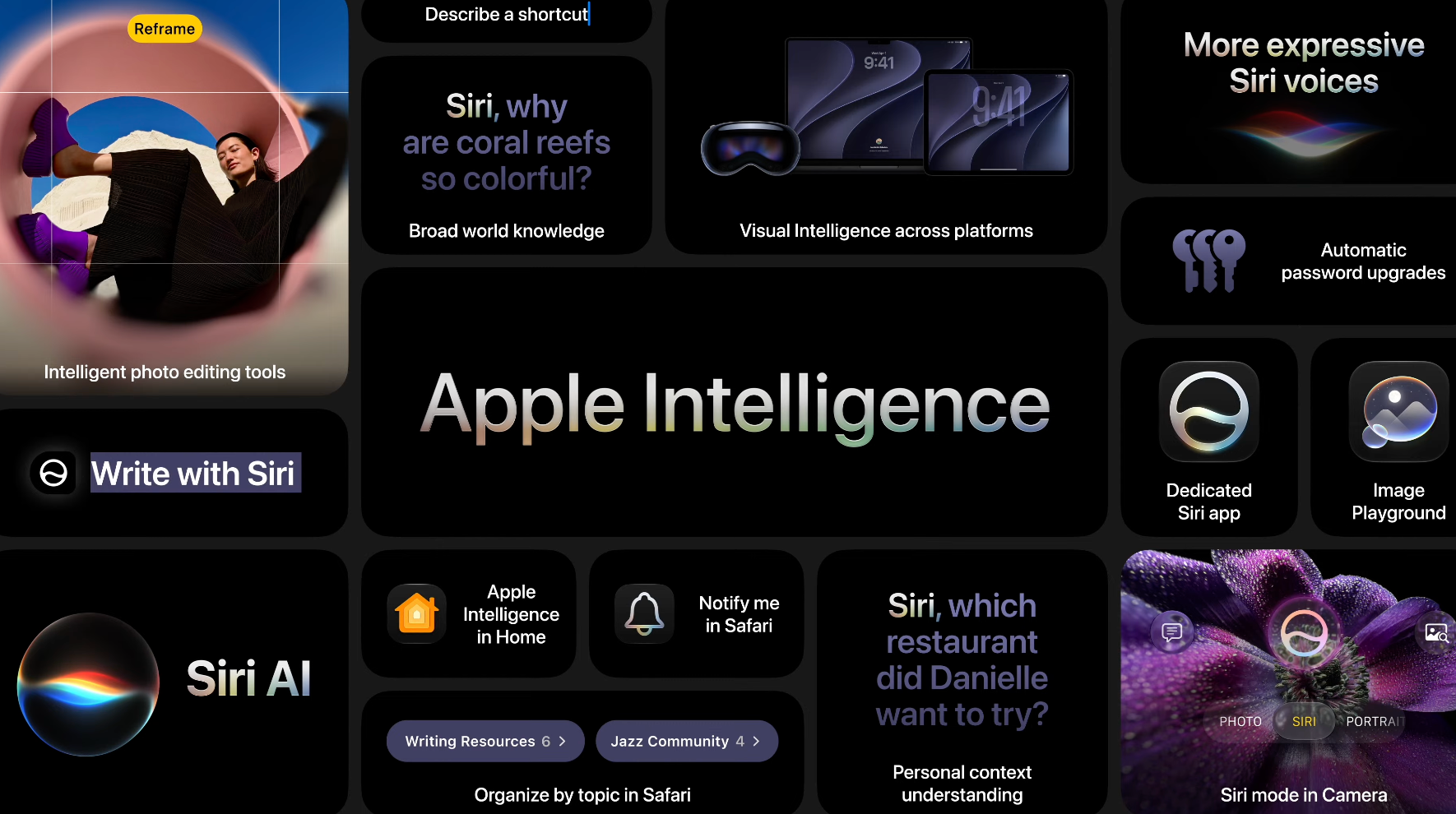
Apple Intelligence remains private, processing most data on-device but also relying on Private Cloud Compute when necessary.
Apple Intelligence in a nutshell. | Image by Screenshot by PhoneArena
Powered by Google
Apple did not sugarcoat this. The new Siri AI is powered by Apple Intelligence... which is powered by Google's Gemini models. This is an admittance of defeat that whatever LLMs Apple has developed internally failed to meet the expectations, so the actual "smarts" of the Siri AI have had to be outsourced.
Personal context understanding
But the new Siri app isn't even the most exciting change.
Starting with iOS 27, Siri will finally understand your deeply unique personal context and be aware of details in your personal data. For example, you will be able to ask Siri to find gaps in your calendar and squeeze in a quick event or a meeting, or check your emails or messages for flight information or a restaurant reservation.
You will also be able to ask Siri to quickly pen an email or a text based on your personal context; you can also ask Siri to quickly jot down a note in your Notes app with relevant data. It can also act agentically and understand complex prompts and act upon them. So, for example, you can ask Siri to search for information online, create a list, and message a group of people without touching a thing.
Of course, it's Apple Intelligence that's acting as the backbone for the new Siri app, so it's safe to assume that it will be only available to iPhone 15 Pro/Pro Max and newer devices. Any older iPhones running iOS 27 will most certainly default to the standard and familiar Siri.
New Siri voice
Siri has a customizable new voice, which allows you to fine-tune pace and expressivity. Aside from boasting a different voice, it's now more conversational and provides richer voice feedback. You can still choose between different local dialects, but can also fine-tune them to suit your needs.
Siri mode for the camera
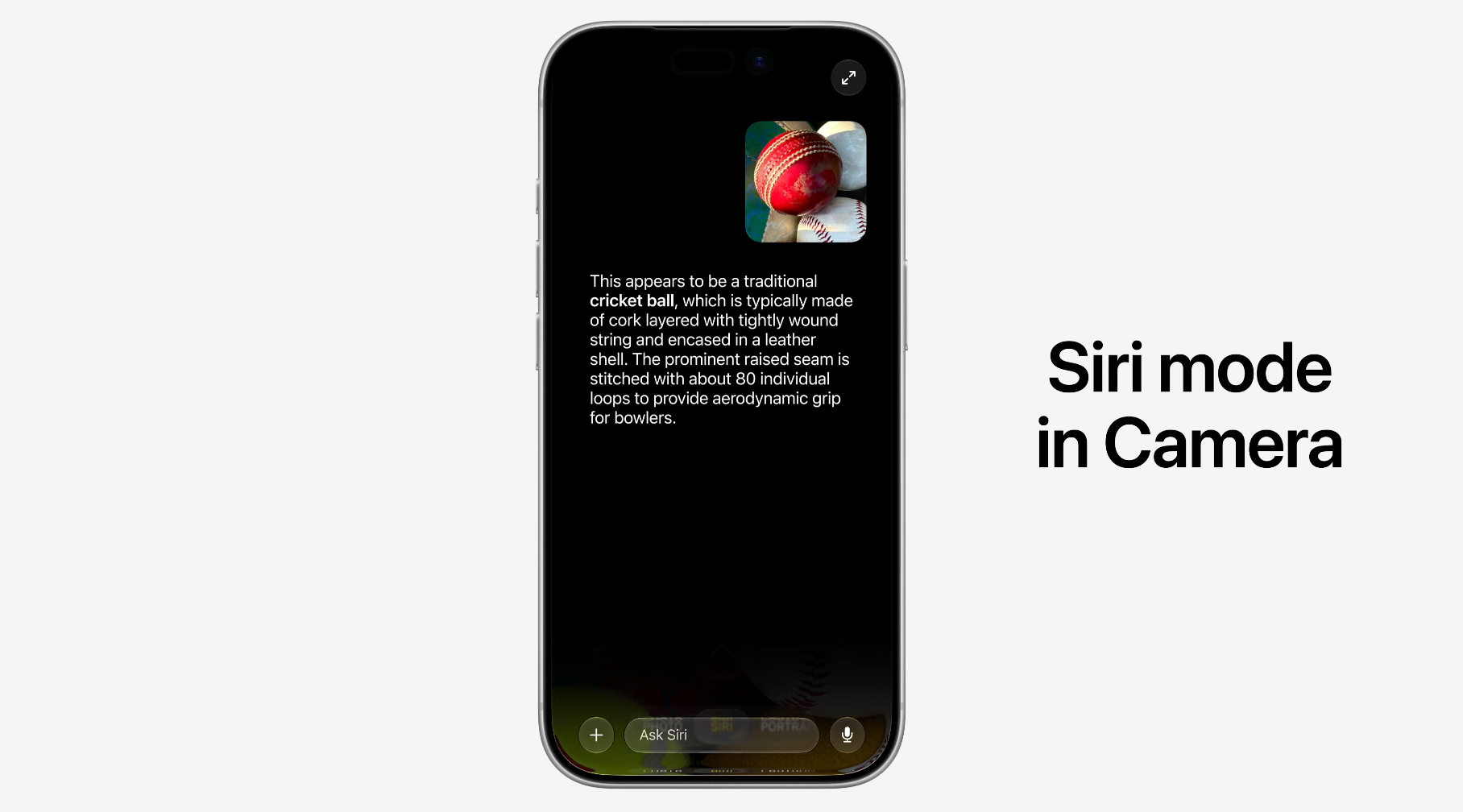
An upgrade of Visual Intelligence, Siri will also be available as a new dedicated mode in your iPhone's Camera app as well. This way, you will be able to point your iPhone's camera at an object and have Siri or any connected AI provider analyze it and provide relevant information about it, quite similar to Gemini's visual search or Android's Google Lens, but on steroids.
You can also use Siri mode to automatically split up the tip on the group tab. Great!
Siri mode in the iOS 27 camera. | Image by Screenshot by PhoneArena
Safari
Safari scores a new helpful tool to manage excessive tabs in the browser. This feature is Apple Intelligence-powered and will bundle up related tabs together, thus making your browsing experience more organized. Safari will also create dedicated tab groups that can be opened later.
A new feature called "Notify Me" will allow Safari to monitor tabs you've closed for any relevant changes.
You can now also, well, sort of vibe-code extensions for Safari. Just explain in natural language what you want Safari to do, and it will configure the website to do just that.
Home and Shortcuts
Apple Intelligence spans to the Home and Shortcuts apps. The Home app will now send you dynamic notifications, based on complex and relevant data from your connected home. So instead of ten notifications, you will get one dynamically updated notification.
You can also vibe-code Shortcuts with Apple Intelligence, which is a perfect use of the technology. Shortcuts is a powerful and complex system, but has a high bar of entry, so utilizing the power of Apple Intelligence feels very logical and natural.
Photos
Apple Intelligence gains two new photo editing features, which will allow users to quickly change the spatial perspective of a photo in their gallery or use its AI chops to intelligently extend it outside the frame. This way, you can attempt to save "ruined" photos by leveraging the power of your iPhone's on-device AI.
While useful, none of these features are unique to the mobile landscape, but nevertheless, they are wonderful additions to iOS.
The Clean-up Tool in Photos is also getting an upgrade and will now be more capable at determining and
Child Accounts
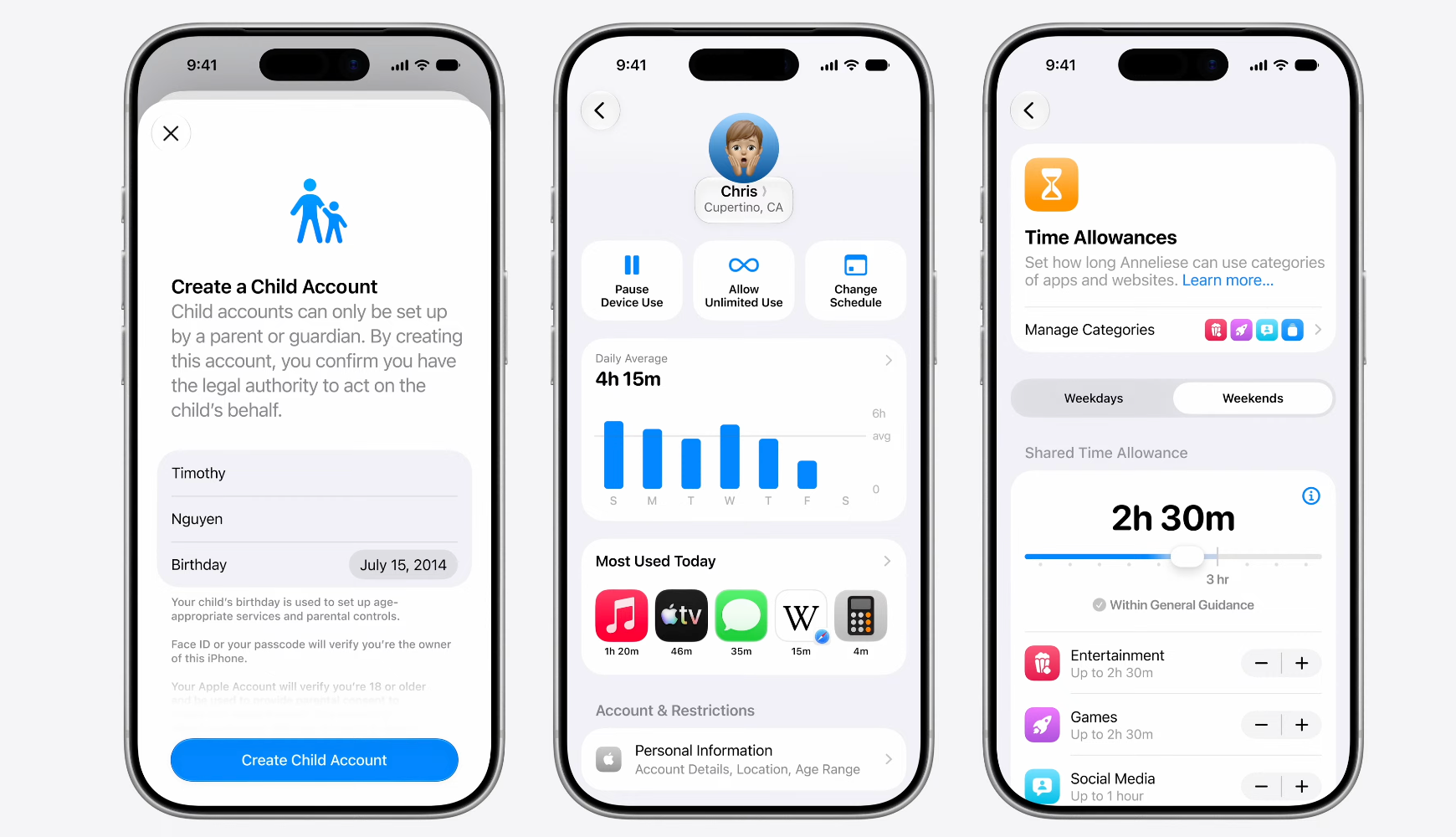
Apple is expanding the control parents have over children accounts, boosting privacy and ensuring that young ones have healthier digital lives. Two new features are "Ask to browse" and "Ask to buy", which allow parents to allow their kids to browse sensitive topics or approve an online purchase.
Child online safety is a big topic in iOS 27. | Image by Screenshot by PhoneArena
Apple has also revamped Screen Time for children accounts. Aside from a more flexible way to set custom timers for select app usage categories, there's a more comprehensive screen time window that shows how much your child has been using certain apps, gaming, or browsing the web. Social media usage can be supervised here, too.
Accessibility upgrades
Among the new features that will arrive with iOS 27 is a useful new on-device subtitle generator for your personal videos. After you update your iPhone to iOS 27, browsing your Photos gallery will automatically generate captions for the videos you've captured, videos you've been sent over iMessage or AirDrop, as well as videos you watch online.
This feature uses Apple's new on-device speech recognition model and will definitely be a great addition to the iPhone, especially for users that are hard of hearing. However, it won't be available globally, at least not yet; it will initially be limited to videos in English in the US and Canada.
Mint Mobile's 6-month plans now cost $10/mo
$10
/mo
$35
$25 off (71%)
Mint Mobile is celebrating its 10-year anniversary with a special offer on its six-month subscription plans. For a limited time, you can get your preferred tier (6GB, 17GB, 23GB or unlimited) for just $10/mo. That saves you between 50% and 71% on the carrier's mobile plans, making it way easier to recommend.
Peter is a skilled writer with over 13 years of experience at PhoneArena. He has published nearly 300 phone reviews and comparisons. This vast experience helps him navigate the mobile tech landscape with ease. He enjoys everything Android but relies on a MacBook Pro daily.
A discussion is a place, where people can voice their opinion, no matter if it
is positive, neutral or negative. However, when posting, one must stay true to the topic, and not just share some
random thoughts, which are not directly related to the matter.
Things that are NOT allowed:
Off-topic talk - you must stick to the subject of discussion
Offensive, hate speech - if you want to say something, say it politely
Spam/Advertisements - these posts are deleted
Multiple accounts - one person can have only one account
Impersonations and offensive nicknames - these accounts get banned
To help keep our community safe and free from spam, we apply temporary limits to newly created accounts:
New accounts created within the last 24 hours may experience restrictions on how frequently they can
post or comment.
These limits are in place as a precaution and will automatically lift.
Moderation is done by humans. We try to be as objective as possible and moderate with zero bias. If you think a
post should be moderated - please, report it.
Have a question about the rules or why you have been moderated/limited/banned? Please,
contact us.














Things that are NOT allowed:
To help keep our community safe and free from spam, we apply temporary limits to newly created accounts: