
Google Chrome gets new features that turn it into a personal assistant
A smarter side panel and Auto browse are coming to your desktop.

A smarter way of dealing with the web
Google has announced in a new blog post that it’s expanding the usefulness of its smartest AI model yet, Gemini 3, directly into the Chrome browser for Windows, macOS, and Chromebook Plus. The goal is to move beyond the basic search functions of the browser and turn it into a useful tool that helps you with what you’re trying to accomplish. No more juggling dozens of tabs in the browser to complete one task.
Multitasking with the new side panel
The most notable change is the addition of a new side panel that keeps Gemini visible, regardless of the site you’re on. It’s the perfect solution for when you have too many tabs open on the browser, as it nearly eliminates the need to juggle dozens of tabs to complete one task.Video credit — Google
Creative edits with Nano Banana
Google is also bringing the creative power of its Nano Banana tool into the browser. Now, you can change or edit images on the fly simply by typing in the side panel. This means you can now make image edits without having to download a file or open another app.Video credit — Google
More connections with Google Apps
Chrome will also connect more tightly with the apps you already use, such as Gmail, Google Calendar, and Google Maps. For example, if you are planning a trip, Gemini can search through your old emails to find event details and then check Google Flights to offer recommendations. As a bonus, it can even write a message to your coworkers letting them know your arrival time.Video credit — Google
Letting Auto Browse handle tasks
Chrome is also launching a feature called Auto Browse, which will be available to AI Pro and AI Ultra plan subscribers in the U.S. This feature lets the browser handle the internet’s more tedious tasks. For instance, it can research hotel prices, fill out long forms, or even help renew your driver’s license. It will essentially handle the logistics so you don’t have to.Video credit — Google
Fighting back against the new wave of AI browsers
This big move comes as Chrome faces growing pressure from the new wave of AI browsers. Browsers such as Dia, Comet, and Neo have launched with AI as their main engine, not just as an add-on. Big players such as OpenAI have also entered the arena with ChatGPT Atlas.
It only makes sense for Google to take this path, especially since they possess what many consider the most powerful model in Gemini 3. The integration of this type of agentic ability into Chrome prevents users from switching to other startups.
It is easier for a user to stay with the browser they are accustomed to if it suddenly becomes capable of doing everything those new browsers are capable of, be it for research or even creating itineraries for traveling.
Which of these new Chrome features would you use the most?
11 Votes
The side panel to summarize reviews and compare products
63.64%
Auto browse to handle my forms and travel bookings
9.09%
Nano Banana to edit and create images on the fly
0%
Having Gemini draft emails based on my calendar and flights
27.27%
A browser that works for you?
Auto browse is the feature that excites me the most, even if it’s behind a subscription. Something else dealing with tax documents or finding a plumber sounds like a dream come true.
While the agentic web is still in its early stages, I would definitely attempt to utilize these features to see the amount of time it could save me on a busy day. And let’s not forget that, with more advanced features, the browser still needs your permission to buy something or post to social media—something I’m definitely grateful for.
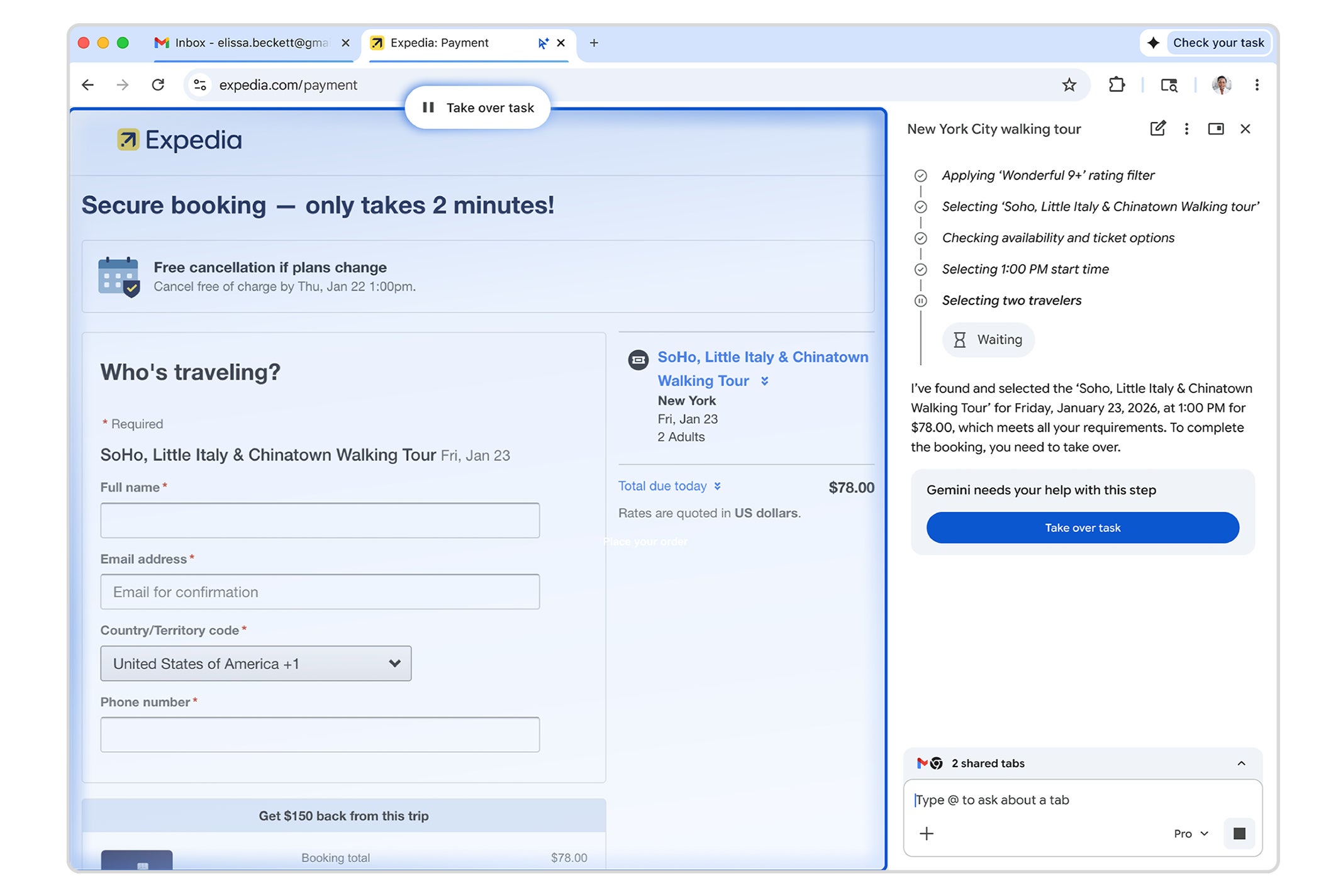
Agentic browsing will stop at certain tasks and ask for your permission. | Image credit — Google


Popular stories





Latest News






Things that are NOT allowed:
To help keep our community safe and free from spam, we apply temporary limits to newly created accounts: