Maybe it's not for you, but one of the best things that I did with my Pixel 6 Pro was to replace Google Assistant with Google's Gemini LLM. AI delivers longer, more in-depth answers to your queries. And on most Android phones running Android 10 and higher, sporting at least 2GB of RAM, Gemini can set alarms and timers. Knowing that most Android users would prefer Gemini, Google originally planned to phase out Google Assistant before the end of this year. However, those plans have changed.
Google delays the phase out of Google Assistant
Google posted a support page online titled, "Here’s an update on our work to upgrade mobile Assistant devices to Gemini." The brief announcement noted how Google had originally hoped to "upgrade the assistant experience to Gemini on most mobile devices by the end of 2025." The company admits that it has to adjust the timeline in order to make the transition from Google Assistant to Gemini seamless.
One of the interesting differences between Apple and Google as tech manufacturers is that when Apple makes a change to a timeline, they often don't publicize it directly, relying on leaks to get the word out. Apple certainly won't ask for feedback from its customers. Google, as seen with its post, will alert Android users when there is a change in a timeline and the Alphabet subsidiary also asked for feedback from Android users.
On the announcement page, Google writes, "We’ll share more details on our plans in the coming months. Your feedback matters to us." Google leaves a link to a page where Gemini users can discuss their experiences with Gemini apps.
Google Assistant will stick around until sometime next year
Google says that it is moving into 2026 its work to upgrade Assistant users to Gemini. The company adds that more details about this transition will be shared in the coming months. Android won't be the only platform dependent on Gemini to perform assistant-type tasks. Last month, Bloomberg's Mark Gurman said that Apple will pay Google $1 billion annually for a custom 1.2 trillion parameter artificial intelligence model of Google's Gemini Large Language Model (LLM) to help power the AI capabilities of Apple's Siri assistant.
Recommended For You
If you're an iPhone user who has the Google Assistant app installed, you should know that the app will be no longer be available sometime next year. The good news is that there is a Gemini app for iOS that you can install right now by tapping on this link. The only thing it won't handle on iOS are system-related tasks such as setting alarms and timers, opening apps, sending texts and making phone calls.
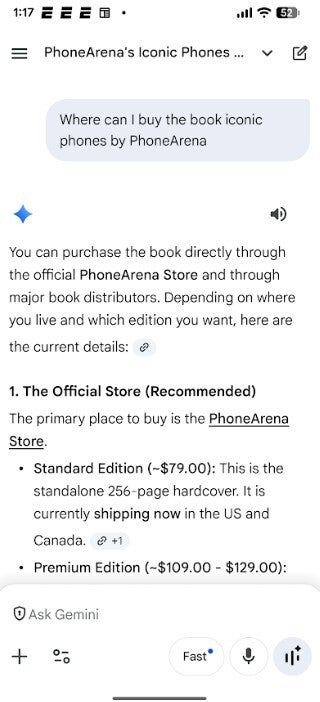
Gemini used as an assistant on the Pixel 6 Pro. mage credit-PhoneArena
Google Assistant, as we know it now, first became available as an exclusive app for the OG Pixel in October 2016, five years after Siri debuted on the iPhone 4s. Google Assistant out scored its rivals like Siri and Alexa on multiple tests. The latest one, from 2021, showed Google Assistant answering 76.57% of simple questions correctly compared to scores of 56.29% and 47.29% for Alexa and Siri respectively.
How to reduce the chance of receiving an incorrect, hallucinated answer from AI
On more complex questions. Google Assistant responded with the correct answer 70.18% of the time. Alexa was right on 55.05% of the queries, while Siri had the correct response on only 41.32% of the questions asked.
Which do you prefer to use as an assistant on Android?
32 Votes
Google Assistant.
40.63%
Gemini.
43.75%
Neither.
3.13%
I don't use assistants.
12.5%
Gemini, like other AI chatbots, does have a tendency to hallucinate every now and then. This happens because AI models are trained to be "people-pleasing" and will often come up with a confident sounding response that just is not true when it doesn't know the real answer. You can reduce the chances of Gemini, or any AI chatbot, giving you an answer it came with up just to respond by requesting citations when you ask your query. Similarly, you can ask that your AI chatbot "think step-by-step" when you give it your question, or ask that "If you are unsure, please state that you do not know" when you speak or type your question.
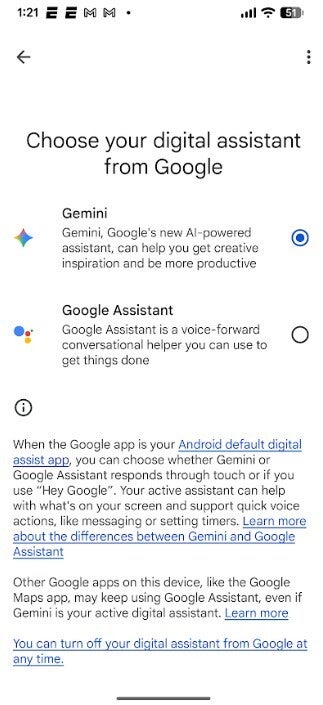
Swapping Google Assistant for Gemini. | Image credit-PhoneArena
If you want to change your digital assistant from Google Assistant on your Pixel to Gemini right now, go to Settings > Apps > Assistant > Digital Assistants from Google and tap the button for Gemini. You will still use the "Hey Google" hot word to activate Gemini.
Mint Mobile's 6-month plans now cost $10/mo
$10
/mo
$35
$25 off (71%)
Mint Mobile is celebrating its 10-year anniversary with a special offer on its six-month subscription plans. For a limited time, you can get your preferred tier (6GB, 17GB, 23GB or unlimited) for just $10/mo. That saves you between 50% and 71% on the carrier's mobile plans, making it way easier to recommend.
Alan, an ardent smartphone enthusiast and a veteran writer at PhoneArena since 2009, has witnessed and chronicled the transformative years of mobile technology. Owning iconic phones from the original iPhone to the iPhone 15 Pro Max, he has seen smartphones evolve into a global phenomenon. Beyond smartphones, Alan has covered the emergence of tablets, smartwatches, and smart speakers.
A discussion is a place, where people can voice their opinion, no matter if it
is positive, neutral or negative. However, when posting, one must stay true to the topic, and not just share some
random thoughts, which are not directly related to the matter.
Things that are NOT allowed:
Off-topic talk - you must stick to the subject of discussion
Offensive, hate speech - if you want to say something, say it politely
Spam/Advertisements - these posts are deleted
Multiple accounts - one person can have only one account
Impersonations and offensive nicknames - these accounts get banned
To help keep our community safe and free from spam, we apply temporary limits to newly created accounts:
New accounts created within the last 24 hours may experience restrictions on how frequently they can
post or comment.
These limits are in place as a precaution and will automatically lift.
Moderation is done by humans. We try to be as objective as possible and moderate with zero bias. If you think a
post should be moderated - please, report it.
Have a question about the rules or why you have been moderated/limited/banned? Please,
contact us.










Things that are NOT allowed:
To help keep our community safe and free from spam, we apply temporary limits to newly created accounts: