If you don't mind waiting 10 seconds for your Android phone to switch from Wi-Fi connectivity to a cellular connection, you might be down to make a quick settings adjustment on your phone that could extend the battery life of your Android handset. Right now, you probably have the Mobile Data Always Active setting on your Android phone enabled (which it is by default). With this setting on, your phone is always connected to cell signals even if you're using Wi-Fi. Having it enabled means that when you turn off Wi-Fi or leave an area with Wi-Fi signals, your phone instantly switches to cellular connectivity.
How to disable a Developer Option that could add some battery life to your Android phone
But it also means that when enabled, you are using battery power to keep that feature running even when you are connected to a Wi-Fi signal. If you were to disable Mobile Data Always Active, you won't need to stay connected to a cell signal thus saving your phone from consuming extra battery power. The only drawback is that without a constant cellular connection, when you do move out of Wi-Fi range, you will have to wait about 10 seconds to connect to the cellular network. You'll have to decide whether having to wait those 10 seconds is worth the small amount of battery life you will save.
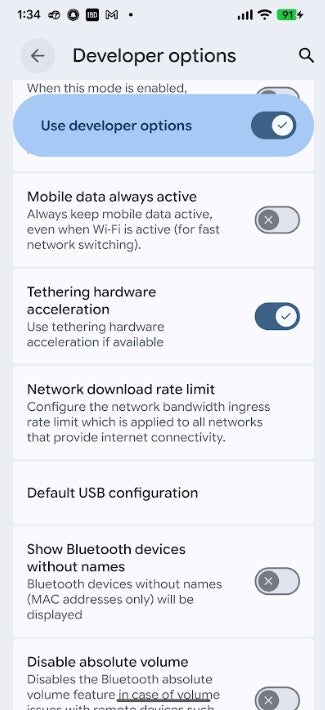
Toggle off Mobile Data Always Active in Developer Options to save some battery life. | Image credit-PhoneArena
Setting this up on your phone is going to require you to enable Developer Options on your Android phone. If you've already done this, bear with me now as I explain the process to those unfamiliar with how this is done. Actually, it is as simple as summoning Beetlejuice. Keep in mind that Developer Options are offered to, well, developers who know what they are enabling and what they are disabling.
Certain Pixel Pro models have another way to improve battery life on your phone
A word to the wise. Enable the wrong feature or disable the wrong feature, and you might notice a major change in how your phone feels or looks. Assuming that you are okay with moving ahead, this is what you do. Go to Settings > About phone. Scroll down to the Build number and tap on it seven times. This is absolutely legitimate. Now, I'd like to tell you that a genie comes out of your phone willing to grant you three wishes (I'd ask for a battery that never dies, a screen that will never crack, and automatic updates each year to the next OS build), but what you do open are pages full of options.
Recommended For You
Will you disable this setting to hopefully improve battery life?
76 Votes
Sure. I see no real reason not to.
75%
Not a chance. Why make me wait 10 seconds?
25%
Once you've unlocked Developer Options, which will require you to verify your identity via a biometric entry or your PIN, go to Settings > System > Developer Options. Once in the menu, scroll until you see the Networking heading. In that section, you'll see Mobile data always active. Toggle it off and leave the menu. The description for this Developer Option reads, "Always keep mobile data active, even when Wi-Fi active (for fast network switching)." Try not to accidentally toggle on or off any of the Developer Options.
Do this to the displays on Android and iOS phones to save battery life
Even if this results in only a small increase in battery life, you should be able to handle the ten additional seconds it might take your phone to switch from Wi-Fi connectivity to Mobile Data. If you don't see any improvement in battery life, you can go back into Developer Options (Settings > System > Developer Options) and toggle on Mobile data always active.
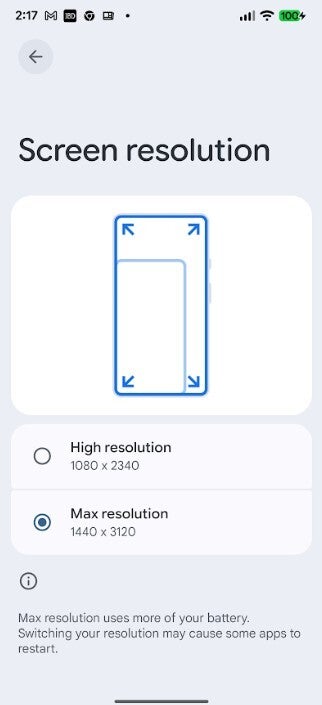
Reducing the resolution on a Pixel Pro model can also save battery life. | Image credit-PhoneArena
If you own a Pixel 6 Pro, Pixel 7 Pro, Pixel 8 Pro, Pixel 9 Pro, Pixel 9 Pro XL, Pixel 10 Pro, or Pixel 10 Pro XL, you can also squeeze out a little more battery life by lowering the resolution of the display. These models all come with a 1440p/QHD+ resolution. Go to Settings > Display & touch > Screen resolution. You can reduce the resolution on your Pixel from 1440 x 3120 to FHD+ with the tap of a button.
On that settings page, Google writes that Maximum resolution (1440p) uses more of your battery. Switching your resolution may cause some apps to restart. You might recall a number of years ago many smartphone users said that they couldn't tell the difference between 1440p and 1080p resolution on their phone displays. Of you own one if the aforementioned Pixel models, this is a chance for you to see for yourself if this is true while saving some battery life at the same time.
Also keep in mind that no matter which phone you own, Android or iOS, reducing the brightness of the screen will also save battery life.
Alan, an ardent smartphone enthusiast and a veteran writer at PhoneArena since 2009, has witnessed and chronicled the transformative years of mobile technology. Owning iconic phones from the original iPhone to the iPhone 15 Pro Max, he has seen smartphones evolve into a global phenomenon. Beyond smartphones, Alan has covered the emergence of tablets, smartwatches, and smart speakers.
A discussion is a place, where people can voice their opinion, no matter if it
is positive, neutral or negative. However, when posting, one must stay true to the topic, and not just share some
random thoughts, which are not directly related to the matter.
Things that are NOT allowed:
Off-topic talk - you must stick to the subject of discussion
Offensive, hate speech - if you want to say something, say it politely
Spam/Advertisements - these posts are deleted
Multiple accounts - one person can have only one account
Impersonations and offensive nicknames - these accounts get banned
To help keep our community safe and free from spam, we apply temporary limits to newly created accounts:
New accounts created within the last 24 hours may experience restrictions on how frequently they can
post or comment.
These limits are in place as a precaution and will automatically lift.
Moderation is done by humans. We try to be as objective as possible and moderate with zero bias. If you think a
post should be moderated - please, report it.
Have a question about the rules or why you have been moderated/limited/banned? Please,
contact us.













![Another batch of Galaxy S26 series users in the US are getting a nice surprise today [UPDATED]](https://m-cdn.phonearena.com/images/article/183643-wide-two_350/Another-batch-of-Galaxy-S26-series-users-in-the-US-are-getting-a-nice-surprise-today-UPDATED.webp)
Things that are NOT allowed:
To help keep our community safe and free from spam, we apply temporary limits to newly created accounts: