Paying with your phone is already quite convenient, but having your passport and other IDs inside your Wallet app is next level.
Google Wallet and Apple Wallet have been offering this feature in the US for quite some time, but the option was missing on Samsung phones. Well, not anymore.
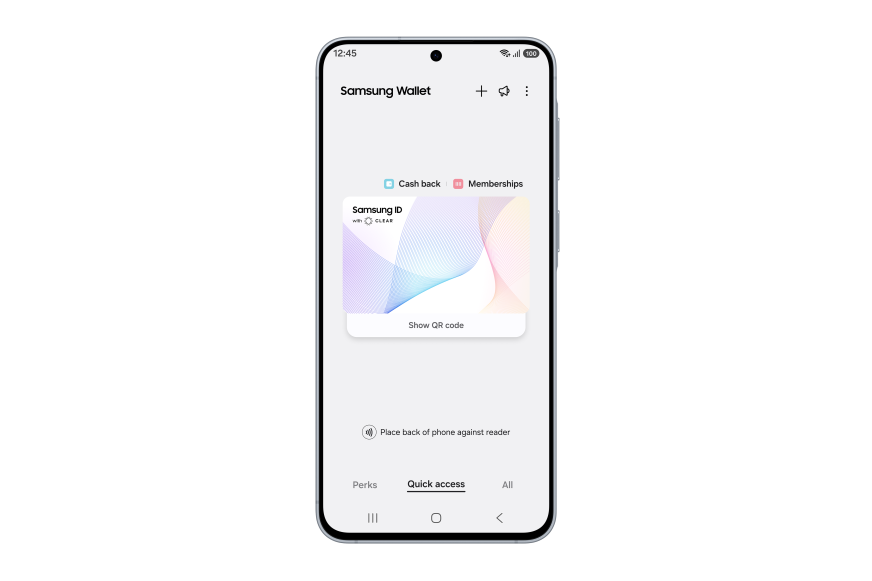
Samsung ID with CLEAR
Your ID inside Samsung Wallet | Image by Samsung
Today the Korean tech giant officially announced its partnership with a company called CLEAR and a new feature in Samsung Wallet — Samsung ID with CLEAR.
"Samsung ID with CLEAR is a digital ID backed by information in your US passport and verified by CLEAR. This enables travelers to verify their identity at more than 250 Transportation Security Administration (TSA) checkpoints using just their phones with ID in Samsung Wallet," reads part of the official press release.
What are your thoughts on the new Samsung ID with CLEAR feature?
15 Votes
The new Samsung ID with CLEAR feature works only in the US
For the moment, this new feature is limited to domestic use inside the US. You will be able to identify yourself not only at the aforementioned 250 TSA points but also at sporting arenas, such as the BMO Stadium in LA.
It's not clear whether this option will expand outside the US, but given the fact that CLEAR operates nationwide, for the time being such expansion seems unlikely.
Recommended For You
In terms of security, a fingerprint or PIN is required for access, and these are backed up by Samsung Knox and encrypted on your Galaxy phone.
You still need to carry your physical passport
It's also worth noting that you still need to bring your physical passport with you. Not only during international travel but also domestically. The feature is meant to make your life easier and let you keep your papers in the bag while passing security checkpoints, but you still need to have them with you.
This is not stated explicitly in the press release, but Samsung did write that users will be able to "leave their physical IDs in their bag and rely on secure digital identity instead," implying that you can't just leave your physical passport at home while you travel.
How to set up your Samsung ID with CLEAR?
Setting up the feature is very simple. Here are the steps:
Open the ‘Quick Access’ tab in Samsung Wallet.
Click ‘+.’
Select ‘Digital IDs.’
Then, select ‘Samsung ID with CLEAR.’
Click the ‘Get Card’ button and follow the prompts.
And that's it. Once your ID is in there, you will be able to bring it up with a tap or a QR scan and leave your physical documents safely stored in your bag.
MacBook Pro (M1 series) flash sale! Limited time offer!
Save $40 on MacBook Pro (M1 series) from Back Market. Discount automatically applied at checkout. Offer ends 25 October 2026 at 23:59.
Mariyan, a tech enthusiast with a background in Nuclear Physics and Journalism, brings a unique perspective to PhoneArena. His childhood curiosity for gadgets evolved into a professional passion for technology, leading him to the role of Editor-in-Chief at PCWorld Bulgaria before joining PhoneArena. Mariyan's interests range from mainstream Android and iPhone debates to fringe technologies like graphene batteries and nanotechnology. Off-duty, he enjoys playing his electric guitar, practicing Japanese, and revisiting his love for video games and Haruki Murakami's works.
A discussion is a place, where people can voice their opinion, no matter if it
is positive, neutral or negative. However, when posting, one must stay true to the topic, and not just share some
random thoughts, which are not directly related to the matter.
Things that are NOT allowed:
Off-topic talk - you must stick to the subject of discussion
Offensive, hate speech - if you want to say something, say it politely
Spam/Advertisements - these posts are deleted
Multiple accounts - one person can have only one account
Impersonations and offensive nicknames - these accounts get banned
To help keep our community safe and free from spam, we apply temporary limits to newly created accounts:
New accounts created within the last 24 hours may experience restrictions on how frequently they can
post or comment.
These limits are in place as a precaution and will automatically lift.
Moderation is done by humans. We try to be as objective as possible and moderate with zero bias. If you think a
post should be moderated - please, report it.
Have a question about the rules or why you have been moderated/limited/banned? Please,
contact us.









Things that are NOT allowed:
To help keep our community safe and free from spam, we apply temporary limits to newly created accounts: