On October 28th in Tokyo the Google Enterprise Day took place and was attended by more than 600 IT leaders from Japan. The big news from the event was that you can remotely manage your device right from your browser without putting your data's security in danger.
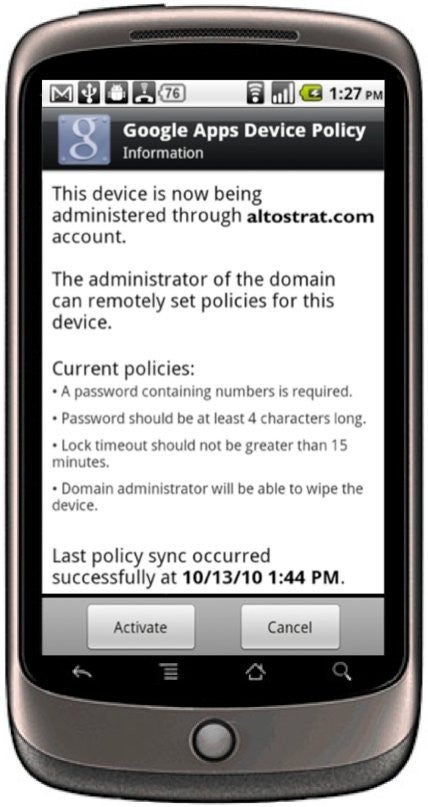
This opportunity is available for any device with Android 2.2 Froyo and will be a great help for all the business establishments and their employees, because they will be able to access corporate information available to them at any time. The corporation, on the other hand, doesn't have to take unnecessary risks. It can control the whole process through an app which is soon to be released on the Android Market called Google Apps Device Policy. Through this app the admin will have the authority to manage data security at all times thanks to the following options:
Recommended For You
Remotely wipe all data from lost or stolen mobile devices
Lock idle devices after a period of inactivity
Require a device password on each phone
Set minimum lengths for more secure passwords
Require passwords to include letters and numbers
The great news is that you can manage your phone whenever you want straight from your browser without help from a server dedicated to that purpose. When an employee leaves the company, all the administrator has to do is to cut his access. All in all, this is an all-around cool stuff for all the business establishments and their employees. Most probably the only company that's not very happy about these prospects is RIM, because the ever-expanding Android (on average, over 200 000 Android devices are activated every day) is catching-up fast even in the business sector, where RIM's BlackBerries are the current leader.
Get Visible as low as $20/mo for 1 year. Limited time offer with code: FRESHSTART
$20
/mo
$25
$5 off (20%)
Offer Ends 6.1.2026 at 11.59pm ET. New members get $5/mo off the $25/mg Visible plan, $35/mo Visible+ plan, or $45/mo Visible+ Pro plan for the first 12 months. Promo code FRESHSTART required at checkout.
Alex I. is a former technology news writer at PhoneArena. His content contribution took place between 2010-2011, and touched on various devices from the mobile tech industry, such as the iPhone 4s, HTC Sensation and LG Optimus Black.
Recommended For You
COMMENTS (4)
COMMENTS (4)
All comments need to comply with our
Community Guidelines
PhoneArena Community Rules
A discussion is a place, where people can voice their opinion, no matter if it
is positive, neutral or negative. However, when posting, one must stay true to the topic, and not just share some
random thoughts, which are not directly related to the matter.
Things that are NOT allowed:
Off-topic talk - you must stick to the subject of discussion
Offensive, hate speech - if you want to say something, say it politely
Spam/Advertisements - these posts are deleted
Multiple accounts - one person can have only one account
Impersonations and offensive nicknames - these accounts get banned
To help keep our community safe and free from spam, we apply temporary limits to newly created accounts:
New accounts created within the last 24 hours may experience restrictions on how frequently they can
post or comment.
These limits are in place as a precaution and will automatically lift.
Moderation is done by humans. We try to be as objective as possible and moderate with zero bias. If you think a
post should be moderated - please, report it.
Have a question about the rules or why you have been moderated/limited/banned? Please,
contact us.







Things that are NOT allowed:
To help keep our community safe and free from spam, we apply temporary limits to newly created accounts: