YouTube Music's Now Playing UI is revised for the Android and iOS versions of the app
YouTube Music takes on Apple Music, and Spotify.
Google has a habit of continuing to tweak its apps to try and make them easier to navigate. Forget about the Material 3 Expressive makeover that we've seen all summer. That was Google throwing paint at its UIs to make them look better. When Google starts moving around buttons and controls, that's when it has a different goal, which is to allow users to more quickly make their way through the features available from one of its apps.
Google changes the "Now Playing" screen on the YouTube Music app
The YouTube Music app has been redesigned with a new look for both the iOS and Android versions of the streaming music platform. The changes show up on the Now Playing screen and start at the very top of the UI, where the Song/Video switcher has been removed. The Cast icon remains in the upper right next to the three-dot overflow menu icon.
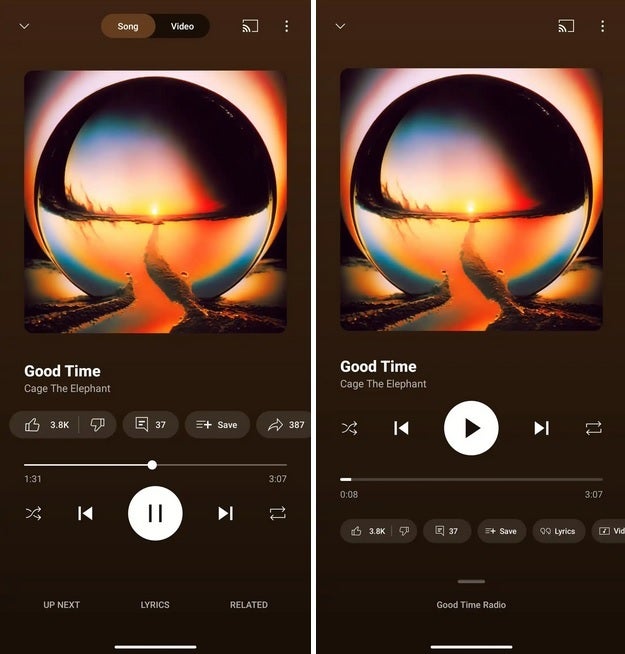
The old YouTube Music Now Playing UI on the left with the redesigned look on the right. | Image credit-9to5Google
Controls such as the Shuffle icon, the Skip Backward button, the Play button, the Skip Forward button, and the Repeat button have been moved above the progress bar The Thumbs Up/Thumbs Down, Comments, Save (to your library) and Share buttons are now the Thumbs Up/Thumbs Down, Lyrics, and the Song/Video Switcher buttons and are a carousel that have been moved underneath the progress bar. Speaking of the progress bar, it is now thicker.
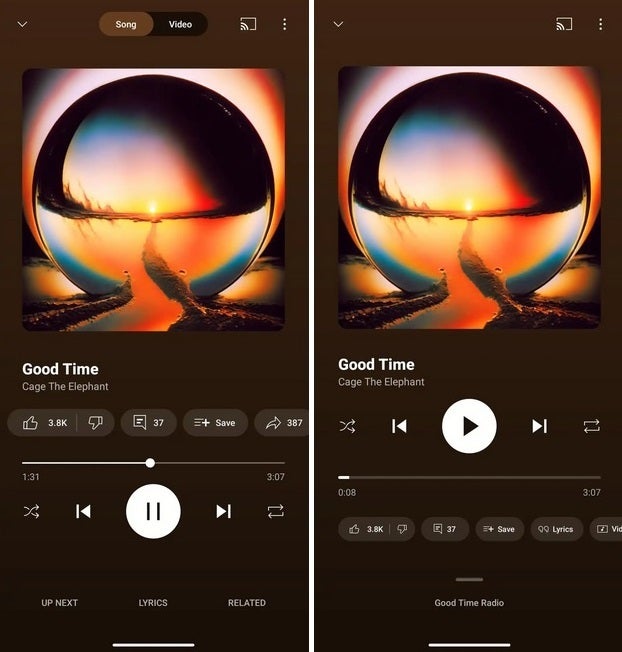
Two redesigned pages for YouTube Music. | Image credit-9to5Google
Replacing the Up Next button is a handle you can drag up to see which playlist or radio channel you're on. If you tap the handle instead of swiping up on it, you will get a dual-window view that shows the Now Playing UI on top and the next four songs in your queue, replacing the carousel with the action buttons. The Related menu and the Lyrics features can be opened and expanded. When closed, you'll see the name of the song you are listening to.
If the redesign hasn't arrived, try this workaround on your Android phone.
While a server-side update is needed to receive the YouTube Music Now Playing redesign, you can try to force the redesign to open on your Android phone by going to Settings> Apps > All xxx apps. Scroll to YouTube Music, and tap on the name of the app. From the App Info page, press Force stop. Close the app and reopen it. This doesn't work often, so don't be too upset if this doesn't trigger the update.
It's almost as though Google has a room full of app designers who are locked in a room and not allowed to go home until they come up with some changes to implement. But it also prevents an app from going stale. You can find YouTube Music in the App Store for iOS, and in the Google Play Store for Android users.
Google has plenty of competition in the streaming music market
YouTube Music competes against Spotify and Apple Music. The latter, with its lossless music and Spatial Audio, is considered to have the best music quality among this trio. Spotify, just now, is rolling out lossless audio. On the other hand, Spotify takes the top spot for UI and is praised for its song recommendations that give subscribers the names of new artists to listen to.
Which music streamer do you like the best?
345 Votes
YouTube Music.
66.09%
Spotify.
14.49%
Apple Music.
12.75%
Another streamer.
6.67%
However, when it comes to the size of each streamer's music library, YouTube Music has tunes that you won't find on Spotify or Apple Music. If you prize a huge music library, YouTube Music should be your pick. If you're looking for the service with the best music quality, Apple Music should be your selection. If you're looking for a music streamer with a free tier (with ads, of course), Spotify or YouTube should be your pick.


Popular stories


Latest News






Things that are NOT allowed:
To help keep our community safe and free from spam, we apply temporary limits to newly created accounts: