Instagram replaces swipe up gesture for sharing links with stickers

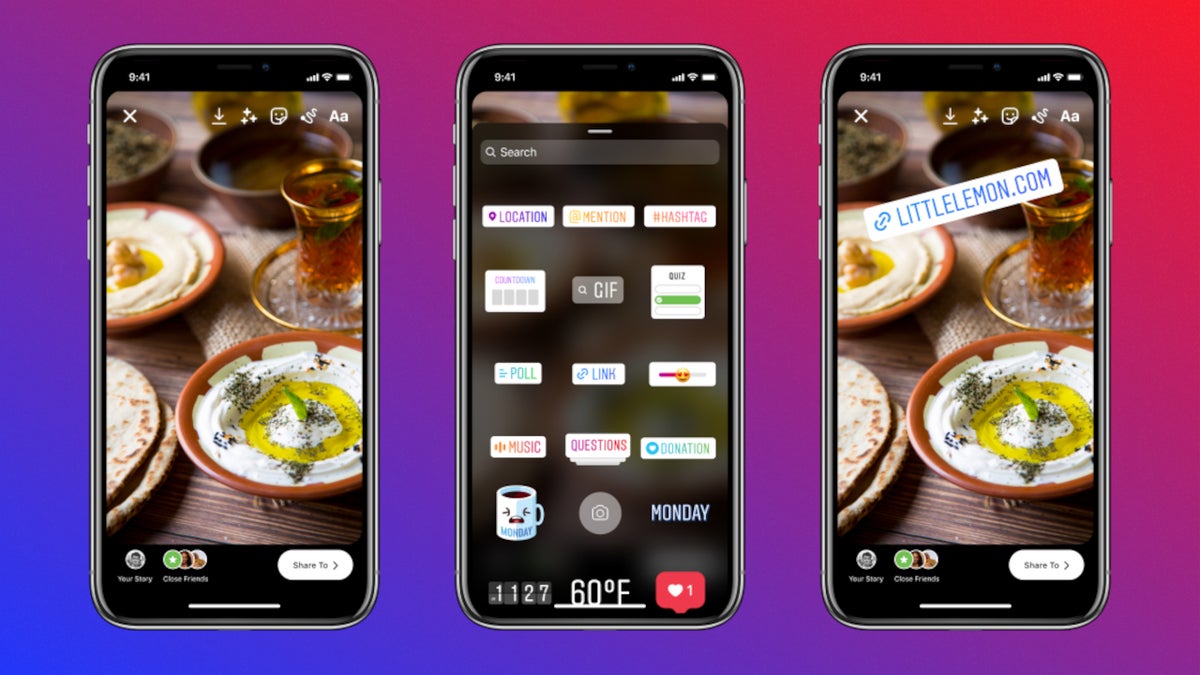
Instagram started to test a new way to share links for its users several months ago, but not many people have had access to the feature until recently. Starting this week, the so-called “link stickers” will be rolled out to all Instagram users on both Android and iOS platforms.
The link stickers are meant to replace the “swipe up” gesture for sharing links, which will be retired. Here is what you’ll have to do, to add a link to an Instagram story:
Instagram also hinted at future tweaks that the sticker might get, such as various customization options to make it clear what someone will see when they tap a link. If you don’t see the ability to add links in Stories yet, make sure to update your Instagram app to the latest version. Also, keep in mind that link stickers cannot be used on the main Instagram feed, they're limited to Stories.
The link stickers are meant to replace the “swipe up” gesture for sharing links, which will be retired. Here is what you’ll have to do, to add a link to an Instagram story:
- Capture or upload content to your story
- Select the sticker tool from the top navigation bar
- Tap the “Link” sticker to add your desired link and tap “Done”
- Place the sticker on your story — like our other stickers — and tap on the sticker to see color variations
Instagram also hinted at future tweaks that the sticker might get, such as various customization options to make it clear what someone will see when they tap a link. If you don’t see the ability to add links in Stories yet, make sure to update your Instagram app to the latest version. Also, keep in mind that link stickers cannot be used on the main Instagram feed, they're limited to Stories.

Popular stories






Latest News






Things that are NOT allowed:
To help keep our community safe and free from spam, we apply temporary limits to newly created accounts: