Google Meet has a massive monthly user base, so there is a good chance you are using it, too. Now it is getting a new feature that makes jumping into meetings way easier, especially when you are in a shared room.
Your phone can now auto-join Meet calls
Last August, Google rolled out a smart feature that detects when you are sitting in a conference room with other people and automatically switches you into Companion mode for a Meet call. The catch was that it only worked on desktops and laptops.
That is finally changing. Google just confirmed that the same feature is coming to Android and iOS. The rollout will happen gradually over the next two weeks, and it is available for all Google Workspace customers, as well as Workspace Individual subscribers.
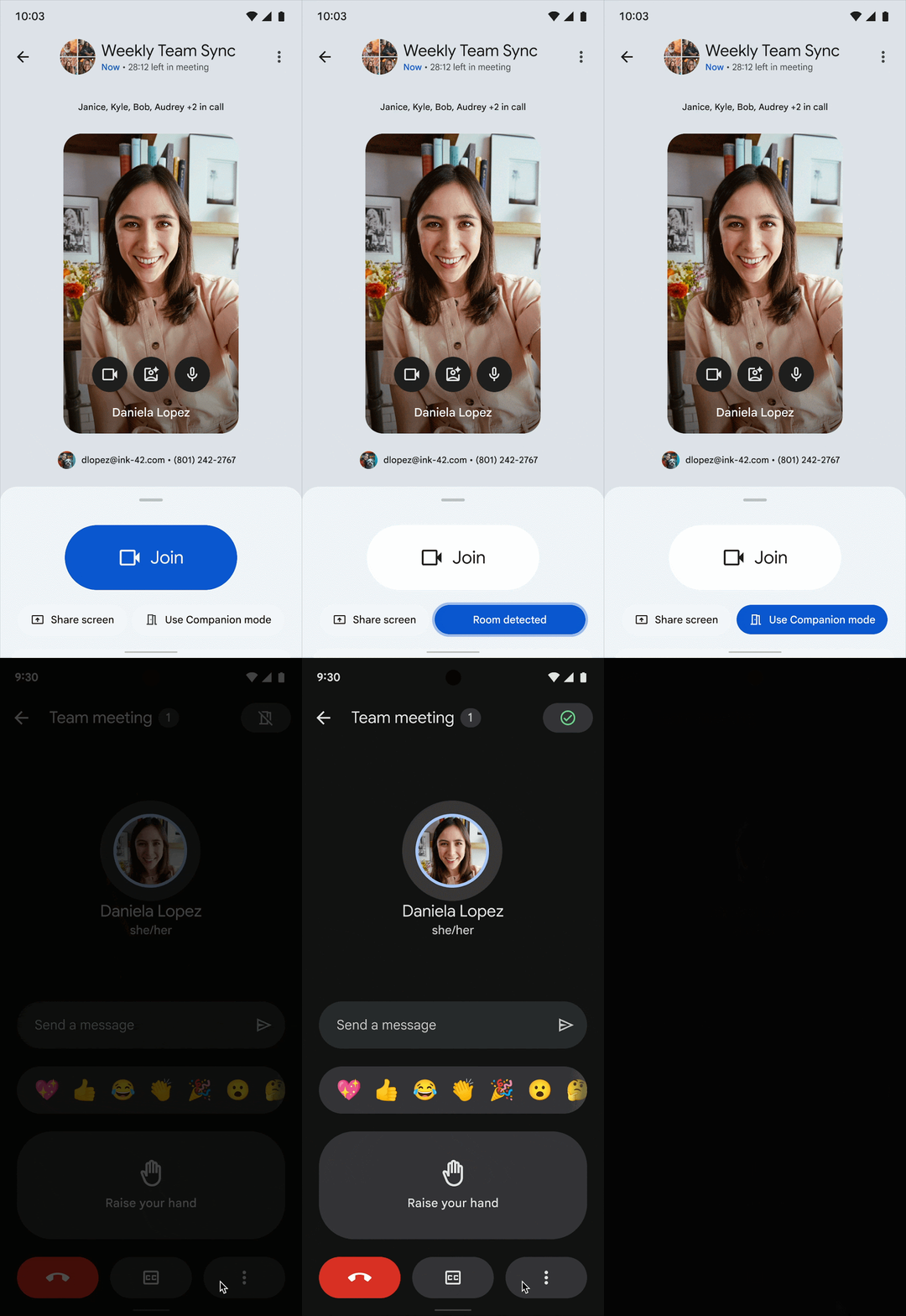
The “Use Companion mode” button is highlighted, inviting the user to join the call. | Image by Google
The way it works is pretty clever. Your phone uses its microphone to pick up ultrasonic signals in the room. That lets Meet know you are in the same space as others and checks you into the right group call, while also avoiding that awkward echo and feedback that happens when multiple devices join with audio on.
Google says Meet can detect when you are in a room and will highlight the “Use Companion mode” button even before you join. Tap that highlighted option, and you are automatically connected to the correct meeting room without having to manually pick anything.
Why this actually matters
The main goal here is to make conference room meetings smoother and to stop audio chaos before it even starts. If you mostly work from home, this update won’t change much. But for anyone going into an office and joining meetings from shared rooms, it can save time and a lot of frustration.
Recommended For You
Echo and audio feedback are some of the most annoying parts of group calls, especially when you can’t tell which device is causing it. This feature should take a lot of that pain away and make Meet feel more polished in real-world office setups.
If Google Meet stops audio chaos in conference rooms, will that make you use it more?
8 Votes
Yes, definitely.
62.5%
Maybe.
12.5%
Probably not.
0%
I don’t use Meet anyway.
25%
Google Meet keeps catching up
Updates like this might look small on paper, but they really do improve how Google Meet feels day to day. It also helps it stay competitive with platforms like Zoom, which already offers a similar experience. If you’ve ever used the Zoom mobile app near a Zoom Room, you’ve probably seen that proximity-based prompt to join or pair, and this is Google’s take on the same idea.
Mint Mobile is now allowing you to get whichever plan you like for either three, six, or 12 months for just $15/mo. If you go for the six-month unlimited service, for instance, you'll now have to pay just $90 upfront instead of $210.
Tsveta, a passionate technology enthusiast and accomplished playwright, combines her love for mobile technologies and writing to explore and reveal the transformative power of tech. From being an early follower of PhoneArena to relying exclusively on her smartphone for photography, she embraces the immense capabilities of compact devices in our daily lives. With a Journalism degree and an explorative spirit, Tsveta not only provides expert insights into the world of gadgets and smartphones but also shares a unique perspective shaped by her diverse interests in travel, culture, and visual storytelling.
A discussion is a place, where people can voice their opinion, no matter if it
is positive, neutral or negative. However, when posting, one must stay true to the topic, and not just share some
random thoughts, which are not directly related to the matter.
Things that are NOT allowed:
Off-topic talk - you must stick to the subject of discussion
Offensive, hate speech - if you want to say something, say it politely
Spam/Advertisements - these posts are deleted
Multiple accounts - one person can have only one account
Impersonations and offensive nicknames - these accounts get banned
To help keep our community safe and free from spam, we apply temporary limits to newly created accounts:
New accounts created within the last 24 hours may experience restrictions on how frequently they can
post or comment.
These limits are in place as a precaution and will automatically lift.
Moderation is done by humans. We try to be as objective as possible and moderate with zero bias. If you think a
post should be moderated - please, report it.
Have a question about the rules or why you have been moderated/limited/banned? Please,
contact us.













Things that are NOT allowed:
To help keep our community safe and free from spam, we apply temporary limits to newly created accounts: